Add a widget to trigger the presets in Wiim Home app

JohnnyAbbati

Member
Joined
Nov 25, 2023
Messages
19
Hello,
it would bei great to add a small widget to the Wiim Home app for Android to simply trigger the saved presets. This way it would not bei necessary to open the app to start a saved radio station.
Would this bei possible to implement?
 
Upvote 0
Do you have arthritis in your fingers? In this case I could understand the request.
One or two clicks more on the phone … big deal!
 
Are you referring to the shortcut menu displaying app shortcuts when long-pressung the app icon? Technically, this doesn't go by the term "widget", that's why I ask.

Sounds like a reasonable idea with one drawback or restriction: We currently have 12 presets and WiiM had announced some time ago that future firmware updates will increase the number to 32. Having 12 shortcuts in the menu is a lot already, more than that I would personally call a mess.
 
Are you referring to the shortcut menu displaying app shortcuts when long-pressung the app icon? Technically, this doesn't go by the term "widget", that's why I ask.

Sounds like a reasonable idea with one drawback or restriction: We currently have 12 presets and WiiM had announced some time ago that future firmware updates will increase the number to 32. Having 12 shortcuts in the menu is a lot already, more than that I would personally call a mess.
It will have to start and run the WiiM Home App anyway, as the connection to each WiiM device need to be established.

I have suggested to @WiiM Support, and they acknowledged, that the WiiM Home App has a user defined Home Page (e.g. the Favorite page) instead of the current device page. In that way you will get to the Presets fast.
 
I thought more about a real 1x1 widget.
My usecase is that I start a defined radio station several times a day.
Doing that by pressing one time on a widget on the homescreen instead of opening the app everytime would save me a lot of time.
 
I thought more about a real 1x1 widget.
My usecase is that I start a defined radio station several times a day.
Doing that by pressing one time on a widget on the homescreen instead of opening the app everytime would save me a lot of time.
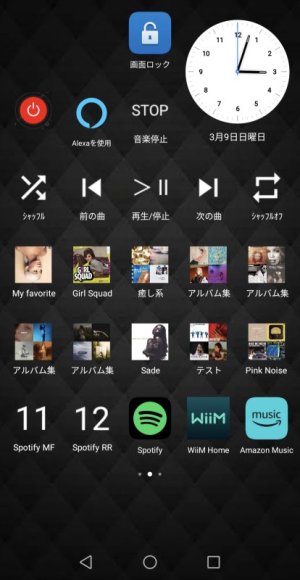
Using WiiM's HTTP API and the Android "Macrodroid app", you can place a preset button widget on your Android phone's home screen.

The steps might be a bit complex, but if you're interested, give it a try.🙂
 
Is it possible to read out the playback status of the Wiim Amp with Macrodroid? So if it is currently playing any music or not?
 
Is it possible to read out the playback status of the Wiim Amp with Macrodroid? So if it is currently playing any music or not?
I'm doing this with the app "tasker". Create a task which gets the state and then save it as a global variable. Tasker V2 also has a full widget builder so you can basically create a full media player widget with it. Works great and is quite responsive, but it takes a bit of tinkering

 
I managed to get it also working with Macrodroid.
There you can get the response of an URL in this case the Wiim player status and store it in a variable. Depending on this variable it is possible to perform specific actions.
I have now created a quick settings tile which is checking if anything is played on the Wiim Amp currently. If not it is starting preset 1, if there is currently playing anything it is pausing the playback.
 
Back
Top