
Play & Volume buttons not working

MartijnS

New Member
Joined
Mar 2, 2026
Messages
6
I just installed a new Wiim Mini. But the buttons on the device are not working. None of them; play, volume up & down. Nothing happens when I press them.
I also tried to reset to factory default and install the device again, but still not working.
 
I just installed a new Wiim Mini. But the buttons on the device are not working. None of them; play, volume up & down. Nothing happens when I press them.
I also tried to reset to factory default and install the device again, but still not working.
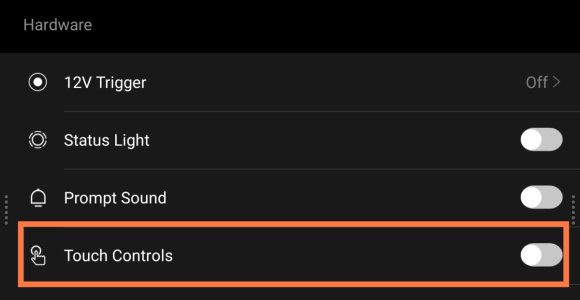
Please enable Touch Controls in the Hardware section of the WiiM app's device settings screen.
Even if it's already on, try switching it off and then back on.

1680.jpg
This is the WiiM Pro screen.
 
Thanks for you reply. I just discoverd this setting indeed. It was already turned on. I tried turn off and turn on. Did not fix. I also tried turn off, reboot, turn on. Did not fix. :(
 
I tried turn off and turn on.
I don't have a mini, but I noticed that the mini may or may not include a power adapter. (Region specific) I then found this on the Amazon website.

"Short version: The included 5V (1A) USB power supply is too weak and causes various errors and problems. With a 5V (2A), the “WiIM mini” works perfectly. I now simply use an old 5V (2A) Samsung USB charger."

Perhaps it would be worth trying another power adapter?
 
Last edited:
I don't have a mini, but I noticed that the mini may or may not include a power adapter. (Region specific) I then found this on the Amazon website.

"Short version: The included 5V (1A) USB power supply is too weak and causes various errors and problems. With a 5V (2A), the “WiIM mini” works perfectly. I now simply use an old 5V (2A) Samsung USB charger."

Perhaps it would be worth trying another power adapter?

I tried with 5v, 2.4A (it was 1A before), but still no effect. :(
 
BTW, I am not sure if they should light up like the power indicator? If so, they are not.
If the status light is turned on in device settings, the Mini's LED should illuminate. If it does not light up, please submit a ticket from the feedback section of the WiiM app. The device logs will be sent to the support team.
 
The status light is working, but I was just wondering if the play/volume buttons also should illuminate. I assume not, but if they should but they don't then that should be an indication of an issue as well...
 
The status light is working, but I was just wondering if the play/volume buttons also should illuminate. I assume not, but if they should but they don't then that should be an indication of an issue as well...
As far as I recall, the buttons don't light up. Are the playback controls from the WiiM app working properly?

Is it only the physical buttons on the device that aren't working? If so, it might be a manufacturing defect.
 
As far as I recall, the buttons don't light up. Are the playback controls from the WiiM app working properly?

Is it only the physical buttons on the device that aren't working? If so, it might be a manufacturing defect.
The buttons don’t light up, but when they are touched, the status light becomes brighter until you stop touching them.
This should indicate whether the touch buttons are working, and also the volume indicator bar in the device card should also move in accordance with touching the + or - touch buttons (unless ‘Fixed Volume Output’ is selected in Audio Settings).
 
The indicator light is not becoming brighter when I touch the buttons.

Yes when using Spotify connect play/pause and volume are working. So it’s only the device. In practice I’ll use the app most of the time so I don’t really need the buttons. But it’s still annoying that a bright device is not working properly.
 
Back
Top