
πŸ‘€ πŸ” Major progress - windows WHA v0.2.4.1 (running on Fedora using wine)

BowsAndArrows

Trusted Contributor
Joined
Mar 14, 2024
Messages
528
Location
Ireland
Just wanted to update the community about decent progress that has been made on the windows beta of the WHA. πŸ‘ŒπŸ”₯

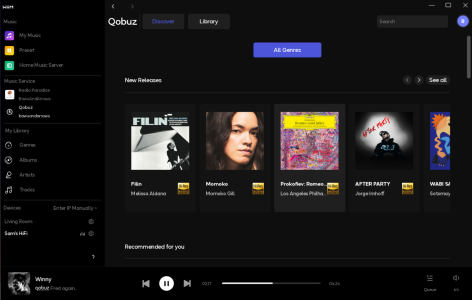
A lot of functionality has been added - we can now browse our qobuz libraries and radio paradise from within the app and it actually works quite well... the presets also show up and are working flawlessly. it seems like many people just are not aware of the beta desktop apps or haven't been following thier progression, anyways. so this is just a reminder to check the desktop apps out again.

it also seems like this is the best option for linux users atm - i've tried installing the android app using waydroid on fedora 43 but i've not been able to get it to work yet. maybe some fellow linux users can test this? πŸ™
 

Attachments

  • Screenshot From 2026-02-14 11-07-03.png
    Screenshot From 2026-02-14 11-07-03.png
    310.2 KB · Views: 15
of note i am having some scaling issues in linux which i fixed by changing the "screen resolution" dpi setting in wine graphic settings (from 90 dpi to approx 220)...and i also used
Code:
 winetricks fontsmooth=rgb
to fix the kind of jagged text rendering... no other major issues apart from that it's a bit slow to load stuff/navigate through menus compared to when running on windows. kudos to the team for continuing to support the less popular versions of the WHA
 
Yes, Arm64 on Windows. I saw current build is reporting as x64 on my Snapdragon device.
i doubt they are gonna make an ARM version of the windows app tbh. i had honestly thought that they had abandoned/shelved development of the desktop apps entirely since it doesn't seem like a priority for the team... but they actually seem to be working on it slowly but consistently, so you never know.
πŸ€·β€β™‚οΈ

have you tried ways of running android apps in windows. i remember they have many ways of doing so - including the built in windows OS add-on??
πŸ€”
 
Just wanted to update the community about decent progress that has been made on the windows beta of the WHA. πŸ‘ŒπŸ”₯

A lot of functionality has been added - we can now browse our qobuz libraries and radio paradise from within the app and it actually works quite well... the presets also show up and are working flawlessly. it seems like many people just are not aware of the beta desktop apps or haven't been following thier progression, anyways. so this is just a reminder to check the desktop apps out again.

it also seems like this is the best option for linux users atm - i've tried installing the android app using waydroid on fedora 43 but i've not been able to get it to work yet. maybe some fellow linux users can test this? πŸ™
i just installed the latest version on Windows 10 (0.2.4.1) and I can't tell the difference from the previous version (0.2.4.0) -
the only preset i see that seems to work is the one i have set for a radio station. all the rest for input change come up empty (and don't work).
when WiiM adds Tidal support , I'll try to get it to work on Fedora
 
i doubt they are gonna make an ARM version of the windows app tbh. i had honestly thought that they had abandoned/shelved development of the desktop apps entirely since it doesn't seem like a priority for the team... but they actually seem to be working on it slowly but consistently, so you never know.
πŸ€·β€β™‚οΈ

have you tried ways of running android apps in windows. i remember they have many ways of doing so - including the built in windows OS add-on??
πŸ€”
We are discontinuing the Android native support in Windows, unfortunately. I'm not really dependent as I use Spotify and Qobuz clients to drive my WiiM, and I can use my phone for radio and presets. It's a minor issue for me, just an interesting nice to have. I see the most value as a media service, but I have no local library.
 
Back
Top