Amp Pro -> PEQ just on the sub out ?

manudrz

Member
Joined
Jan 13, 2025
Messages
12
Hi, I'd like to know if it would be doable to have the parametric EQ separate for main output and the sub out ? For exemple 8 of 10 EQ to the main output and 2 for subwoofer ? I think it's my only option to put a linkwitz transform without messing my main stereo speakers.
Anyway, thanks a lot, I love my Amp Pro (y)
 
Hi, I'd like to know if it would be doable to have the parametric EQ separate for main output and the sub out ? For exemple 8 of 10 EQ to the main output and 2 for subwoofer ? I think it's my only option to put a linkwitz transform without messing my main stereo speakers.
Anyway, thanks a lot, I love my Amp Pro (y)
Hi

I know this may not be helpful, but I have a splitter adapter connected to the sub out of the WiiM Amp Ultra, and a 2 RCA cable to the line in of the WiiM Pro. 2 subwoofers are connected to the Pro's line out. This allows the Pro's 10-band PEQ to be used exclusively for the subwoofers.
 
Hum, thanks for the Idea but that's not really the way I'd like to take, double or triple conversion...
A few time back, I've tried SigmaStudio and if I remember well you can just add EQ where you want, til limits of your onboard DSP. Am I again the only one with tricky needs ? 😅
 
I'm not quite sure I fully understand your problem. Are you using the automatic room correction process RoomFit or do you skip it and apply the PEQ filters for room correction manually?

If the former you can now apply an additional 10 bands of PEQ (or GEQ, which is not helpful here) for whatever you want on top of the RoomFit filters. This includes applying a Linkwitz transformation, of course. What's currently not possible is to apply the PEQ prior to performing a RoomFit run. You can set a fitting lower frequency limit for RoomFit, though.

If it's the latter you are totally free to place any number of PEQ filters below or above the subwoofer crossover frequency. They may not be technically reserved for the subwoofer output, but it's your very own decision to set the center frequency of any number of filters so low that it will only affect the sub.

This is relatively straight forward.
 
Hello, I haven't used Roomfit yet so yes I use the PEQs manually. The PEQs applied as is influence the entire phase and impedance of my main speakers, I don't find this optimal. From my little knowledge I think it would be much cleaner to have a separate PEQ for the subwoofer output as I explained.
But thanks for the advice, I'll look into Roomfit soon, and I'm looking into adding 2 vents to my DIY sub so that might solve my problem.
 
Hello, I haven't used Roomfit yet so yes I use the PEQs manually. The PEQs applied as is influence the entire phase and impedance of my main speakers, I don't find this optimal. From my little knowledge I think it would be much cleaner to have a separate PEQ for the subwoofer output as I explained.
Don't worry. These are active digital filters placed before the power amplifier. They don't interfer with your speakers' impedance at all. The filter always just sees the constant and pretty much resistive input impedance of the power stage (mains) or the sub out buffer (subwoofer).

A high Q peak filter placed below the crossover frequency has no influence on the mains whatsoever. Each and every analogue (passive or active) or digital IIR filter will always influence the level and the phase of the signal at the same time. This is unavoidable. So, if you need to place a filter close to the crossover frequency (and consequently both the sub and the mains will contribute to the total output to a degree) you absolutely want the phase shift to be applied to both! Otherwise there was an inconsistency in phase that would lead to non-ideal accoustical summation.

From my point of view there's really no drawback to being able to distribute the filters freely across the frequency range.

But thanks for the advice, I'll look into Roomfit soon, and I'm looking into adding 2 vents to my DIY sub so that might solve my problem.
Give RoomFit a try. It works pretty well know.

If your sub's amp has the power and your driver has the required linear excursion there's nothing wrong with applying a Linkwitz transformation to a closed box design. Adding vents is means adding more variables to the equation. How did you calculate the enclosure before building this sub?
 
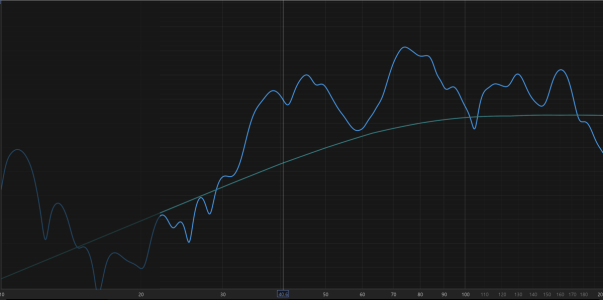
Yeah, I got it but from my point of view it might be an improvment to the Wiim app. I'll try Roomfit when I'll find time, my sub is powered with a basic mono TPA3255. It's my 2 versatile Peerless P830668 SLS (parallel) in 200L / 7CuFt so I can both make closed/LinkwiztT/BR. I used a french site/database "Dome acoustique" but at that time I've had the 'here famous' DSPiy. So I designed my close box with the Linkwitz Transform in mind, and things has changed when my soundcard died I've took the decision to stop diying.
In fact I've stopped DIYaudio because I have DIYed all my little wood house so I needed to simplified my installation and be able to just listen music easily. As I was asking here, I've also asked how I can improve the Fs of my sub on french forum, and a "master" guy recommanded me to put 2 ports and it will be ok :)
I think I can show you here, maybe
Here = As a good stubborn Norman (it's an espression here), I still think 1 or 2 PEQ would be much cleaner if they were separate for subs only :) Greatings
 
Last edited:
 
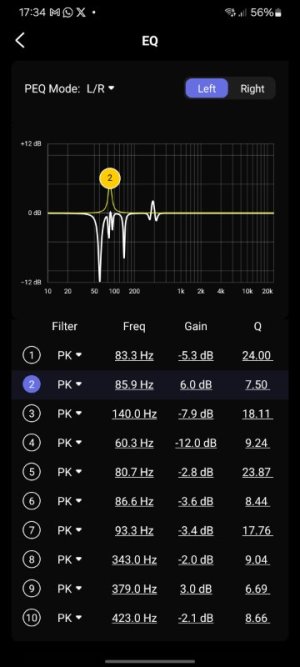
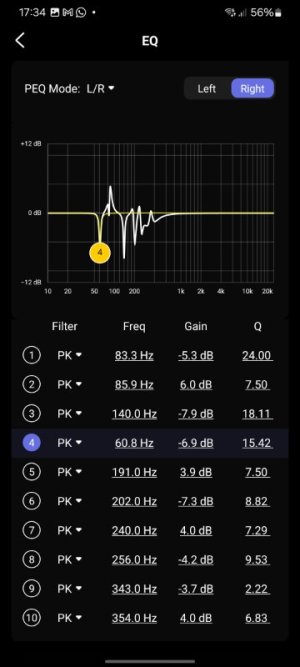
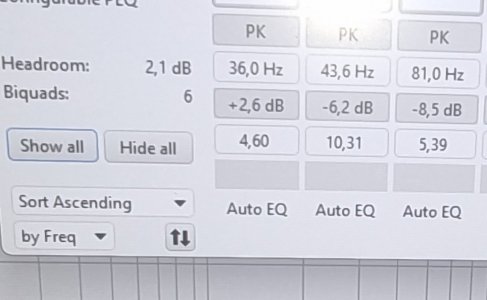
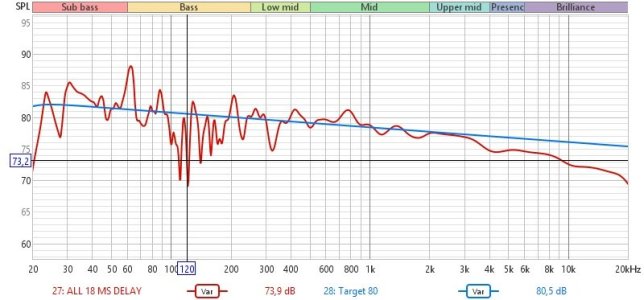
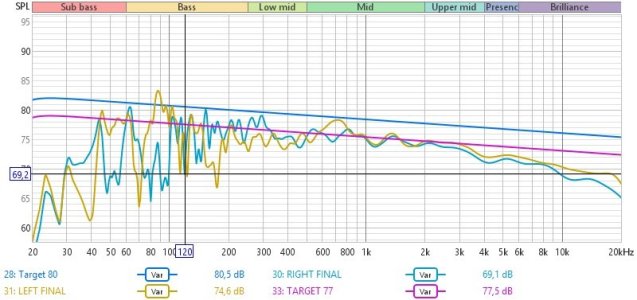
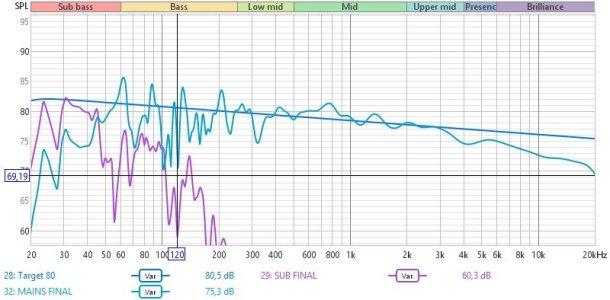
"I wish Wiim would give us Wiim folks 10 channels dedicated to sub out ='( so basically today I redid everything, yes I know, can only get so far with EQ, but I think today I'm happier than yesterday, also did buy ear protection, and a laser distanciometer, so I did it at -10 dbfs and 90% wiim volume (limited at 95%), speakers are perfectly at same distance to LP, and impulse response confirms this, so I bypassed mains sub out crossover so now I have sub plus mains doing bass. which filled some weak spots. results below.


sub only eq is applied directly at sub internal amplifier as is the 120 hz crossover.

the first 3 left and right channel peq bands are actually for the sub but wiim doesnt have seperate sub PEQ ;'( ."

so basically I was again trying to tune my system and now I'm sure Wiim team should add seperate PEQ bands for SUB out, whats the point of BYPASSING mains in sub out page if then you are going to use PEQ L/R and you have to affect both speakers and subwoofer.
 

Attachments

  • LEFT EQ (FIRST 3 ARE DIRECTED AT SUB).jpg
    LEFT EQ (FIRST 3 ARE DIRECTED AT SUB).jpg
    41.1 KB · Views: 8
  • RIGHT EQ (FIRST 3 ARE DIRECTED AT SUB).jpg
    RIGHT EQ (FIRST 3 ARE DIRECTED AT SUB).jpg
    41.2 KB · Views: 6
  • SUB ONLY EQ.jpg
    SUB ONLY EQ.jpg
    83.7 KB · Views: 7
  • ALL (MAINS WITH 18MS DELAY).jpg
    ALL (MAINS WITH 18MS DELAY).jpg
    64.1 KB · Views: 4
  • LEFT + RIGHT.jpg
    LEFT + RIGHT.jpg
    68.8 KB · Views: 6
  • SUB + MAINS (ONLY SUB XO AT 120).jpg
    SUB + MAINS (ONLY SUB XO AT 120).jpg
    68.4 KB · Views: 8
Hello, I haven't used Roomfit yet so yes I use the PEQs manually. The PEQs applied as is influence the entire phase and impedance of my main speakers, I don't find this optimal. From my little knowledge I think it would be much cleaner to have a separate PEQ for the subwoofer output as I explained.
But thanks for the advice, I'll look into Roomfit soon, and I'm looking into adding 2 vents to my DIY sub so that might solve my problem.

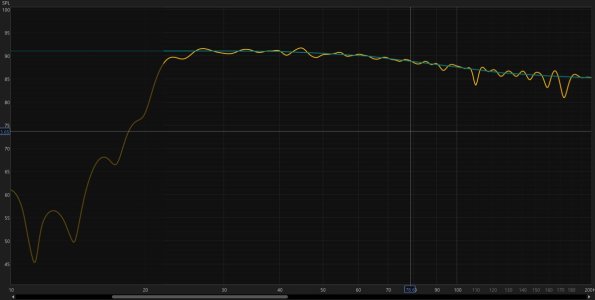
The absence of separate EQ for the subwoofer is really the only thing stopping me from purchasing a WiiM Amp Pro or Ultra right now. The below graph was done with separate EQ for the subwoofer and speakers using 2 USB-C Jcally dongles, one to an amplifier and one to the subwoofer, muxed together using Voicemeter and EQ'd with REW and Equalizer APO.

If I could do this with a WiiM Pro Plus or Ultra instead, I would upgrade in a heartbeat just to lose the 10ms delay from VoiceMeter, and to also have all that DPS available for non-PC outputs.

Any chance that's something they're working on with the WiiM app?

(Edit: I do have experience with the WiiM Amp as I got one for my parents who are not audiophiles and were happy with just stereo speakers)
1769981040913.jpeg
 
The absence of separate EQ for the subwoofer is really the only thing stopping me from purchasing a WiiM Amp Pro or Ultra right now. The below graph was done with separate EQ for the subwoofer and speakers using 2 USB-C Jcally dongles, one to an amplifier and one to the subwoofer, muxed together using Voicemeter and EQ'd with REW and Equalizer APO.

If I could do this with a WiiM Pro Plus or Ultra instead, I would upgrade in a heartbeat just to lose the 10ms delay from VoiceMeter, and to also have all that DPS available for non-PC outputs.

Any chance that's something they're working on with the WiiM app?

(Edit: I do have experience with the WiiM Amp as I got one for my parents who are not audiophiles and were happy with just stereo speakers)
View attachment 33272

I'm still not sure why you think that EQ dedicated to the sub out was absolutely necessary.

This curve does look nice and smooth for sure. Move the mic 30 cm into any other direction and most likely it will look different at certain frequencies.

What you can do already is using PEQ (manually) on top of the automatic Room for PEQ. You can can limit the use of RoomFit to frequencies above the crossover frequency or even disable subwoofer correction altogether. In a next step you can manually dedicate all 10 PEQ filters to the frequency band covered by the subwoofer.

Isn't that all you need for the REW driven correction you're after?
 
I'm still not sure why you think that EQ dedicated to the sub out was absolutely necessary.

This curve does look nice and smooth for sure. Move the mic 30 cm into any other direction and most likely it will look different at certain frequencies.

What you can do already is using PEQ (manually) on top of the automatic Room for PEQ. You can can limit the use of RoomFit to frequencies above the crossover frequency or even disable subwoofer correction altogether. In a next step you can manually dedicate all 10 PEQ filters to the frequency band covered by the subwoofer.

Isn't that all you need for the REW driven correction you're after?

In my case, due to speaker placement limitations, my speakers have some unusually high spikes and nulls in the sub bass (10 - 15 decibels or so) resulting in needing a higher than usual crossover (I think I settled on 105hz) and a couple of Peaking filters to bring the spikes down further than the high pass filter could achieve to keep the subwoofer and speakers from interfering with each other. There's no way to fix this without being able to EQ the subwoofer and speakers independently. 200hz and below is where most Equalizing is done, so I doubt I'm alone in this issue.

I guess having a second WiiM or a MiniDSP or similar between the first WiiM's sub-out and the subwoofer would be a solution, albeit an expensive one, but my hope was for a less complicated solution like an app update else my current setup will probably have to suffice. Unfortunate as the WiiM Amp is a delightful little tool.


Ooh, now there's an idea! A separate WiiM module slimmed down such that it's really only meant for DSP. Something like that for under $300 would fly off the shelves give how pricey the alternatives are (miniDSP and the like) and would solve my problem nicely.
 
In my case, due to speaker placement limitations, my speakers have some unusually high spikes and nulls in the sub bass (10 - 15 decibels or so) resulting in needing a higher than usual crossover (I think I settled on 105hz) and a couple of Peaking filters to bring the spikes down further than the high pass filter could achieve to keep the subwoofer and speakers from interfering with each other. There's no way to fix this without being able to EQ the subwoofer and speakers independently. 200hz and below is where most Equalizing is done, so I doubt I'm alone in this issue.

I guess having a second WiiM or a MiniDSP or similar between the first WiiM's sub-out and the subwoofer would be a solution, albeit an expensive one, but my hope was for a less complicated solution like an app update else my current setup will probably have to suffice. Unfortunate as the WiiM Amp is a delightful little tool.


Ooh, now there's an idea! A separate WiiM module slimmed down such that it's really only meant for DSP. Something like that for under $300 would fly off the shelves give how pricey the alternatives are (miniDSP and the like) and would solve my problem nicely.
But in a way, that's already the case, and for DIY enthusiasts, if the analog inputs* were of good quality, they would be even better with, for example, a "plus"
Can use it for example...preamp /wiim/ amp...or just for headphone etc etc
;-)
(*You can use this to help the minidsp pocketadc)
 
Back
Top