Audio network bridge

Barry2944

Member
Joined
Dec 8, 2025
Messages
10
Newbie here. Need to transport line level audio from a line output of a receiver in one building to the line in of an amplifier in another building. The buildings are connected via fiber optic cable using an Ethernet network. Can I do this with Wiim devices?

thanks - barry2944
 
Newbie here. Need to transport line level audio from a line output of a receiver in one building to the line in of an amplifier in another building. The buildings are connected via fiber optic cable using an Ethernet network. Can I do this with Wiim devices?

thanks - barry2944
Welcome.

Yes, you could have two wiims in a wiim group - as long as both wiims are on the same network.
You'd have to be able to connect to that same network on your phone / tablet.
Receiver line out to wiim A line in.
Wiim B line out to amp line in.

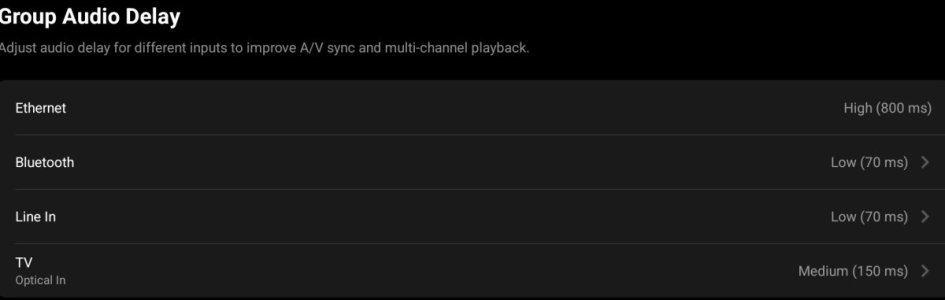
How much of a delay can you cope with?
tbh, even at 70ms I find that with tv input into such a wiim group makes lip sync barely noticable on the 'B' wiim.
1000000720.jpg
 
Note what @Mr Ee says about same network. He doesn't just mean connected by cable he means same subnet.

It is possible to do what you want if the two buildings are on different subnets but not in the way described. Instead you would use something else at the sending end.
 
Devices will be on same subnet. Which Wiim device do you recommend? Do you know where I should look for a document showing how to do the configuration?

thanks
What EXACTLY do you want to do?
Have the source in one place and listen to it in another location or listen to it in both locations?
Do you already have amps/audio setups in both buildings?

What is the intended audio source?

We should know this in order to give the right advice re. devices needed.

The setup as such is pretty basic. You will simply pair the two WiiMs. This is a standard option in the WiiM Home App which is required to control your WiiM(s).
 
The objective is to have whatever audio source is playing in building A also play in building B. Both buildings have receivers and speakers. We want to take line out from receiver in bldg A and connect it to line in of building B receiver. Buildings are connected via fiber on a local LAN.

thanks -B
 
The objective is to have whatever audio source is playing in building A also play in building B. Both buildings have receivers and speakers. We want to take line out from receiver in bldg A and connect it to line in of building B receiver. Buildings are connected via fiber on a local LAN.

thanks -B
Thanks, Barry.

Whatever source you want to use, it will have to be the ‚Master‘ WiiM im building A itself or anything connected to its input.

So the receiver in building A will have to be reduced to its amplifier function receiving its input signal from the WiiM.

The devices you need are any of the WiiM streamers. Mini, Pro, Pro Plus or Ultra, depending on your audio quality requirements and source input count and kind.

What are you listening to? CD‘s, Spotify/Tidal etc., radio?
The latter two can be had natively from any of the streamers mentioned above. An external source like a CD player or TV will need to be connected physically to the Master WiiM.
 
Receiver in bldg A has input via BT from an Ipad. This has to stay in place, which is why we will take the line out from the receiver as input to the WiiM.

The long story is that I initially recommended WiiM for bldg. A and B. Owner decided to use Yamaha receivers in both and installed them. Now they realize that the receivers cannot be networked and need a solution so a single audio source controlled in bldg A can play in both buildings. After they realized that what they installed will not work, they came back to me for a solution. Telling them to replace the Yamaha is not an option, so we need to create a networked audio bridge.

 
Receiver in bldg A has input via BT from an Ipad. This has to stay in place, which is why we will take the line out from the receiver as input to the WiiM.

The long story is that I initially recommended WiiM for bldg. A and B. Owner decided to use Yamaha receivers in both and installed them. Now they realize that the receivers cannot be networked and need a solution so a single audio source controlled in bldg A can play in both buildings. After they realized that what they installed will not work, they came back to me for a solution. Telling them to replace the Yamaha is not an option, so we need to create a networked audio bridge.
I see.

The problem is that if you use the line out of the Yamaha it will not output a signal to its speaker ports any longer. Unless there is a tape monitor line out (a thing from the 80s😊).

But you might just as well use the BT on the Master WiiM. This will be physically connected to line-in on the Yamaha in building A.
Further the Master WiiM will send the same BT input to its slave WiiM in building B via the network. The slave is also physically connected to the line-in of the Yamaha in building B.
Pretty basic in fact.
 
So far we‘ve been saying ‚‘line-in‘ and ‚‘line-out‘.
Since the Yamahas have Bt I assume the also have an optical SPDIF in?
In this case your in luck. You could get away with two WiiM Minis and feed the receivers via this digital connection. I guess the DACs in the Yamahas will add a little re. sound quality compared the Minis‘ DACs if you were to use analogue connections.
 
According to the receiver docs, the line out is intended to be used with a recording device. The diagram shows a tape or CD player. (Very 80s) I think it will work with the line out but we could also use BT on the master. They will not know the difference.

WiiM Pro looks like it would be the best choice for this application.

Thanks for the advice.

b
 
So far we‘ve been saying ‚‘line-in‘ and ‚‘line-out‘.
Since the Yamahas have Bt I assume the also have an optical SPDIF in?
In this case your in luck. You could get away with two WiiM Minis and feed the receivers via this digital connection. I guess the DACs in the Yamahas will add a little re. sound quality compared the Minis‘ DACs if you were to use analogue connections.
It would be much better if he used a couple of Pro’s on Ethernet. WiFi will introduce another unnecessary degree of potential issue.
 
Back
Top