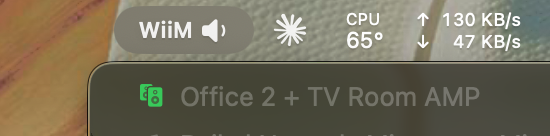
[beta] MacOS volume control for WiiM

Works fine but would be nice if I change volume on the master of a group it changes the group volume.

I've not implemented group control yet. how would we like to do it? :

1. Absolute Volume :
  • Master volume = 50 → All slaves = 50
  • Simple and predictable
  • All speakers play at exact same level
2. Relative Volume (What native app might does?):
  • If master goes up by +10, all slaves go up by +10
  • Preserves individual volume differences
  • Example: Master at 50, Slave at 30. Increase master by 10 → Master becomes 60, Slave becomes 40
let me know what I should buiid.
 
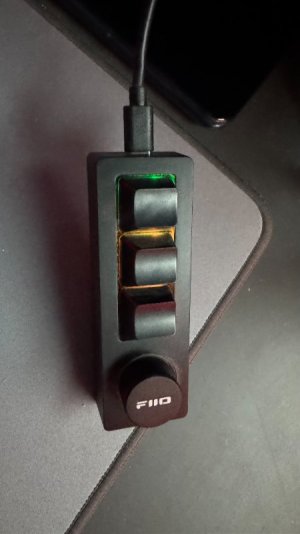
Many thanks for this gem of an app, just what I needed, as I had a couple FiiO USB knob/buttons waiting for such an app !
 

Attachments

  • IMG_6210.jpg
    IMG_6210.jpg
    41.1 KB · Views: 16

Attachments

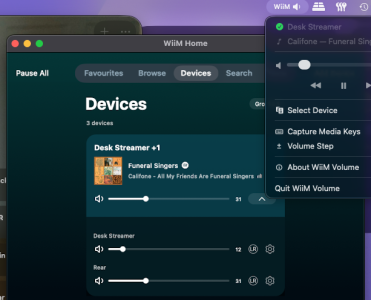
  • Screenshot 2026-02-16 at 11.12.17.png
    Screenshot 2026-02-16 at 11.12.17.png
    229.4 KB · Views: 10
Seems to still be adjusting just the master, also thanks for the work appreciated.
See screenshot these are two WiiM Pro in action.
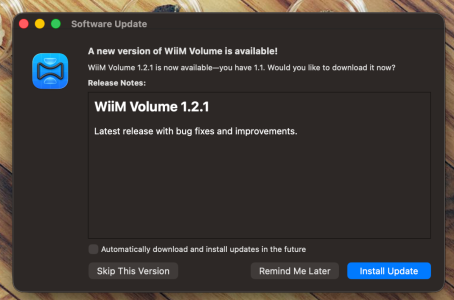
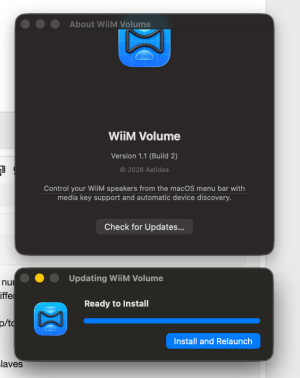
  • Fixed: Auto update didn't work, i made a mistake with the build versions and patch numbering. xD
  • Fixed: JSON parsing of the multiroom:getSlaveList API response (Wiim did things differently, or i had old docs)
  • Fixed: App now fetches current volumes before adjusting
  • Fixed: Correctly calculates delta (even) when volumes were changed by another app/touch buttons etc.
  • Bug: When going to 0 then back up, all devices ended up at the same volume
  • Solution:
    • When going to 0: Save the volume offsets (differences) between master and slaves
    • When coming from 0: Restore those offsets to maintain the differences
    • Example: Master 50, Slave 30 → both go to 0 → increase to 20 → Master 20, Slave 0 (preserving the -20 offset)
It's still a bit more buggy than i would like, as in 'responsive' since it needs to 'talk' to all the devices in the group. single volume changes stays at <10ms. But in a group it's per device ~(10ms + N×3ms) and the 'slowest' device is the max mean. to fix this i should cache the volume settings. invalidate after 1/2 sec in case the vol is adjusted somewhere else. but that's much effort.

Keep the feedback coming. !

download here: https://download.v-kooistra.com/wiim-volume/
 

Attachments

  • Screenshot 2026-02-16 at 13.42.14.png
    Screenshot 2026-02-16 at 13.42.14.png
    397.1 KB · Views: 6
  • Screenshot 2026-02-16 at 13.45.38.png
    Screenshot 2026-02-16 at 13.45.38.png
    201.8 KB · Views: 8
Last edited:
  • Bug: When going to 0 then back up, all devices ended up at the same volume
Is this a bug as it is normal WiiM behaviour when using WiiM apps?
 
  • Bug: When going to 0 then back up, all devices ended up at the same volume
Is this a bug as it is normal WiiM behaviour when using WiiM apps?
Well, it's a Algo issue. the API doesn't allow for increments (by design), only absolute values (afaik). thus we need to do it ourselves if we want the feature of keeping the relative offsets in groups. So to your question: yes this is normal WiiM behaviour. I just didn't like it.
Updated to latest, I assume it wasn't meant to resolve the group volume issue?
Correct, im still working on the group function. it's more complex than 1 device. will release it soon :)
Screenshot 2026-02-16 at 15.19.45.png

edit: group vol , updated.
 
Last edited:
Great work! Thanks! Exactly what I needed. Also works on Sequoia 15.7.1 (24G231) on Mac Studio M2 Max.
Correction: It seems that when running this on Sequoia no other audio device will work anymore. It overrides everything. So It will work If all you use is Wiim. If you need multiple ways to apple audio out, you probably do need Tahoe. For me there are some software reasons not being able to update to Tahoe, next to of course the horrible power consuming Glass UI.
 
Correction: It seems that when running this on Sequoia no other audio device will work anymore. It overrides everything. So It will work If all you use is Wiim. If you need multiple ways to apple audio out, you probably do need Tahoe. For me there are some software reasons not being able to update to Tahoe, next to of course the horrible power consuming Glass UI.


Thanks for the feedback, I think i understand your case. Would it be solved with : Pass-through mode — after sending the volume command to WiiM, also let the event propagate to the system so both adjust. So it will update the volume of WiiM and MacOS native audio out.

the implementation now, is exclusive WiiM bindings to the keys.

lmk!
 
Well, I guess that would work. But If I understand you correctly, that would alter volume levels across other audio-outs as well? Not a very big deal, but potentially It may result in very loud sound when switching source?
 
Wat een geweldige app. Dankjewel. Heerlijk om vanaf de laptop het volume te veranderen.

(translation; What a great app. Thank you very much. Lovely changing volume with my laptop)
 
Tried your app today. It doesn't appear on my menu bar. It's running (showing up in activity monitor) but not visible.
 
Tried your app today. It doesn't appear on my menu bar. It's running (showing up in activity monitor) but not visible.
that is strange. what does happen to me sometimes: the icon is hidden in the camera pill nudge (on laptops). can you share a screenshot of the menubar? also which OS version are you running? let's debug this :)

it's not going to be in your Dock with the icons. just menubar only. PS: when holding command, you can rearrange the icons.
View attachment dragdrop.mp4
 
Last edited:
picked up the latest version. Hard to do a screenshot of the missing icon as it's ... missing? :) running macos 26.2
 
picked up the latest version. Hard to do a screenshot of the missing icon as it's ... missing? :) running macos 26.2
Ha fair point 😄

Hmm, it's possible the app is starting but hanging before the menu bar icon appears. Could you check two things for me?

  1. Console.app — open it, filter by "WiiM" in the search bar, then launch the app. See if any errors or crash logs show up.
  2. Activity Monitor — when it's "running", does it show significant CPU usage? (that would suggest it's hanging/spinning somewhere)
  3. Keys -- do the volume keys repond? or nothing happens?
That'll help me narrow down whether it's a display issue (icon hidden behind the notch) or a startup issue. I'll also add proper logging in the next build to make this easier to diagnose. 1.3.0
 
Last edited:
Tried again and this time it shows up. I think the problem is that it behaves weirdly with menu bar manager. I'm using ICE (similar to bartender) and for some reason I can't make it visible.

Not a big deal though, and probably an edge case.

Will try it out tonight then!
 
Back
Top