
I’m looking help trying to troubleshoot a problem with music streaming via Ethernet to my WiiM Ultra. I can connect to the WiiM no problem via Bluetooth through Tidal Connect. However, the actual streaming is going through my tablet and not the Ethernet. I can’t enable the native Tidal app within the WiiM home software. (Can’t complete the Tidal interface within the WiiM home app, keeps hanging.. another problem for another discussion) Question: when does the WiiM stream from the Ethernet and why can’t I get it to do that? There is a good Ethernet connection according to the network status screen.

You are using an out of date browser. It may not display this or other websites correctly.
You should upgrade or use an alternative browser.
You should upgrade or use an alternative browser.
Ethernet streaming on WiiM Ultra
- Thread starter Tremmie
- Start date
-
- Tags
- tidal connect

HansD-NL
Valued Contributor
Welcome.I’m looking help trying to troubleshoot a problem with music streaming via Ethernet to my WiiM Ultra. I can connect to the WiiM no problem via Bluetooth through Tidal Connect. However, the actual streaming is going through my tablet and not the Ethernet. I can’t enable the native Tidal app within the WiiM home software. (Can’t complete the Tidal interface within the WiiM home app, keeps hanging.. another problem for another discussion) Question: when does the WiiM stream from the Ethernet and why can’t I get it to do that? There is a good Ethernet connection according to the network status screen.
The ethernet (or wifi) "input" on WiiM devices is for all audio streaming from outside (internet) and inside your local network. So everything except direct inputs (from a cd player or other device) and Bluetooth.
For the first bit of your question you will get a to the point answer from the user Wiimer, quite sure of that


Hi,I’m looking help trying to troubleshoot a problem with music streaming via Ethernet to my WiiM Ultra. I can connect to the WiiM no problem via Bluetooth through Tidal Connect.
First, I need to clarify: Are you using Tidal Connect within the Tidal app? Or is your phone connected to the Ultra via Bluetooth? Tidal Connect uses Wi-Fi. Please tell us what color the LED on the Ultra's volume knob is. If it's white, it's playing via Wi-Fi (or Ethernet). If it's green, it's playing via Bluetooth.
Unfortunately, I haven't used Tidal myself, so I hope other members can offer advice. First, please try rebooting Ultra and logging out of Tidal.However, the actual streaming is going through my tablet and not the Ethernet. I can’t enable the native Tidal app within the WiiM home software. (Can’t complete the Tidal interface within the WiiM home app, keeps hanging.. another problem for another discussion) Question: when does the WiiM stream from the Ethernet and why can’t I get it to do that? There is a good Ethernet connection according to the network status screen.


Welcome.
When you are in the Tidal app and press the 'cast' icon, do you see something like this for your ultra, showing tidal connect?
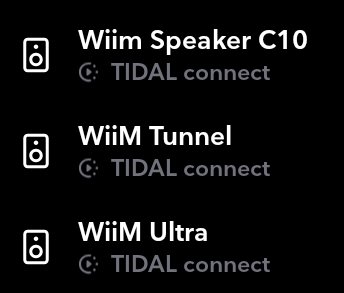
When you choose it, does the cast icon change from a rectangle to a circle, indicating it's connected?


In the Wiim app, what does the Now Playing screen show?
e.g. here it shows Tidal Connect.

When you are in the Tidal app and press the 'cast' icon, do you see something like this for your ultra, showing tidal connect?
When you choose it, does the cast icon change from a rectangle to a circle, indicating it's connected?
In the Wiim app, what does the Now Playing screen show?
e.g. here it shows Tidal Connect.
As for trying to use Tidal from within the wiim app, a couple of things that have caused issues for some are:
unusual characters in the password
the browser that opens, e.g. chrome, firefox etc.
Do you have another phone/tablet to try? The tidal logon details will be stored on the wiim itself, so you only need to get the registraton working from one phone/tablet.
unusual characters in the password
the browser that opens, e.g. chrome, firefox etc.
Do you have another phone/tablet to try? The tidal logon details will be stored on the wiim itself, so you only need to get the registraton working from one phone/tablet.

A simple point to clarify regarding both issues:I can’t enable the native Tidal app within the WiiM home software. (Can’t complete the Tidal interface within the WiiM home app, keeps hanging.. another problem for another discussion) Question: when does the WiiM stream from the Ethernet and why can’t I get it to do that? There is a good Ethernet connection according to the network status screen.
The WiiM Ultra does need access to the Internet, of course, not just access to your local network. It must not be blocked from the Internet.
Also, your phone running the WiiM Home App must be on the same logical network as the WiiM Ultra. It doesn't matter if it's Ethernet or Wi-Fi or what frequency range, but it must be the same subnet. The devices must not be on different VLANs and client isolation must not be enabled. Can you play any of the built-in Internet radio stations at all?
Finally a short comment on jargon: Most people over here would call the Tidal App installed on your smartphone (or on your PC) to be the "native app", not the Tidal support integrated into the WiiM Home App. It was very clear the way you put it, but could be confusing in the upcoming conversation.
I once had an issue with drop outs, streaming, and software update issues from either one of my WiiM Amps or my WiiM Ultra that was my related to my home network. After trying a different ethernet cable, it turned out that the issue was the ethernet switch (older TP-Link managed from Omada controller), and I had to disable IPv6 from the WiiM Device to get around it for the time being. This may not be your issue, although I might throw it out as a wild idea to look into.
Thanks for your reply. I am using Tidal Connect from within the Tidal app. I am using my IPad to connect to the WiiM. The light on the knob is green, so that means Bluetooth. The network status information within the WiiM home app tells me I have a good network connection, but I can’t get the WiiM to stream from it. It only gets streaming content from my iPad via Bluetooth.Hi,
First, I need to clarify: Are you using Tidal Connect within the Tidal app? Or is your phone connected to the Ultra via Bluetooth? Tidal Connect uses Wi-Fi. Please tell us what color the LED on the Ultra's volume knob is. If it's white, it's playing via Wi-Fi (or Ethernet). If it's green, it's playing via Bluetooth.
Unfortunately, I haven't used Tidal myself, so I hope other members can offer advice. First, please try rebooting Ultra and logging out of Tidal.
Thanks for your reply. When I am streaming music from Tidal, I open the now playing track and click on the small speaker icon in the bottom left. Nowhere is the words or icon indicating Tidal Connect. It was explained to me that if I use Tidal Connect, the music would stream from the Ethernet and my iPad would essentially be the remote.Welcome.
When you are in the Tidal app and press the 'cast' icon, do you see something like this for your ultra, showing tidal connect?
View attachment 34084
When you choose it, does the cast icon change from a rectangle to a circle, indicating it's connected?
View attachment 34086 View attachment 34087
In the Wiim app, what does the Now Playing screen show?
e.g. here it shows Tidal Connect.
View attachment 34085
Ok. You lost me at subnet. We only have one WiFi network. The WiiM is not connected to WiFi, only Ethernet.A simple point to clarify regarding both issues:
The WiiM Ultra does need access to the Internet, of course, not just access to your local network. It must not be blocked from the Internet.
Also, your phone running the WiiM Home App must be on the same logical network as the WiiM Ultra. It doesn't matter if it's Ethernet or Wi-Fi or what frequency range, but it must be the same subnet. The devices must not be on different VLANs and client isolation must not be enabled. Can you play any of the built-in Internet radio stations at all?
Finally a short comment on jargon: Most people over here would call the Tidal App installed on your smartphone (or on your PC) to be the "native app", not the Tidal support integrated into the WiiM Home App. It was very clear the way you put it, but could be confusing in the upcoming conversation.
Another interesting piece of this puzzle is that I got a trial subscription to Qobuz and the same problem happened. The configuration within the WiiM app failed to complete. ??As for trying to use Tidal from within the wiim app, a couple of things that have caused issues for some are:
unusual characters in the password
the browser that opens, e.g. chrome, firefox etc.
Do you have another phone/tablet to try? The tidal logon details will be stored on the wiim itself, so you only need to get the registraton working from one phone/tablet.
Rephrasing harkpabst's question, Can you play anything under the Wiim Home App Music Services, such as something from vTuner or TuneIn? To access Music Services, click on Browse at the bottom of the WiiM Home App and then scroll down to Music Services.
I have tried streaming from those free services but nothing happens. It looks like it is trying to start, but then stops and displays “no music selected”Rephrasing harkpabst's question, Can you play anything under the Wiim Home App Music Services, such as something from vTuner or TuneIn? To access Music Services, click on Browse at the bottom of the WiiM Home App and then scroll down to Music Services.
Disconnect the LAN cable and connect WiiM to the same Wi-Fi network as your iPad. Then, check the network status for any abnormalities. If there are no issues, verify if TuneIn can play.Still nothing
I disconnected the LAN. The unit was stuck in a firmware update (which never completed) so I had to unplug and restart the unit. I completed the set up again with the correct network. I am still unable to stream anything from wifi
Similar threads
- Replies
- 0
- Views
- 394
- Replies
- 33
- Views
- 2K
- Replies
- 10
- Views
- 627

- Question
- Replies
- 8
- Views
- 851
- Replies
- 13
- Views
- 896
