
I’m looking help trying to troubleshoot a problem with music streaming via Ethernet to my WiiM Ultra. I can connect to the WiiM no problem via Bluetooth through Tidal Connect. However, the actual streaming is going through my tablet and not the Ethernet. I can’t enable the native Tidal app within the WiiM home software. (Can’t complete the Tidal interface within the WiiM home app, keeps hanging.. another problem for another discussion) Question: when does the WiiM stream from the Ethernet and why can’t I get it to do that? There is a good Ethernet connection according to the network status screen.

You are using an out of date browser. It may not display this or other websites correctly.
You should upgrade or use an alternative browser.
You should upgrade or use an alternative browser.
Ethernet streaming on WiiM Ultra
- Thread starter Tremmie
- Start date
-
- Tags
- tidal connect

Can you confirm that the WiiM app's network status screen shows your Wi-Fi signal is being received properly?I disconnected the LAN. The unit was stuck in a firmware update (which never completed) so I had to unplug and restart the unit. I completed the set up again with the correct network. I am still unable to stream anything from wifi
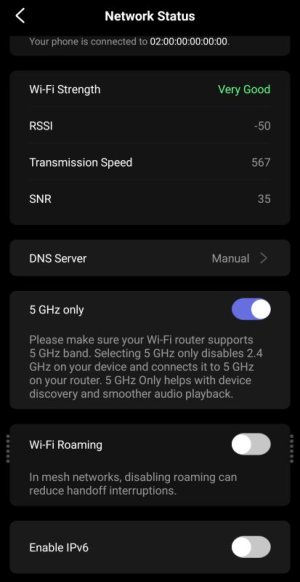
Also, if you are successfully connected to the same network as your iPad but still cannot play TuneIn, I recommend submitting a ticket via the feedback section in the WiiM app.
(WiiM home > More > Feedback)
Your device logs will be sent, which will help resolve the issue.

If you're not seeing the wiim in the tidal 'speaker' list then there's something wrong with your network.
When this happens to me I do one of these to fix it
disable / enable wifi on my tablet
switch my tablet between 2.4 and 5 ghz as I have different ssids for them (this one fixes it more often than not)
restart my tablet
restart my modem
Did we talk about the ipv6 and dns server settings in the wiim app yet? (In the Network Status screen.)
When this happens to me I do one of these to fix it
disable / enable wifi on my tablet
switch my tablet between 2.4 and 5 ghz as I have different ssids for them (this one fixes it more often than not)
restart my tablet
restart my modem
Did we talk about the ipv6 and dns server settings in the wiim app yet? (In the Network Status screen.)
Last edited:

Buryme2wice
Active Member
- Joined
- May 13, 2024
- Messages
- 53
Just a theory, but if the OP has more than one device could they set up a hotspot on their phone & use WHA on the other to link their Ultra to? Thereby bypassing the home network & offering some proof the Ultra CAN successfully connect to the outside world?Your WiiM Ultra - for yet to be discovered reasons - seems to be blocked from the Internet (not your local network). Yes, there's a difference.
Appreciate this won't narrow down if it's an issue within the local network or beyond as suggested by @harkpabst but at least rules out a fault with the Ultra.
Thanks for the reminder. Here is the Help Center article on how to use your phone's hotspot with your WiiM device.Just a theory, but if the OP has more than one device could they set up a hotspot on their phone & use WHA on the other to link their Ultra to? Thereby bypassing the home network & offering some proof the Ultra CAN successfully connect to the outside world?
Appreciate this won't narrow down if it's an issue within the local network or beyond as suggested by @harkpabst but at least rules out a fault with the Ultra.

Connect WiiM to Your Phone's Hotspot for Portable Streaming
Want to enjoy your favorite music when Wi-Fi isn't available—like when you're camping, traveling, or relaxing outdoors? With the latest WiiM Home app, you can now connect your WiiM device directly to your phone’s hotspot—making portable streaming...
WiiM Home App (and firmware, as far as possible) should be on the latest available version.
Well, fellas. I’ve exhausted all efforts to make this work. I did not buy the WiiM ultra to be a Bluetooth only streamer. Hifi should be simple with minimal set up stress. Not so here. I just want to listen to music in the best quality possible. I’m going to sell the unit and move on. Thanks for your help. 

HansD-NL
Valued Contributor
As it does for "all" other users. Your situation, whatever the cause is highly unusual.Well, fellas. I’ve exhausted all efforts to make this work. I did not buy the WiiM ultra to be a Bluetooth only streamer. Hifi should be simple with minimal set up stress. Not so here. I just want to listen to music in the best quality possible. I’m going to sell the unit and move on. Thanks for your help.
I’m back. Problem solved! My wife had paused the device access on our Xfinity router. She did not know what it was (generic IoT device). She unpaused it and now I can stream via Ethernet. I now have access to Tidal from within the WiiM app and can stream via Tidal connect. So, I guess the solution was simple after all. I guess the WAF goes beyond aesthetics.
HansD-NL
Valued Contributor
Your wife must be a network administrator or IT person in some other capacity, which is great to hear.I’m back. Problem solved! My wife had paused the device access on our Xfinity router. She did not know what it was (generic IoT device). She unpaused it and now I can stream via Ethernet. I now have access to Tidal from within the WiiM app and can stream via Tidal connect. So, I guess the solution was simple after all. I guess the WAF goes beyond aesthetics.
"I guess the WAF goes beyond aesthetics." LOL

HansD-NL
Valued Contributor
What I always do is assign a fixed IP address for "important" devices in the DHCP settings of a router. It's not necessary but if you ever loose a device on the network, need to open ports or transport methods to (and from) a specific device you will know which one it is. (and give it a name you like)
Excellent news. Sounds like you would benefit from a household CCB.I’m back. Problem solved! My wife had paused the device access on our Xfinity router. She did not know what it was (generic IoT device). She unpaused it and now I can stream via Ethernet. I now have access to Tidal from within the WiiM app and can stream via Tidal connect. So, I guess the solution was simple after all. I guess the WAF goes beyond aesthetics.
I don't want to say "I told you so", but I told you so.I’m back. Problem solved! My wife had paused the device access on our Xfinity router. She did not know what it was (generic IoT device). She unpaused it and now I can stream via Ethernet. I now have access to Tidal from within the WiiM app and can stream via Tidal connect. So, I guess the solution was simple after all. I guess the WAF goes beyond aesthetics.

Rephrasing harkpabst's question, Can you play anything under the Wiim Home App Music Services, such as something from vTuner or TuneIn? To access Music Services, click on Browse at the bottom of the WiiM Home App and then scroll down to Music Services.
Is "Music Services" the same as "Home Music Share" ? If not how do I find it ?
Im using an Android phone with my Wiim Pro box. Thx
slartibartfast
Major Contributor
- Joined
- Apr 18, 2024
- Messages
- 6,156
Music Services appear under "Music Services" in the app.Is "Music Services" the same as "Home Music Share" ? If not how do I find it ?
Im using an Android phone with my Wiim Pro box. Thx
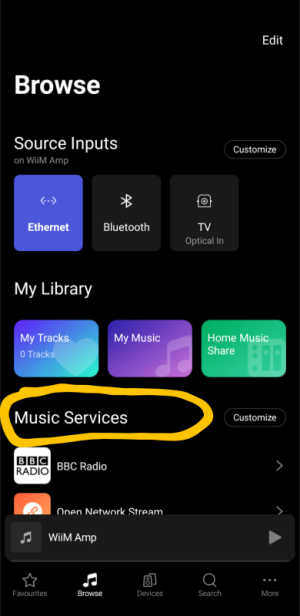
Home Music Share OTOH gives you access to music stored on a local media server in your own network or simple file shares containing music files, if you have such local servers.Is "Music Services" the same as "Home Music Share" ? If not how do I find it ?
Im using an Android phone with my Wiim Pro box. Thx
Similar threads
- Replies
- 0
- Views
- 394
- Replies
- 33
- Views
- 2K
- Replies
- 10
- Views
- 627

- Question
- Replies
- 8
- Views
- 851
- Replies
- 13
- Views
- 896
