
Font options needed

BuTTuS

New Member
Joined
Mar 7, 2026
Messages
2
I'm a new and perfectly happy owner of a Wiim Sound speaker, except for one thing, the lack of font options...
For the "now playing" display I would prefer to have the album art in "full screen", but that white only text is then impossible to read in some situations.
Please give us a font option with shaded text or something to make it visible regardless of background color?
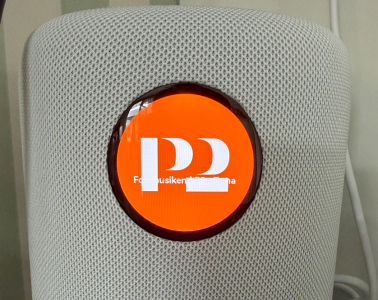
1772907449386.png
 
I'm a new and perfectly happy owner of a Wiim Sound speaker, except for one thing, the lack of font options...
For the "now playing" display I would prefer to have the album art in "full screen", but that white only text is then impossible to read in some situations.
Please give us a font option with shaded text or something to make it visible regardless of background color?

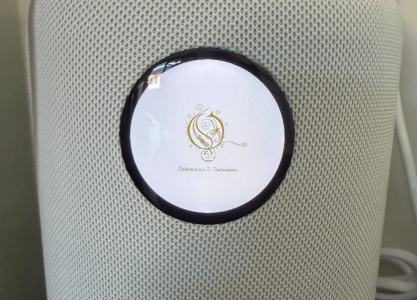
View attachment 34939
You‘re looking at a picture, not an info screen.
 
Welcome!

I actually agree, and raised this 'problem' very early on.
The track progress bar around the outside suffers the same, being effectively invisible in some situations.
 
You want "Intelligent Text Color", not "Font Options".
You don't want to be able to cycle through Arial Narrow, Comic Sans, Lucinda Console, Courier New, etc.
You want the WiiM Display to automatically select a Text Color that is a good contrast for the predominant Background Color of the area where that text will be displayed. This needs to be an automatic function, as you surely don't want to go through a number of menu selections for every Song whose Cover Art color selection conflicts with your previous Color Selection.
 
Back
Top