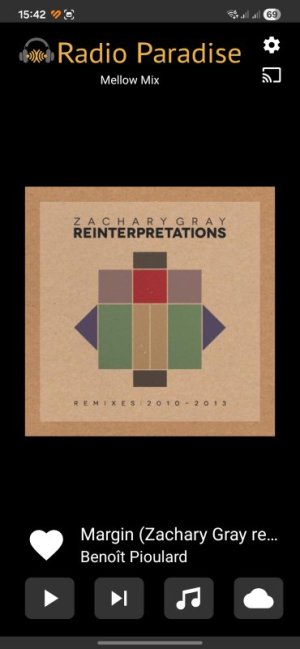
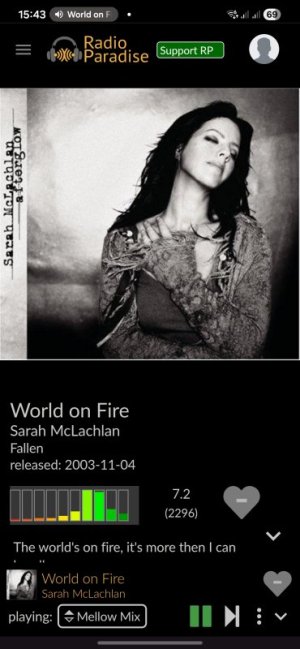
I can't go back to the previous track now...😭

Wiimer

Major Contributor
Community Curator
Joined
Oct 28, 2022
Messages
7,517
Location
Japan
It seems that the UI of the WiiM app’s “Now Playing” screen has been updated without my noticing. As a result, pressing the back button no longer takes you back to the previous track.

In the new UI, tapping the back button once takes you back to the beginning of the track. However, it’s nearly impossible to double-tap to go back to the previous track.

As I pointed out here before, the delay prevents the double-tap from registering..


View attachment 2349.mp4


@WiiM Team ,

I tested this on Amazon Music, YouTube Music, and Spotify, and this issue occurs on all streaming services. Even if I tap the back button within 3 seconds of playback starting, in most cases it simply returns me to the beginning of the track.
(Also, for some reason, Qobuz is the only one that works the same way as before. Tapping the back button once takes me back to the previous track.)


As it stands, this is very difficult to use.
Will you be adding a feature to skip tracks by swiping left or right in the future?

Please consider a way to go back to the previous track.
Please!
 
It seems that the UI of the WiiM app’s “Now Playing” screen has been updated without my noticing. As a result, pressing the back button no longer takes you back to the previous track.

In the new UI, tapping the back button once takes you back to the beginning of the track. However, it’s nearly impossible to double-tap to go back to the previous track.

As I pointed out here before, the delay prevents the double-tap from registering..


View attachment 36845


@WiiM Team ,

I tested this on Amazon Music, YouTube Music, and Spotify, and this issue occurs on all streaming services. Even if I tap the back button within 3 seconds of playback starting, in most cases it simply returns me to the beginning of the track.
(Also, for some reason, Qobuz is the only one that works the same way as before. Tapping the back button once takes me back to the previous track.)


As it stands, this is very difficult to use.
Will you be adding a feature to skip tracks by swiping left or right in the future?

Please consider a way to go back to the previous track.
Please!
In Tidal the back button always go to previous track (except on first track of cause). To go to the start of a track you need to press back and then forward.

This is on Android v. 3.5.5
 
I only have Amazon Music as part of Prime, but at least I can play full albums that I bought from Amazon. In this scenario, tapping the back button always takes me back to the previous title, just as it does with the Tidal integration.

Could this in any way be related to shuffle and/or repeat being enabled?
 
Currently, the behavior when you tap once varies by service.

Spotify Lossless (Skip to the beginning)
View attachment 3331.mp4


YTM Premium (Skip to the beginning)
View attachment 3330.mp4


As @harkpabst mentioned, AM is Prime. (Skip to the beginning)
View attachment 3332.mp4

Of course, I’m testing it on a track in the middle of the album, not the first track.

On Qobuz and local sources, it skips to the previous track as usual.

Android app version 3.5.5
 
Currently, the behavior when you tap once varies by service.

Spotify Lossless (Skip to the beginning)
View attachment 36853


YTM Premium (Skip to the beginning)
View attachment 36854


As @harkpabst mentioned, AM is Prime. (Skip to the beginning)
View attachment 36855

Of course, I’m testing it on a track in the middle of the album, not the first track.

On Qobuz and local sources, it skips to the previous track as usual.

Android app version 3.5.5
@WiiM Support Unfortunately another example of an inconsistent look & feel.

This is part of the confusion experienced by new users.
 
Currently, the behavior when you tap once varies by service.

Spotify Lossless (Skip to the beginning)
View attachment 36853


YTM Premium (Skip to the beginning)
View attachment 36854


As @harkpabst mentioned, AM is Prime. (Skip to the beginning)
View attachment 36855

Of course, I’m testing it on a track in the middle of the album, not the first track.

On Qobuz and local sources, it skips to the previous track as usual.

Android app version 3.5.5
By its very nature, I wouldn't expect Amazon Music Prime to be able to go back to the previous track. Does it work in the Amazon Music app?
 
By its very nature, I wouldn't expect Amazon Music Prime to be able to go back to the previous track. Does it work in the Amazon Music app?
You're right; I didn't check that thoroughly enough regarding Music Prime. Does it skip to the previous track in the case of Unlimited?

I don't remember when YTM and Spotify started behaving this way. Maybe it's always been like this, but it's strange that they work differently from other streaming services..
 
Im using Amazon Music Unlimited and the back button sends me to previous track of the queue/playlist as expected.
I also tried with Qobuz (free 30 seconds playback :) ) and it also works as expected.
Not sure how else in may try to reproduce your problem...spotify free maybe?
Also using android 3.5.5 Wiim Home App
 
Im using Amazon Music Unlimited and the back button sends me to previous track of the queue/playlist as expected.
I also tried with Qobuz (free 30 seconds playback :) ) and it also works as expected.
Not sure how else in may try to reproduce your problem...spotify free maybe?
Also using android 3.5.5 Wiim Home App
It seems to be limited to Spotify and YTM.

However, when playing YTM on Chromecast, I can skip to the previous track using the back button on the WHA.
 
I just installed but with Spotify free version i can only use Next (and random jump), not back which is greyed out in Spotify app.
In WHA there are just no back and no next buttons at all when streaming spotify..jusr pause/play.
 
It seems to be limited to Spotify and YTM.
I think that we also lost the ability to skip back to the start of a track on Radio Paradise too.
I was on the beta trial for Radio Paradise and I am fairly sure we could skip back tracks, even after the beta became mainstream.
 
I think that we also lost the ability to skip back to the start of a track on Radio Paradise too.
I was on the beta trial for Radio Paradise and I am fairly sure we could skip back tracks, even after the beta became mainstream.
I think that has never been an option in RP. Only skip forward.
It is not even an option in their native web and android apps as you see:

Android app>>>>>>Web Player
1000138005.jpg1000138006.jpg
 
I just installed but with Spotify free version i can only use Next (and random jump), not back which is greyed out in Spotify app.
In WHA there are just no back and no next buttons at all when streaming spotify..jusr pause/play.
That's the same as Amazon Music Prime.
It seems you can't reproduce it without paying.😅😂

Someone will probably test it eventually.
 
That's the same as Amazon Music Prime.
It seems you can't reproduce it without paying.😅😂

Someone will probably test it eventually.
Yeah - decades ago I bought lots of CDs via Amazon, and for many, digital copies of the 'albums' became available in my 'amazon music library'. I believe I also uploaded a fair amount. Over the years this 'library' of mine has been associated with my Amazon Prime account, but I've never subscribed to AM Unlimited beyond a trial period. Recently while configuring WiiM devices and setting up Alexa for the Ultra, I tried to play selections from 'my library', and I ran into annoying limitations on accessing content that Amazon sold to me in the past.

I had breifly considered making AMUnlimited my primary music-on-demand source, but... screw them. I don't want my music choices, or requests of Alexa, influencing the ads I see everywhere around the www:sneaky:.
 
Yeah - decades ago I bought lots of CDs via Amazon, and for many, digital copies of the 'albums' became available in my 'amazon music library'. I believe I also uploaded a fair amount. Over the years this 'library' of mine has been associated with my Amazon Prime account, but I've never subscribed to AM Unlimited beyond a trial period. Recently while configuring WiiM devices and setting up Alexa for the Ultra, I tried to play selections from 'my library', and I ran into annoying limitations on accessing content that Amazon sold to me in the past.

I had breifly considered making AMUnlimited my primary music-on-demand source, but... screw them. I don't want my music choices, or requests of Alexa, influencing the ads I see everywhere around the www:sneaky:.
Annoyingly, those lossy digital copies seem to be chosen in preference to the same album in HD/UHD which you'd get if you're subscribed to Unlimited and hadn't bought the album. Of course you could delete those tracks from your library, but that then screws up any playlists that includes those tracks which in my case is a lot. Reverse/perverse logic in play :(
 
Last edited:
Back
Top