Music Library on NAS shared folder?

vicviper

New Member
Joined
Feb 12, 2026
Messages
12
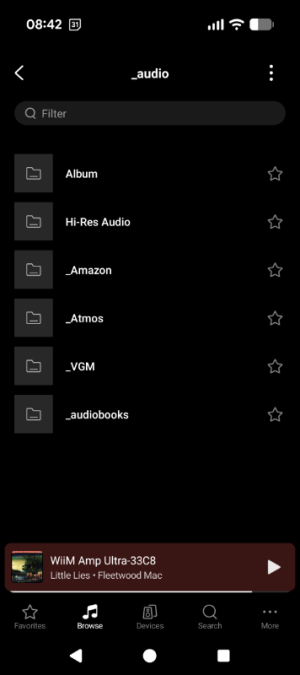
Maybe I'm missing something here but should music libraries on NAS shared folders be indexed somehow in the Wiim Home App? I added a network share and can access the folder just fine but it's really just the folder, no sorting by album, artist, or displaying cover art. All of my music is properly tagged including local folder images but the app does not display anything like that.

The manual suggests "re-scanning" the library but I just don't have such an option in the app (or can't seem to find it). Can anyone point me to this or are NAS folders really just restricted to pure folder/file browsing?

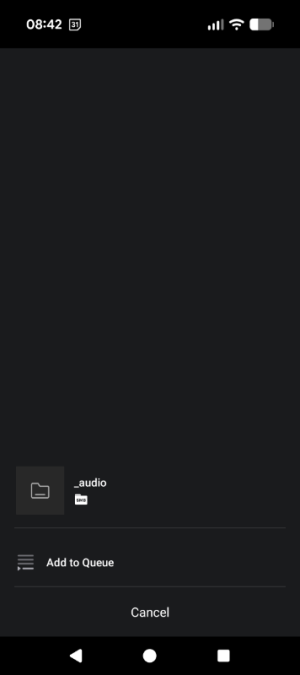
Attaching screenshots for the folder view and hamburger menu options.
 

Attachments

  • Screenshot_20260213-084233.png
    Screenshot_20260213-084233.png
    45.9 KB · Views: 7
  • Screenshot_20260213-084250.png
    Screenshot_20260213-084250.png
    19.3 KB · Views: 7
WHA doesn't scan a folder from a NAS yet.

You need a host music service on your NAS, PC, or Ri, like roon, LMS, minimserver, mediamonkey asset, etc etc. so then the WHA connects to your service

Also I'd ditch WHA it's pretty damn awful. I use picoreplayer on a pi5, much better.
 
I'm actually coming from Volumio and PiCorePlayer running on Raspberry, but there is simply no alternative to using the Wiim Home App for my Wiim Amp Ultra and I actually would have prefered an all-in-one solution here.

I have a DLNA server running on my NAS and WHA also has issues indexing that properly (stops at 500 songs), so I guess the local network support is just not fully in place yet? Kinda bummed that this seems such an afterthought and poorly integrated within the Wiim ecosystem.
 
I'm actually coming from Volumio and PiCorePlayer running on Raspberry, but there is simply no alternative to using the Wiim Home App for my Wiim Amp Ultra and I actually would have prefered an all-in-one solution here.

I have a DLNA server running on my NAS and WHA also has issues indexing that properly (stops at 500 songs), so I guess the local network support is just not fully in place yet? Kinda bummed that this seems such an afterthought and poorly integrated within the Wiim ecosystem.

Yeah it's really just browse by folder.

I only use the WHA for initial setup, room EQ and speaker preset, I use LMS for the music selection.

No issues 300,000 tracks on my LMS Pi5
 
I'm actually coming from Volumio and PiCorePlayer running on Raspberry, but there is simply no alternative to using the Wiim Home App for my Wiim Amp Ultra and I actually would have prefered an all-in-one solution here.

I use pCp too and use the Material Skin interface for most of my use of my WiiM devices, with the WHA being used primarily for configuration.

I have a DLNA server running on my NAS and WHA also has issues indexing that properly (stops at 500 songs), so I guess the local network support is just not fully in place yet? Kinda bummed that this seems such an afterthought and poorly integrated within the Wiim ecosystem.

Surely the DLNA server should do its own indexing, unless you’re trying to use the “advanced” setting in the WHA
 
I use pCp too and use the Material Skin interface for most of my use of my WiiM devices, with the WHA being used primarily for configuration.


Surely the DLNA server should do its own indexing, unless you’re trying to use the “advanced” setting in the WHA

Well, if I knew in advance how poorly Wiim is handling local network streaming, I maybe would have stayed with the Raspberry-based solutions. According to the user manual, SMB shares should still display local folder artwork but this never worked for me. Any ideas? All my folders have a cover.jpg or folder.jpg file in them.

Also, switching back to legacy did the trick, DLNA is working correctly again. Is "advanced" mode really limited to 500 songs max? That's not even 1% of my collection lol.
 
Well, if I knew in advance how poorly Wiim is handling local network streaming, I maybe would have stayed with the Raspberry-based solutions. According to the user manual, SMB shares should still display local folder artwork but this never worked for me. Any ideas? All my folders have a cover.jpg or folder.jpg file in them.

Also, switching back to legacy did the trick, DLNA is working correctly again. Is "advanced" mode really limited to 500 songs max? That's not even 1% of my collection lol.

Ditch WHA.
Ditch browsing by folder.
Use a good server/UI app

WHA advanced scan stops at 110,000.

So pretty useless for me.
 
Out of curiosity, what app are you using for the LMS server?

I am genuinely interested in that but at the same time that would mean I have no need for the Wiim hardware any longer as I could just as well go back to having Volumio on Raspberry stream to a nice USB DAC/power amp.
 
Out of curiosity, what app are you using for the LMS server?

I am genuinely interested in that but at the same time that would mean I have no need for the Wiim hardware any longer as I could just as well go back to having Volumio on Raspberry stream to a nice USB DAC/power amp.

Raspberry Pi5
Picoreplayer, LMS installed on a 2.5" SSD
Craig Drummonds Material skin app APK on phone
Craig Drummonds Material plugin
 
Out of curiosity, what app are you using for the LMS server?

I am genuinely interested in that but at the same time that would mean I have no need for the Wiim hardware any longer as I could just as well go back to having Volumio on Raspberry stream to a nice USB DAC/power amp.
I came from piCorePlayer to a WiiM Amp mainly because of bass management. Room Correction was an added benefit when it arrived. If you don't use either or don't subscribe to Amazon music then there are fewer reasons to change.
 
I came from piCorePlayer to a WiiM Amp mainly because of bass management. Room Correction was an added benefit when it arrived. If you don't use either or don't subscribe to Amazon music then there are fewer reasons to change.

Yeah I use the room correction feature with the Ultra, since I have two sets of speakers I just switch between the speaker presets
 
Well, if I knew in advance how poorly Wiim is handling local network streaming, I maybe would have stayed with the Raspberry-based solutions. According to the user manual, SMB shares should still display local folder artwork but this never worked for me. Any ideas? All my folders have a cover.jpg or folder.jpg file in them.
Why would you even want to rely on your WiiM indexing an SMB share if you already have a DLNA server running? As pointed out by @Burnside before, your DLNA server is expected to do the indexing for you.

SMB file share browsing is just a stopgap solution for those who cannot run a media server for whatever reasons. But it's not generally limited to 500 songs, of course.
 
Last edited:
Why would you even want to rely on your WiiM indexing an SMB share if you already have a DLNA server running? As pointed out by @Burnside before, your DLNA server is expected to do the indexing for you.

SMB file share browsing is just a stopgap solution for those who cannot run a media server for whatever reasons. But it's not generally limited to 500 songs, of course.
I dunno. The DLNA server I currently use has weird/limited sorting options so SMB was always a preferred method for me but within the Wiim app, any home network streaming option is pretty terrible so I'm not winning/losing out on much here.

Currently trying LMS/Squeezelite/Material skin app combo and so far I really like it. Thanks for the recommendation, @rccarguy !
 
I dunno. The DLNA server I currently use has weird/limited sorting options so SMB was always a preferred method for me but within the Wiim app, any home network streaming option is pretty terrible so I'm not winning/losing out on much here.

Currently trying LMS/Squeezelite/Material skin app combo and so far I really like it. Thanks for the recommendation, @rccarguy !

Recommend using these plugins

Music and Artist Information (v1.19.7)
Material Skin (v6.1.7)
Music and Artist Information (v1.19.7)
UPnP/DLNA bridge (v3.4.1)

Also tag your albums/singles/ep so music looks like this (release type) it's the option somewhere so it seperates those types
 

Attachments

  • 1771009233015.png
    1771009233015.png
    265.2 KB · Views: 4
Recommend using these plugins

Music and Artist Information (v1.19.7)
Material Skin (v6.1.7)
Music and Artist Information (v1.19.7)
UPnP/DLNA bridge (v3.4.1)

Also tag your albums/singles/ep so music looks like this (release type) it's the option somewhere so it seperates those types
Don’t use the UPnP/DLNA Bridge unless you have no other choice. Just my 2p
 
Don’t use the UPnP/DLNA Bridge unless you have no other choice. Just my 2p
Don’t you mean the unsupported upnp media server plugin? Despite it being the cause of phillipe having no hair left getting it to work with WiiM, I didn’t have any issues with upnpbridge when I used it on my Mini.
 
Don’t you mean the unsupported upnp media server plugin? Despite it being the cause of phillipe having no hair left getting it to work with WiiM, I didn’t have any issues with upnpbridge when I used it on my Mini.
No. I meant the Bridge. The only WiiM related reason for using it is the Mini AFAIK. Using it when you could be using Squeezelite is a recipe for issues.
 
Don’t you mean the unsupported upnp media server plugin? Despite it being the cause of phillipe having no hair left getting it to work with WiiM, I didn’t have any issues with upnpbridge when I used it on my Mini.
It works but if you have Squeezelite as an option why bother with the bridge? If you want to use Replaygain etc via the bridge then you need to allow it to transcode.
 
Back
Top