Question about Amazon Favorites in the Wiim App

GonzoF1

New Member
Joined
Mar 21, 2026
Messages
5
Hi everyone… I am frustrated and need to ask a few questions.

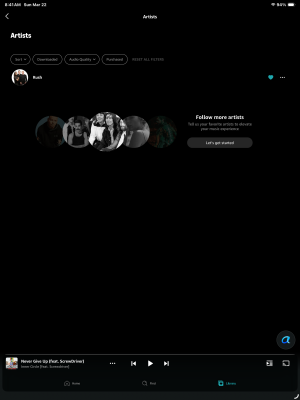
I have been using a couple of WiiM Minis around the house for a few months. I have an Amazon Unlimited plan, but run the (whatever you call it) native version on the WiiMs with my iPad and iPhone. I don’t hate it. I usually just play albums and rarely play stations or playlists. The app’s interface is easy enough for my 60 y/o brain to wrp around. I am pretty good at digging in the menus and finding what I am looking for… HOWEVER… I don’t really understand Favorites and Presets. When I goto Favorites, all that is there is WVH Mammoth album… also in the Tracks… just WVH Mammoth tracks from the same album. That’s it. Nothing else. I have been listening to other kinds of music for months. In fact, I really dont recall listening to WVH. I have nothing against Wolfie and his awesome project, I just don’t know how this became my ONLY Favorite. Literally, the only one. I can’t bet rid of it. I don’t see a way to edit or remove it. I went to the full Amazon Music app and un-hearted it. There is a lot of other stuff that IS hearted that doesn’t show on the WiiM app. How do I get Favorites to populate with ACTUAL favorite stuff? It is incredibly frustrating to not be able to find any setting for this.

Additionally, Presets… is it only able to populate with songs? Not Albums or Artists? That seems a little short-sighted if true.

Thanks for any help you can be.
 
Hi everyone… I am frustrated and need to ask a few questions.

I have been using a couple of WiiM Minis around the house for a few months. I have an Amazon Unlimited plan, but run the (whatever you call it) native version on the WiiMs with my iPad and iPhone. I don’t hate it. I usually just play albums and rarely play stations or playlists. The app’s interface is easy enough for my 60 y/o brain to wrp around. I am pretty good at digging in the menus and finding what I am looking for… HOWEVER… I don’t really understand Favorites and Presets. When I goto Favorites, all that is there is WVH Mammoth album… also in the Tracks… just WVH Mammoth tracks from the same album. That’s it. Nothing else. I have been listening to other kinds of music for months. In fact, I really dont recall listening to WVH. I have nothing against Wolfie and his awesome project, I just don’t know how this became my ONLY Favorite. Literally, the only one. I can’t bet rid of it. I don’t see a way to edit or remove it. I went to the full Amazon Music app and un-hearted it. There is a lot of other stuff that IS hearted that doesn’t show on the WiiM app. How do I get Favorites to populate with ACTUAL favorite stuff? It is incredibly frustrating to not be able to find any setting for this.

Additionally, Presets… is it only able to populate with songs? Not Albums or Artists? That seems a little short-sighted if true.

Thanks for any help you can be.
Hi
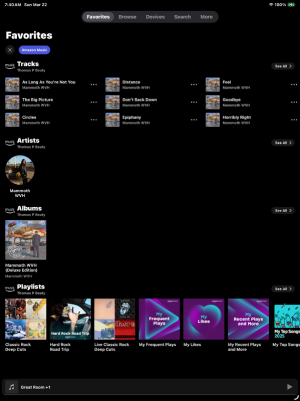
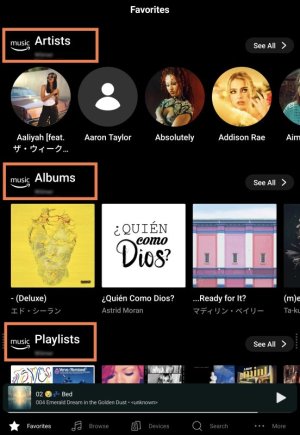
If Amazon Music is enabled in the WiiM app, the Favorites screen will display the "artists, albums, and playlists" you've added to My Music in the Amazon Music app, listed in alphabetical order. Is there nothing there?

This is how it appears in my WiiM app.
1855.jpg


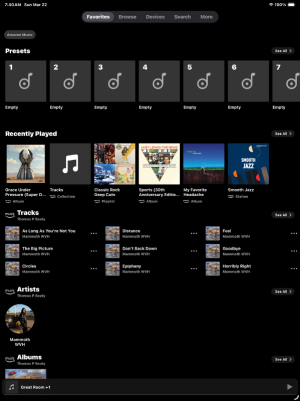
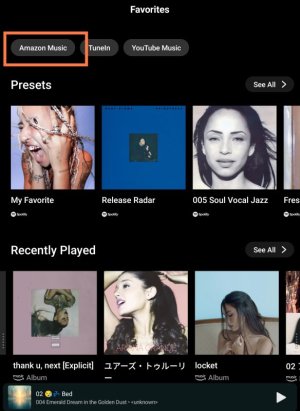
There are presets at the top of the Favorites screen, and your playback history is saved in the "Recently played" section below them.

If you tap the "Amazon Music" tab at the top, these sections will disappear, and only Amazon Music's "Artists, Albums, and Playlists" will be displayed.
1850.jpg


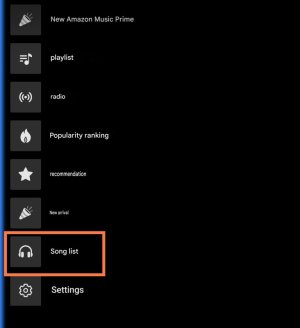
Also, on the browse screen, tap the Amazon Music icon, then tap "Music Library (Song list)" above the settings icon to view all the playlists saved in My Music.
1852.jpg


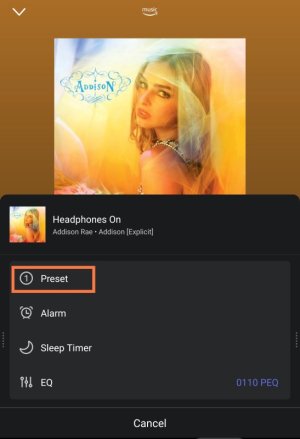
You can save albums, playlists, stations, and popular songs by artists as presets. For example, while an album is playing, tap the three-dot icon on the playback screen to save the album as a preset.
1854.jpg


You can also play music on WiiM using Alexa Cast in the Amazon Music app. In that case, you’ll have access to most of the Amazon Music app’s features.
 
Hi everyone… I am frustrated and need to ask a few questions.

I have been using a couple of WiiM Minis around the house for a few months. I have an Amazon Unlimited plan, but run the (whatever you call it) native version on the WiiMs with my iPad and iPhone. I don’t hate it. I usually just play albums and rarely play stations or playlists. The app’s interface is easy enough for my 60 y/o brain to wrp around. I am pretty good at digging in the menus and finding what I am looking for… HOWEVER… I don’t really understand Favorites and Presets. When I goto Favorites, all that is there is WVH Mammoth album… also in the Tracks… just WVH Mammoth tracks from the same album. That’s it. Nothing else. I have been listening to other kinds of music for months. In fact, I really dont recall listening to WVH. I have nothing against Wolfie and his awesome project, I just don’t know how this became my ONLY Favorite. Literally, the only one. I can’t bet rid of it. I don’t see a way to edit or remove it. I went to the full Amazon Music app and un-hearted it. There is a lot of other stuff that IS hearted that doesn’t show on the WiiM app. How do I get Favorites to populate with ACTUAL favorite stuff? It is incredibly frustrating to not be able to find any setting for this.

Additionally, Presets… is it only able to populate with songs? Not Albums or Artists? That seems a little short-sighted if true.

Thanks for any help you can be.
To get Amazon favorites to show up in the WiiM home app you have to heart individual songs. You used to be able to heart an album but Amazon made a change to their app so now you have to heart every song individually to have the whole album show up. It’s a real pain.
 
Hi
If Amazon Music is enabled in the WiiM app, the Favorites screen will display the "artists, albums, and playlists" you've added to My Music in the Amazon Music app, listed in alphabetical order. Is there nothing there?

This is how it appears in my WiiM app.
View attachment 35583


There are presets at the top of the Favorites screen, and your playback history is saved in the "Recently played" section below them.

If you tap the "Amazon Music" tab at the top, these sections will disappear, and only Amazon Music's "Artists, Albums, and Playlists" will be displayed.
View attachment 35584


Also, on the browse screen, tap the Amazon Music icon, then tap "Music Library (Song list)" above the settings icon to view all the playlists saved in My Music.
View attachment 35581


You can save albums, playlists, stations, and popular songs by artists as presets. For example, while an album is playing, tap the three-dot icon on the playback screen to save the album as a preset.
View attachment 35582


You can also play music on WiiM using Alexa Cast in the Amazon Music app. In that case, you’ll have access to most of the Amazon Music app’s features.


Thanks for the reply…

Here is what I see:
IMG_2430.pngIMG_2431.png

I have looked around the Amazon app and dont see a ‘My Music’ section.
 
Within the WiiM app… When I go to Browse then look in Amazon under the Services, there is a My Music section and I do see the WVH Mammoth in there, but there is no way to remove it. You cant swipe or select or un-heart or anything.
 
Within the WiiM app… When I go to Browse then look in Amazon under the Services, there is a My Music section and I do see the WVH Mammoth in there, but there is no way to remove it. You cant swipe or select or un-heart or anything.
The WiiM app is only reflecting what it sees in your Amazon account, so you'd really need to remove it in the Amazon Music app. However, it's long been known that Amazon can take a while to reflect any changes across its different platforms and third party interfaces
 
Last edited:
Within the WiiM app… When I go to Browse then look in Amazon under the Services, there is a My Music section and I do see the WVH Mammoth in there, but there is no way to remove it. You cant swipe or select or un-heart or anything.
As @Burnside mentioned, you can't edit My Music in the WiiM app. To remove WVH Mammoth, open the Amazon Music app, tap "Library," tap the "Artists" tab, and unfollow WVH Mammoth (tap the heart icon).
 
What is “a while” hours, days, weeks? Here is what the Amazon Music ‘Library’ screen looks like.

View attachment 35602
You could maybe try "refresh my music" in the Amazon Music app, and logging out and back in to Amazon Music in the WiiM app,to see if that forces a refresh. If you're on Android, I'd also try deleting the WiiM app's cache.
 
You are right @GonzoF1 , Amazon Music is not very well integrated in Wiim Home App.
They include in the roadmap long ago implementing the new Amazon Music API but this is never coming. Agree with you that is quite nightmare.
In Wiim Home App you library appears as Favourites or browsing amazon music service as "My Music"... in here no artwork shown at all and items they just don't sync as you would expect with things you added/removed from your Amazon Music interface. I experienced the same ... Plus it is not possible to use heart/unheart from wiim home app tracks, artis, albums...anything, except stations (?) (U'll ser the heart when playing a Amazon music station, fun enough)
At the end is better to use Amazon Music app to control your wiim device streaming while browsing your library as it truly is.
Regards
 
You are right @GonzoF1 , Amazon Music is not very well integrated in Wiim Home App.
They include in the roadmap long ago implementing the new Amazon Music API but this is never coming. Agree with you that is quite nightmare.

If the new Amazon Music API is the Amazon Music Web API then that's being run by Amazon and they will dictate the pace;

In Wiim Home App you library appears as Favourites or browsing amazon music service as "My Music"... in here no artwork shown at all and items they just don't sync as you would expect with things you added/removed from your Amazon Music interface. I experienced the same ... Plus it is not possible to use heart/unheart from wiim home app tracks, artis, albums...anything, except stations (?) (U'll ser the heart when playing a Amazon music station, fun enough)
At the end is better to use Amazon Music app to control your wiim device streaming while browsing your library as it truly is.
Regards

I tend to favour the use of the Amazon Music app and Alexacast but still tend to use the WiiM app interface if I'm just wanting to run one of my own playlists of which I have many.
 
What does API stand for?
Here's a definition: "An Application Programming Interface (API) is a set of rules and protocols that enables different software applications to communicate and exchange data with each other. Acting as an intermediary, it allows one system to safely use the functionality or data of another, essential for modern development."

Basically it's the interface between the WiiM app and the Amazon Music (or other) streaming service.
 
Going a bit off-topic, I would be grateful if someone could clearly explain the “heart” mechanism to me.
I admit that I’ve never really understood it, and so I’ve always avoided using it.

In the past, there was an (explicit) option to add a track to the “library”.
In fact, over time I added about 2,000 tracks to my library.

By choice, whenever I wanted to add a track to one (or more) playlists, I would always add it to the library first and then from there to the playlist(s).
In this way, I had an overall container (the library) and some sub-containers, not necessarily disjoint (the playlists).

Everything was perfectly clear, clean, and consistent, and it worked very well for me.

At some point, the “heart” mechanism was introduced, which was supposed to replace the process of adding tracks to the library.
However, when using it, I ended up—at least in my view, in a rather unclear and inconsistent way—with tracks in the library without a “heart,” and tracks with a “heart” but not in the library.

Clearly I must be misunderstanding something: could you please clarify this for me?
Thank you.
 
It changed at some point yes. Now you can add albums with a heart, also artist, but that does not automatically add all related tracks.
That way Now you can have liked artist, liked albums and liked tracks.
I appreciate it works this way because i want in my favorite tracks only the individual tracks i liked from certain artist or albums, and not the whole discography of an artist or album i liked. This wasnt like that in the past i believe. I actually had to un-heart thousands of tracks manually that were there because i liked the whole album or the artist but i appreciate not having in the favorite tracks list. Having the album as favorite is enoguh and clearer for me.
 
Yeah, I think it's changed over time and might even be down to which version of the app on which platform you used. I have lots of playlists in which I have some songs liked (you'd think by default they'd all be "liked" otherwise I wouldn't have put them in a playlist), with others unliked, and even some where the heart icon is greyed out. I admit I have a mixture of uploaded tracks, purchased tracks and tracks I've liked when listening to the app and I'm not sure they have all been treated the same over time. I must admit if I like an album I would prefer that all its tracks were liked otherwise I wouldn't have liked individual tracks and not the album. However, I admit that liking an artist then having all their tracks liked is maybe a step too far. At best, I'd say it's a guddle as we say in these here parts ;)
 
OK, thank you very much for the information.
From the Amazon Music app on PC (which, thankfully, has not been affected by this “heart” redesign), the situation is as follows:
  • There are 2,756 tracks in the library
  • The “Favorites” playlist contains 0 tracks (i.e., it is empty)
This situation actually matches what existed before the “reform.”

From the Amazon Music app on the iPhone, the situation is as follows:
  • I cannot see whether the tracks in the library are actually 2,756 (in fact, if anyone knows how to check this, I would appreciate it in advance). The interesting thing is that all tracks appear as “hearted.” I never did this myself, so it must have happened automatically.
  • The “Favorites” playlist contains 0 tracks (i.e., it is empty). I don’t know if this is normal, but I’m perfectly fine with it.
Now, the question is the following: before the “reform,” while listening on the iOS app (on iPhone or iPad), I could decide whether to add a given track to the library (I should clarify that I’m not interested in adding artists or albums to the library); afterwards, I could decide whether, while keeping it in the library, to also add it to one or more playlists (including the Favorites one).

How does it work now? I don’t understand the logic...

If, during listening (which in my case is typically via Alexa Cast on WiiM, but also with headphones “on the road”), I add a track using the “heart,” is it added both to the library and to the Favorites playlist?

And afterwards, can I add it to another playlist?

And if I later remove the heart, is it removed from the library, from the Favorites playlist, and from all other playlists to which I added it?
 
Going a bit off-topic, I would be grateful if someone could clearly explain the “heart” mechanism to me.
I admit that I’ve never really understood it, and so I’ve always avoided using it.

In the past, there was an (explicit) option to add a track to the “library”.
In fact, over time I added about 2,000 tracks to my library.

By choice, whenever I wanted to add a track to one (or more) playlists, I would always add it to the library first and then from there to the playlist(s).
In this way, I had an overall container (the library) and some sub-containers, not necessarily disjoint (the playlists).

Everything was perfectly clear, clean, and consistent, and it worked very well for me.

At some point, the “heart” mechanism was introduced, which was supposed to replace the process of adding tracks to the library.
However, when using it, I ended up—at least in my view, in a rather unclear and inconsistent way—with tracks in the library without a “heart,” and tracks with a “heart” but not in the library.

Clearly I must be misunderstanding something: could you please clarify this for me?
Thank you.
I don't use AM anymore, but as far as I know, the heart icon is a button for adding tracks to the "My Likes" playlist.

In other words, it serves the same purpose as the "Good" button on the WiiM app.
 
Back
Top