Question about Amazon Favorites in the Wiim App

GonzoF1

New Member
Joined
Mar 21, 2026
Messages
7
Hi everyone… I am frustrated and need to ask a few questions.

I have been using a couple of WiiM Minis around the house for a few months. I have an Amazon Unlimited plan, but run the (whatever you call it) native version on the WiiMs with my iPad and iPhone. I don’t hate it. I usually just play albums and rarely play stations or playlists. The app’s interface is easy enough for my 60 y/o brain to wrp around. I am pretty good at digging in the menus and finding what I am looking for… HOWEVER… I don’t really understand Favorites and Presets. When I goto Favorites, all that is there is WVH Mammoth album… also in the Tracks… just WVH Mammoth tracks from the same album. That’s it. Nothing else. I have been listening to other kinds of music for months. In fact, I really dont recall listening to WVH. I have nothing against Wolfie and his awesome project, I just don’t know how this became my ONLY Favorite. Literally, the only one. I can’t bet rid of it. I don’t see a way to edit or remove it. I went to the full Amazon Music app and un-hearted it. There is a lot of other stuff that IS hearted that doesn’t show on the WiiM app. How do I get Favorites to populate with ACTUAL favorite stuff? It is incredibly frustrating to not be able to find any setting for this.

Additionally, Presets… is it only able to populate with songs? Not Albums or Artists? That seems a little short-sighted if true.

Thanks for any help you can be.
 
Do you mean that the “Good” button in the WiiM app can be used to add a track to the Amazon Music library?
If you are fortunate enough to see the thumbsup button, yes.
The thumbs up button appear in wiim using AM only while playing AM stations...you can like a song that pops up randomly while playing an Amazon radio station, but you cannot heart/thumbs up a song you stumble upon searching, or contained in some album you started to play or even in a playlist curated by the platform.. it makes no sense at all.
Already cried enough here
 
If you are fortunate enough to see the thumbsup button, yes.
The thumbs up button appear in wiim using AM only while playing AM stations...you can like a song that pops up randomly while playing an Amazon radio station, but you cannot heart/thumbs up a song you stumble upon searching, or contained in some album you started to play or even in a playlist curated by the platform.. it makes no sense at all.
Already cried enough here
Really weird!
And what about the “heart” button in AM IOS app?
Also for you it adds the track both to the AM Library and to the AM Favorites at the same time?
 
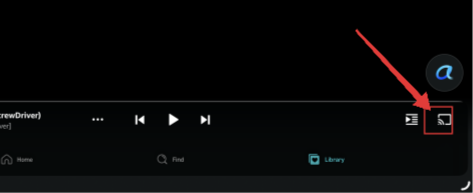
What is “a while” hours, days, weeks? Here is what the Amazon Music ‘Library’ screen looks like.

View attachment 35602

When you tap the cast icon in the bottom-right corner of the screen, does your WiiM device appear?
3098.png
Tapping it will switch the audio output to your WiiM device. You can also play music using the Amazon Music app.
 
When you tap the cast icon in the bottom-right corner of the screen, does your WiiM device appear?
View attachment 35620
Tapping it will switch the audio output to your WiiM device. You can also play music using the Amazon Music app.
Some of them do… yes. But TBH, I have no interest in casting. To me… and some people feel differently about this… but to me, I bought this device as a streaming device that connects to my home network and streams high def music directly from it to my amp and speakers. I don't want to rely on another device like my phone or my Alexa to cast music to it. Otherwise, there are other casting-only devices or even Bluetooth that would do that with equal efficiency. That just means another device to manage a connection to and from. My network of four WiiM Minis gives me a lot of flexibility, with, what I hoped, would be the same interface to Amazon Music. However, that doesnt seem to be the case. Well, sort of, but not really. I didnt realize there would be two different Amazon Music app that barely talk to each other.

I can deal with the WVH music being the only thing in my Favorites, I just hoped there was an easy fix for it. Apparently, we have to wait for Amazon to get their sh!t together with whatever the API thing is. Bummer really. Not insurmountable, just irritating.
 
I understand your frustration.
But just a correction. When you cast from your phone to any or a group of your minis you are not sending audio from your phone to the wiims (not like bluetooth). The wiims will take the audio stream directly from your internet connection. Your phone can be switched off or you can leave the house and the music will keep playing. Phone acts as a remote.

Here Gemini explanation if tou wish to read more:

When you use the Cast button in the Amazon Music app to stream to an Alexa-enabled device like the WiiM Mini, the process changes from "streaming to your phone" to "remote controlling" the WiiM device. [1, 2]
Here is why the audio is not sent through your phone:

  • Cloud Streaming Path: Unlike Bluetooth, which acts as a "wireless cable" from your phone to a speaker, the Alexa Cast protocol tells the WiiM Mini the specific URL of the music track. The WiiM Mini then connects directly to the Amazon Music servers via your Wi-Fi to pull the audio stream.
  • Phone as a Remote: Once casting begins, your phone only sends small "control signals" (like play, pause, or volume changes). It no longer handles the heavy lifting of downloading and re-transmitting the actual music data.
  • Benefits of Direct Streaming:
    • Higher Quality: Since the WiiM Mini pulls the stream directly, it can access high-resolution formats like Ultra HD (24-bit/192kHz) without the compression losses common in Bluetooth.
    • Battery Efficiency: Your phone’s battery is not drained by processing the audio stream.
    • No Interruptions: You can take phone calls, watch videos on social media, or even leave the house entirely without the music on the WiiM Mini stopping. [1, 2, 3, 4, 5, 6]
To ensure this works correctly with a WiiM Mini, you must have your Amazon account linked in the WiiM Home App to enable the "AlexaCast" protocol. [7, 8]
Are you experiencing any audio dropouts or quality issues while casting to your WiiM Mini?

[1] https://www.pocket-lint.com
[2] https://doc.av-connection.com
[3] https://www.sonos.com
[4] https://www.youtube.com
[5] https://www.youtube.com
[6] https://support.polkaudio.com
[7] https://www.facebook.com
[8] https://faq.wiimhome.com
 
but to me, I bought this device as a streaming device that connects to my home network and streams high def music directly from it to my amp and speakers.
You can do that with AlexaCast.

The reason is exactly as @hipoagumol said. Whether you play it through the WiiM app or via AlexaCast, the WiiM device streams directly over the network. Technical details aside, the result is the same, and the sound quality is the same. And as far as I know, the WiiM is the only device capable of this (UHD 24-bit/192kHz playback via AlexaCast), which is a major advantage of the WiiM.

That said, if you find the WiiM app easier to use than the Amazon Music app, that’s a different story. My suggestion is to use both depending on the situation. Or, if you’re going to use only the WiiM app, Qobuz would be a better choice.
 
Otherwise, there are other casting-only devices or even Bluetooth that would do that with equal efficiency.

Actually, when it comes to full resolution casting from the Amazon Music app, WiiM streamers are the only non-Amazon devices that support that.

In common across many streaming services the API (or interface) that is supplied to third parties like WiiM almost always has fewer features than the streaming service's own app, and that's why I personally prefer casting from them to using the WiiM app. In both instances, the streaming service's own app or the interface in the WiiM app both require the use of your phone - they're just different ways of asking the streaming service to send tracks to your WiiM.
 
Any tips on managing multiple devices like I am able to do in the WiiM app?
Do you play music in multi-room, or on a single device?

If you’re playing on a single device, you’ll need to switch the WiiM device you’re using in the Amazon Music app each time. If you’re playing in a multi-room group, cast to the group leader device.

You can also save your favorite albums to presets in the WiiM app and play them by tapping the preset button in the app.

How to use Presets
 
Any tips on managing multiple devices like I am able to do in the WiiM app?
Alexa app allows multiroom group of speakers creation and your wiim devices will be seen as speakers along with Echo devices ans others. You can combine them at your will. I have for example created wiim ultra+wiim mini (living room+ office), wiim ultra+ echo dot (living room + kitchen)...
All these are visible by amazon music when you hit the cast button .
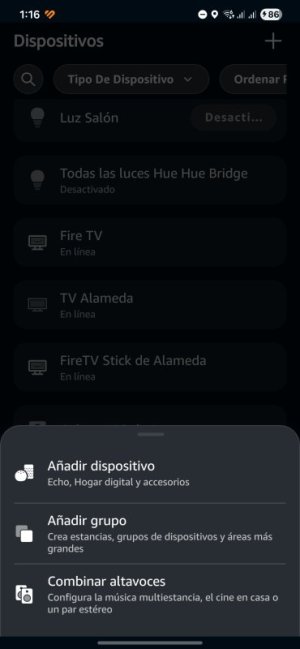
Sorry my alexa app is in Spain spanish but you can figure out:
1000133988.jpg
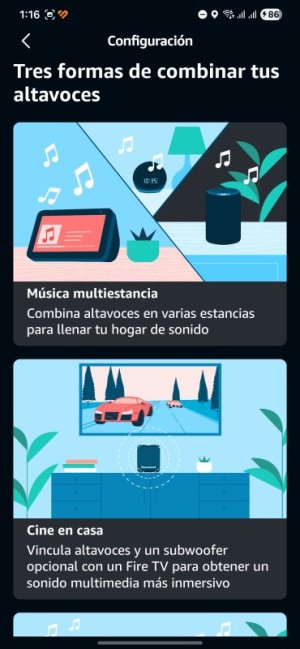
Combinar altavoces should be in english "Combine Speakers" or similar
1000133989.jpg
Then the upper option stands for Multiroom Music

Then all the sound capable devices that your alexa app has added previously (you need to scan or sometimes it will prompt if anything new is seen in your lan) will be listed.
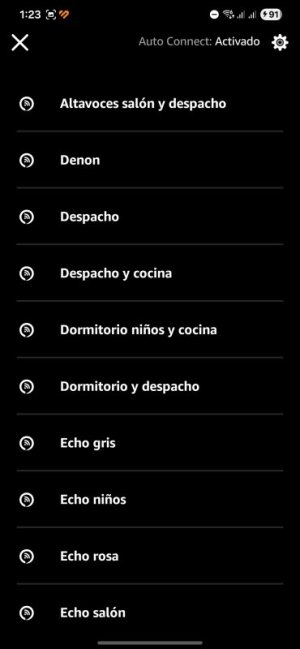
In my case you see several Echo speakers and "Denon" is how i called one Wiim mini (connected to a denon mini amp) and "Los altavoces" is my Wiim Ultra connected to my main living room and and speakers. So you can cambine as many as you wish and create as many group as you wish and give them names.
Then you'll see them in Amazon Music when clicking cast button:
"Altavoces salón y despacho" will play for example wiim ultra (living room) and wiim mini (office) , "Despacho y cocina" groups wiim mini and echo dot (kitchen) and so on... jusr need to get familiar with Alexa app.
1000133991.jpg
 
Back
Top