
Sort Music Services in search results

kmksea

New member
Joined
Nov 20, 2025
Messages
1
I have numerous Music Services configured in the WiiM app. But I usually want to use a specific service, and in search results I have to scroll past Amazon Music and iHeartRadio to get to Tidal.

I'd like to be able to simply sort the music services under Manage Music Services to influence the order they show up both in the Browse interface as well as in Search results.
 
Upvote 2
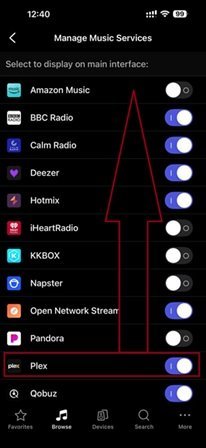
I have a similar question: how can I make the Service I need #1 in the list?
 

Attachments

  • photo_2026-01-02_12-46-11.jpg
    photo_2026-01-02_12-46-11.jpg
    19.6 KB · Views: 8
BBC Radio is always #1. Did they pay Wiim? I'm not familiar with BBC and don't listen to them. Why would I care?
 
No offence, my answer above was rhetorical. Then let's rename Plex to aPlex (it will be listed alphabetically).
 
Last edited by a moderator:
BBC Radio is always #1. Did they pay Wiim? I'm not familiar with BBC and don't listen to them. Why would I care?
Why would you enable it if you don't listen to BBC? :unsure:

PS:
You can create presets in the order you want.
 
Last edited:
I've calculated that after turning on the Wiim, to launch my favourite album, I have to click the entire Wiim Home interface on my iPhone nine times. No, my fingers don't get tired, but somehow everything I need is always at the end of each section. Even on a PC, I can launch the same album much faster. And I can't customize the interface to my liking; in my opinion, it's not very user-friendly.
 
Last edited by a moderator:
the answer is above
No, unfortunately it is not.

You showed us a screenshot of the page where you can customise which services you want to be visible. If you disable BBC there it won't show up on the Browse tab.

You still cannot change the order of music services, but you can assign them to presets. It's as easy as that.
 
Back
Top