Finding my Audirvana Origin Library - Mac Mini Server?

Bambooken

New Member
Joined
Aug 25, 2024
Messages
13
Hi all,
I'm not sure this is possible but…
I have a Mac mini in my home 2 channel audio stack running Audirvana Origin using a local library of high resolution music files. I am able to set the Audirvana Origin output to UPnP and it finds my Ultra as an available "output device".
I have Source Inputs set to WiFi
My problem is that my Wiim does show the Mini-Audirvana as a source. I may not be looking in the right place. Under Devices… not there, Under the "Browse" menu, not there either (under Music Services).

Is there a setting I may be missing? Am I looking in the wrong place?

TIA
Boo
 
Hi all,
I'm not sure this is possible but…
I have a Mac mini in my home 2 channel audio stack running Audirvana Origin using a local library of high resolution music files. I am able to set the Audirvana Origin output to UPnP and it finds my Ultra as an available "output device".
I have Source Inputs set to WiFi
My problem is that my Wiim does show the Mini-Audirvana as a source. I may not be looking in the right place. Under Devices… not there, Under the "Browse" menu, not there either (under Music Services).

Is there a setting I may be missing? Am I looking in the wrong place?

TIA
Boo
Your looking in the right place.
I‘m not familiar with Audirvana and its UPnP implementation, but it sounds as if this is a casting solution, not a genuine UPnP server that’s present on the network. You can probably play to your WiiM from the Mac using the UPnP protocol but not control anything through the WHA.

In simple terms, you can push but not pull. Much like Airplay and Chromecast.
 
Last edited:
Hi all,
I'm not sure this is possible but…
I have a Mac mini in my home 2 channel audio stack running Audirvana Origin using a local library of high resolution music files. I am able to set the Audirvana Origin output to UPnP and it finds my Ultra as an available "output device".
I have Source Inputs set to WiFi
My problem is that my Wiim does show the Mini-Audirvana as a source. I may not be looking in the right place. Under Devices… not there, Under the "Browse" menu, not there either (under Music Services).

Is there a setting I may be missing? Am I looking in the wrong place?
Or you might be looking in the wrong place, indeed. ;)

DLNA servers should show up here:
"Browse" tab => "Home Music Share" in the My Library category => category Media Server.

The exact name displayed depends on your media server. I also have no experience with Audirvana.
 
Hi all,
I'm not sure this is possible but…
I have a Mac mini in my home 2 channel audio stack running Audirvana Origin using a local library of high resolution music files. I am able to set the Audirvana Origin output to UPnP and it finds my Ultra as an available "output device".
I have Source Inputs set to WiFi
My problem is that my Wiim does show the Mini-Audirvana as a source. I may not be looking in the right place. Under Devices… not there, Under the "Browse" menu, not there either (under Music Services).

Is there a setting I may be missing? Am I looking in the wrong place?

TIA
Boo
I have always found that I can push to the WiiM from Audirvana on my Mac Mini or my Macbook Air, but I've never been able to pull in the WiiM from Audirvana.

-Ed
 
I have always found that I can push to the WiiM from Audirvana on my Mac Mini or my Macbook Air, but I've never been able to pull in the WiiM from Audirvana.

-Ed
Hello Ed,
I did not properly describe what I am trying to do.
I'd like to play my local existing music files through my Ultra. Those files are the library for Audirvana playback. The Audirvana is installed on my dedicated MacMini which resides on the same LAN (network) as my Ultra. So, essentially push from Audirvana to my WiiM Ultra. After setting Audirvana to output to UPnP… it finds my Ultra as an available "output device" which I believe shows that the Ultra is available to output/push to (not from).
If I understand your comment… you are successfully doing this?
 
Hello Ed,
I did not properly describe what I am trying to do.
I'd like to play my local existing music files through my Ultra. Those files are the library for Audirvana playback. The Audirvana is installed on my dedicated MacMini which resides on the same LAN (network) as my Ultra. So, essentially push from Audirvana to my WiiM Ultra. After setting Audirvana to output to UPnP… it finds my Ultra as an available "output device" which I believe shows that the Ultra is available to output/push to (not from).
If I understand your comment… you are successfully doing this?
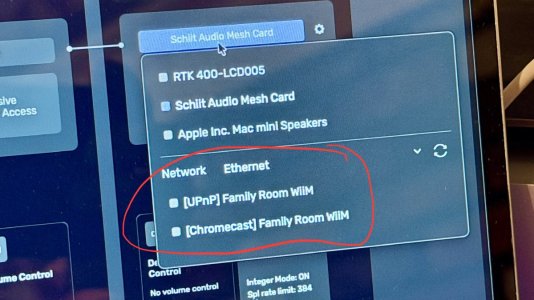
Yes, so my personal library is stored to an NVMe drive mounted inside of the dock for my Mac Mini. In Audirvāna, my WiiM Ultra shows up as an Output Device, and I even have two broadcast methods, UPnP or Chromecast:
IMG_1125.jpeg

This is the beta for version 3.0, but this all worked even before the version 3.0 beta came out.

-Ed
 
Last edited:
Hello Ed,
I did not properly describe what I am trying to do.
I'd like to play my local existing music files through my Ultra. Those files are the library for Audirvana playback. The Audirvana is installed on my dedicated MacMini which resides on the same LAN (network) as my Ultra. So, essentially push from Audirvana to my WiiM Ultra. After setting Audirvana to output to UPnP… it finds my Ultra as an available "output device" which I believe shows that the Ultra is available to output/push to (not from).
If I understand your comment… you are successfully doing this?
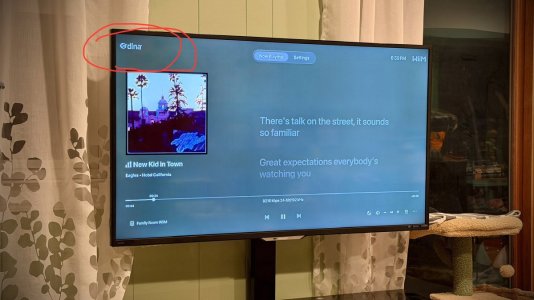
Here is how it looks when playing music stored on my Mac Mini via Audirvāna using UPnP to my WiiM Ultra, with the WiiM Home App for Apple TV 4K showing the source as DLNA on the top left:
IMG_1126.jpeg

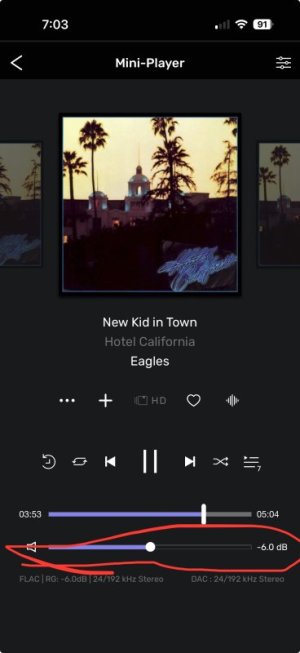
I am even able to control the WiiM’s volume through Audirvāna’s UI on the Mac Mini or even in the Audirvāna Remote app on my iPhone:
IMG_1127.jpeg

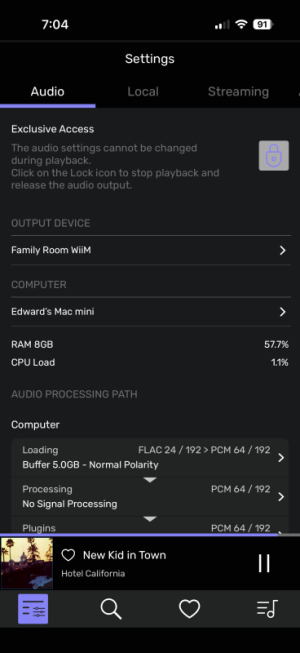
And as you can see, it is able to broadcast full 192KHz/24-bit sample rate/resolution.

IMG_1128.png

-Ed
 
Back
Top