Synology media server and building library

andreart

Member
Joined
Dec 4, 2025
Messages
6
Hi. I have 3 different Synology servers. Sharing my music with Media server and DLNA to other devices.

Before buying check that Synology was supported and it is easy to build library https://faq.wiimhome.com/en/support/solutions/articles/72000642736-building-and-managing-a-media-library-from-your-media-server
That I dont need to buy one more hdd and plug to Wiim.
But at the final it is not supported and now removed from support help section :(

Please can you give advice how to build library on WiiM with Synology NAS ? Indexing NAS files as external HDD.
 
Last edited:
Hi. I have 3 different Synology servers. Sharing my music with Media server and DLNA to other devices.

Before buying check that Synology was supported and it is easy to build library https://faq.wiimhome.com/en/support/solutions/articles/72000642736-building-and-managing-a-media-library-from-your-media-server
That I dont need to buy one more hdd and plug to Wiim.
But at the final it is not supported and now removed from support help section :(

Please can you give advice how to build library on WiiM with Synology NAS ?
Does this help?
 
Hi. I have 3 different Synology servers. Sharing my music with Media server and DLNA to other devices.

Before buying check that Synology was supported and it is easy to build library https://faq.wiimhome.com/en/support/solutions/articles/72000642736-building-and-managing-a-media-library-from-your-media-server
That I dont need to buy one more hdd and plug to Wiim.
But at the final it is not supported and now removed from support help section :(

Please can you give advice how to build library on WiiM with Synology NAS ?
The make or model of your NAS is more or less irrelevant.
All they need to do is run a UPnP/DLNA server software. This is also responsible to build the library. The renderer (here: WiiM) is not involved.

All WiiM devices with a streaming function are able to access the UPnP/DLNA libraries which are on the same local network as itself.

So go ahead, it will work.
 
there is no problem to browse audio on nas, but wiim dont want to build inner library like from hdd from NAS. the only one usb port is connected to external DAC and i cannot connect external HDD to it.
 
there is no problem to browse audio on nas, but wiim dont want to build inner library like from hdd from NAS. the only one usb port is connected to external DAC and i cannot connect external HDD to it.
Do you want to connect a HDD to your WiiM? In your original post it sounded like you wanted to avoid that:
That I dont need to buy one more hdd and plug to Wiim.


Please can you give advice how to build library on WiiM with Synology NAS ?
WiiM can't index remote storage, only SMB browsing is supported.

Maybe you should clarify what you're trying to achieve.
 
Hi. I have 3 different Synology servers. Sharing my music with Media server and DLNA to other devices.

Before buying check that Synology was supported and it is easy to build library https://faq.wiimhome.com/en/support/solutions/articles/72000642736-building-and-managing-a-media-library-from-your-media-server
That I dont need to buy one more hdd and plug to Wiim.
But at the final it is not supported and now removed from support help section :(

Please can you give advice how to build library on WiiM with Synology NAS ? Indexing NAS files as external HDD.
As someone who is new to this stuff and totally confused I would like to ask a few questions.

I use a Synology/Media Server/Audio Station to store and manage my music collection. It is organised by in folders by ARTIST>Album and I play the music by selecting the folder I want to listen to. This thread raises some questions for me...

Am I missing out playing music using my system?

What advantages does a library present as asked in this thread

Is my folder system a library?

What is the advantage of Using something like Minim Server which I have never been able to figure out how to instal and use?

If the mods want I will start a new thread to avoid going too far off topic.
 
Am I missing out playing music using my system?
If you're happy with 'simply' selecting a folder, a bit like choosing a cd, then no, you're not missing out.
If you want to be able to queue up more than one folder, play a random album, play random tracks and all sorts of stuff you never knew you were missing or wanted, then yes :)
 
Let me see if I have got this straight, WHA manages the device and the server manages the music? If so how do I access Audio Station from WHA to manage a queue or am I way off track. As I get further into this stuff I am getting the feeling that a lot of knowledge is simply gained by using it and the manual hasn't been written for a lot of it. I am almost afraid to press reply in case I look like a total idiot!!
 
I use a Synology/Media Server/Audio Station to store and manage my music collection. It is organised by in folders by ARTIST>Album and I play the music by selecting the folder I want to listen to. This thread raises some questions for me...
Just for my understanding, how do you access those folders to be played?
Is my folder system a library?
Yes, it is a library. But as a stand-alone it relies on physical sorting of folders and files, comparable to CDs in a rack.

What is the advantage of Using something like Minim Server which I have never been able to figure out how to instal and use?
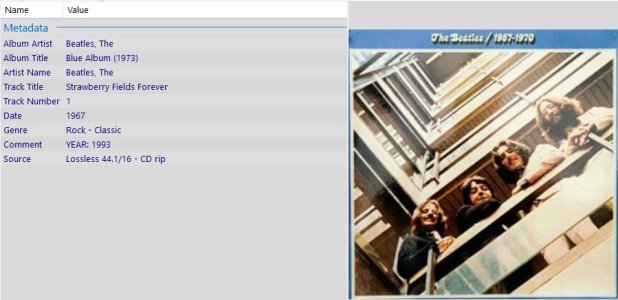
Opposed to the sorting by physical storage location a media server will analyse and sort your library based on the tags which are embedded in the files. Tags are also called Metadata. This means that you are assigning certain attributes to each single file. These tags are saved within the file.

Here's an example:
Tags.jpg

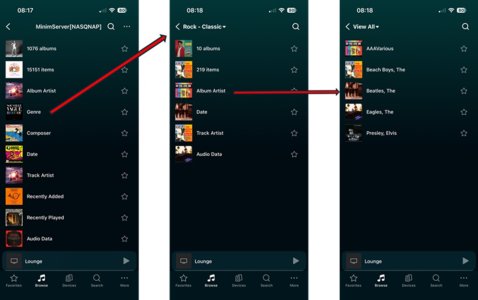
The server will not mingle with your original data, it will simply read the available tags, establish its own 'library' (which is just an index list) and present it to you based its settings. The result can look like this:

UPnP Tree.jpg

So now you can not only search/access your library based on the classical file/folder structure, but you can navigate using any criteria that are available as tags in your files.
 
Last edited:
Let me see if I have got this straight, WHA manages the device and the server manages the music? If so how do I access Audio Station from WHA to manage a queue or am I way off track. As I get further into this stuff I am getting the feeling that a lot of knowledge is simply gained by using it and the manual hasn't been written for a lot of it. I am almost afraid to press reply in case I look like a total idiot!!
When we talk about servers we usually mean a software that uses the UPnP (UniversalPlug'n'Play) protocol. Sometimes also the term 'DLNA' is used. For practical use they mean the same thing. A protocol is a network language. So if both the server and the player (also often called renderer) speak the same language they can communicate. WiiM devices are specified for DLNA/UPnP.

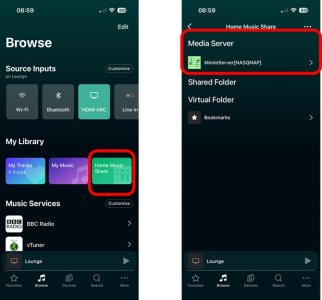
Your Audio Station also 'speaks' DLNA if I am informed correctly. Consequently it should be seen by the WiiM Home App (WHA) and you should be able to access it.
See here:

UPnP server.jpg
 
Just for my understanding, how do you access those folders to be played?

Yes, it is a library. But as a stand-alone it relies on physical sorting of folders and files, comparable to CDs in a rack.


Opposed to the sorting by physical storage location a media server will analyse and sort your library based on the tags which are embedded in the files. Tags are also called Metadata. This means that you are assigning certain attributes to each single file. These tags are saved within the file.

Here's an example:
View attachment 30999

The server will not mingle with your original data, it will simply read the available tags, establish its own 'library' (which is just and index list) and present it to you based its settings. The result can look like this:

View attachment 31000

So now you can not only search/access your library based on the classical file/folder structure, but you can navigate using any criteria that are available as tags in your files.
I access the folders through WHA My Library>Home Music Share>NAS>Media Server>Music which then gives me a choice of view by Folder, playlist, artist etc etc. TTTT today is the first time I have noticed "Media Server" on the screen as I have never really read it just chose the link to the NAS. I have been choosing to select the music by folder or playlists I have but setting up a queue is something that has puzzled me. When I first started to use Audio Station to organise music and make playlists (which I can see in WHA) I tagged all my music (using Jaikoz) AS can index by Artist, Genre as the main tags.
 
When we talk about servers we usually mean a software that uses the UPnP (UniversalPlug'n'Play) protocol. Sometimes also the term 'DLNA' is used. For practical use they mean the same thing. A protocol is a network language. So if both the server and the player (also often called renderer) speak the same language they can communicate. WiiM devices are specified for DLNA/UPnP.

Your Audio Station also 'speaks' DLNA if I am informed correctly. Consequently it should be seen by the WiiM Home App (WHA) and you should be able to access it.
See here:

View attachment 31001
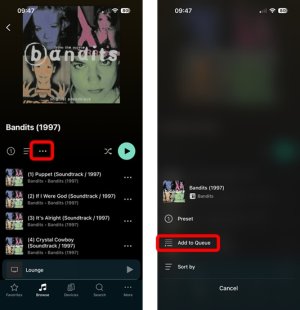
Yes, they are the screens I see, so my next question is how do I queue music? I think queueing music is the magic sauce in some ways.
 
Thanks, was just about to post similar. I think “add to queue” only appears when you already have items in the queue i.e. you need to start playing something then go find something else to add to the queue.
 
I access the folders through WHA My Library>Home Music Share>NAS>Media Server>Music which then gives me a choice of view by Folder, playlist, artist etc etc. TTTT today is the first time I have noticed "Media Server" on the screen as I have never really read it just chose the link to the NAS. I have been choosing to select the music by folder or playlists I have but setting up a queue is something that has puzzled me. When I first started to use Audio Station to organise music and make playlists (which I can see in WHA) I tagged all my music (using Jaikoz) AS can index by Artist, Genre as the main tags.
Given your Synology already had read all your tags, you may find using the album, genre and other tags quicker for selecting the music you want rather than just browsing by folder. I seldom if ever browse by folder, although I know some (one?) who do…
 
Back
Top