

We just published an updated roadmap for the WiiM Ultra and the WiiM Amp Ultra, and we’ll be updating some other roadmaps soon. You can see the full details on our Help Center (Ultra| Amp Ultra), but here are some highlights and a quick look at where we're headed.
We're sharing this openly because your feedback directly shapes our priorities. We watch all the forum conversations, app surveys, and feature requests you share, and use it all to feed into this. So check it out, and we hope there’s something in here you love the idea of!
These roadmaps focus on the Ultra and Amp Ultra first. They're our flagship devices with the hardware to support more advanced features. Where it makes sense and where it's technically feasible, we'll bring capabilities to other products in the lineup. Some features will be Ultra-specific by necessity.

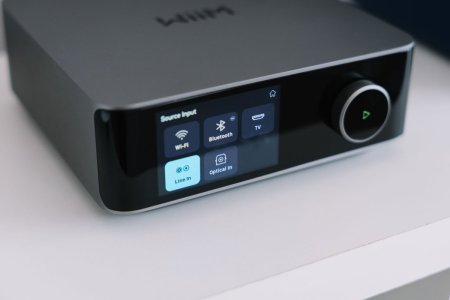
Display & Interface Upgrades
Input-specific screen layouts that remember your preferences and automatically switch based on active input. Black background mode for album art that blends seamlessly with the bezel. Standby and clock options including permanent clock display during playback with adjustable timeout durations. Direct USB and Favorites browsing on the touchscreen without needing your phone.
Next-Generation Room Correction
BassFit integration automatically aligns time and level between your main speakers and subwoofer for seamless low-end coherence. SurroundFit calibration provides precise automated alignment of front, surround, and subwoofer channels for immersive experiences. RoomFit+ evolution delivers tighter bass response and improved transient handling. CenterFit phantom center creates adjustable vocal enhancement for improved dialogue clarity. Context-aware bass management assigns independent crossover and gain settings per source. Discrete dual subwoofer control enables independent calibration to smooth out room modes.
Smarter Audio Processing
Scenario-based presets for Night, Dialog, and Sports modes powered by our 10-band PEQ engine. Adaptive dynamic loudness using Fletcher-Munson curves to preserve bass and treble at low volumes. Pro-grade filter import from REW or AutoEQ. Advanced profile management for transferring correction data across devices with Expert Mode for weighted measurements.
Connectivity & Ecosystem
Adaptive source profiles let you customize EQ curves, volume, display layouts, and grouping logic per input that automatically engage when you switch sources. Universal hi-res multi-room with expanded support across Roon Ready and Google Cast endpoints. NAS Mode (SMB Write) transforms the devices into network music servers, managing and transferring files to your USB drive wirelessly. Native Plex integration with Plex control. Complete overhaul of the internet radio engine for faster buffering and higher bitrate streams. Expanded wireless subwoofer protocol to Roon and Google Cast. Support for USB libraries up to 200,000 tracks.
Smart Home Integration
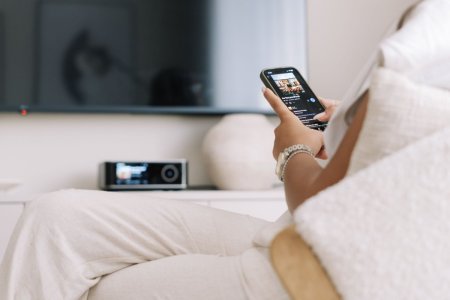
Deeper Home Assistant integration with support for presets and alarms. Native Apple HomeKit and Shortcuts support. Smart input switching that preserves playback context and volume states.
Future Concepts Under Consideration
Specialized streaming integrations for Idagio (Classical), Nugs.net (Live Events), and SiriusXM. Personal cloud locker support for Dropbox, OneDrive, and iCloud, allowing you to stream your collection directly without a physical NAS or USB drive.
Visual personalization with new VU meter styles, dynamic music spectrums, and expanded clock faces. Native WiiM Home App on Apple TV, Google TV, and FireTV. On-glass navigation for local radio and recently played tracks. Home screen widgets for iOS and Android. Precision volume with customizable remote steps. Multi-point room calibration. Per-output EQ. Advanced DAC filter settings with user-selectable interpolation filters (Amp Ultra).
Flexible wireless home theater supporting scalable 4.0, 4.1, and 5.1 channel configurations. Smart presets that trigger complex routines—setting input, volume, EQ, and grouping simultaneously. Persistent grouping for fixed speaker zones. Native YouTube Music support. Completely rewritten USB media engine.
We're building this with you, not for you. The difference matters.
Check out the full roadmaps (Ultra | Amp Ultra).
What This Roadmap Represents
This is a transparent look at what we're actively building, what we're exploring, and what we've recently shipped. Some of these features will land exactly as described. Others might evolve as we work through technical realities and a few might not make it at all. You’ll also notice that there are no timelines, development is a long process and priorities shift throughout the year, so we’re not going to commit to specific timing right now.We're sharing this openly because your feedback directly shapes our priorities. We watch all the forum conversations, app surveys, and feature requests you share, and use it all to feed into this. So check it out, and we hope there’s something in here you love the idea of!
These roadmaps focus on the Ultra and Amp Ultra first. They're our flagship devices with the hardware to support more advanced features. Where it makes sense and where it's technically feasible, we'll bring capabilities to other products in the lineup. Some features will be Ultra-specific by necessity.
What's Next
Display & Interface Upgrades
Input-specific screen layouts that remember your preferences and automatically switch based on active input. Black background mode for album art that blends seamlessly with the bezel. Standby and clock options including permanent clock display during playback with adjustable timeout durations. Direct USB and Favorites browsing on the touchscreen without needing your phone.
Next-Generation Room Correction
BassFit integration automatically aligns time and level between your main speakers and subwoofer for seamless low-end coherence. SurroundFit calibration provides precise automated alignment of front, surround, and subwoofer channels for immersive experiences. RoomFit+ evolution delivers tighter bass response and improved transient handling. CenterFit phantom center creates adjustable vocal enhancement for improved dialogue clarity. Context-aware bass management assigns independent crossover and gain settings per source. Discrete dual subwoofer control enables independent calibration to smooth out room modes.
Smarter Audio Processing
Scenario-based presets for Night, Dialog, and Sports modes powered by our 10-band PEQ engine. Adaptive dynamic loudness using Fletcher-Munson curves to preserve bass and treble at low volumes. Pro-grade filter import from REW or AutoEQ. Advanced profile management for transferring correction data across devices with Expert Mode for weighted measurements.
Connectivity & Ecosystem
Adaptive source profiles let you customize EQ curves, volume, display layouts, and grouping logic per input that automatically engage when you switch sources. Universal hi-res multi-room with expanded support across Roon Ready and Google Cast endpoints. NAS Mode (SMB Write) transforms the devices into network music servers, managing and transferring files to your USB drive wirelessly. Native Plex integration with Plex control. Complete overhaul of the internet radio engine for faster buffering and higher bitrate streams. Expanded wireless subwoofer protocol to Roon and Google Cast. Support for USB libraries up to 200,000 tracks.
Smart Home Integration
Deeper Home Assistant integration with support for presets and alarms. Native Apple HomeKit and Shortcuts support. Smart input switching that preserves playback context and volume states.
Future Concepts Under Consideration
Specialized streaming integrations for Idagio (Classical), Nugs.net (Live Events), and SiriusXM. Personal cloud locker support for Dropbox, OneDrive, and iCloud, allowing you to stream your collection directly without a physical NAS or USB drive.
What We've Already Delivered
Visual personalization with new VU meter styles, dynamic music spectrums, and expanded clock faces. Native WiiM Home App on Apple TV, Google TV, and FireTV. On-glass navigation for local radio and recently played tracks. Home screen widgets for iOS and Android. Precision volume with customizable remote steps. Multi-point room calibration. Per-output EQ. Advanced DAC filter settings with user-selectable interpolation filters (Amp Ultra).
Flexible wireless home theater supporting scalable 4.0, 4.1, and 5.1 channel configurations. Smart presets that trigger complex routines—setting input, volume, EQ, and grouping simultaneously. Persistent grouping for fixed speaker zones. Native YouTube Music support. Completely rewritten USB media engine.
Your Suggestions!
These roadmaps are a starting point. We're watching your responses, reading the threads, and paying attention to what resonates. If there's a feature you're interested in, say so. If something doesn't make sense for your use case, let us know, but be respectful. Not every feature is going to hit for every person, a feature you’ll never use might be exactly what someone else needs.We're building this with you, not for you. The difference matters.
Check out the full roadmaps (Ultra | Amp Ultra).


