

You are using an out of date browser. It may not display this or other websites correctly.
You should upgrade or use an alternative browser.
You should upgrade or use an alternative browser.
Volume issues
- Thread starter Kuk
- Start date
-
- Tags
- volume control

hgo58
Major Contributor
Do you have playback control on lock screen enabled, in the WiiM Home App?When I go back and forth between the Wiim app and tidal app the volume increases? Not just once, but every time I go from Wiim to tidal, the volume takes a significant jump??
If so, try to disable it, it don't work properly!
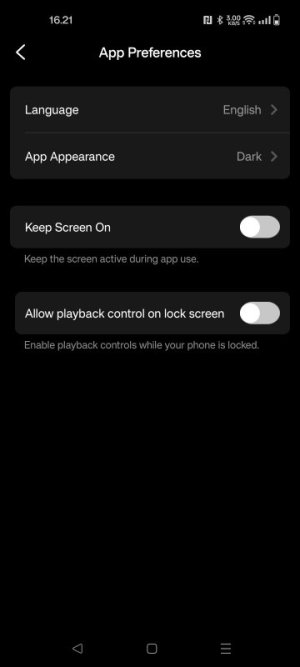
Thanks for the suggestion, unfortunately didn’t workDo you have playback control on lock screen enabled, in the WiiM Home App?
If so, try to disable it, it don't work properly!
View attachment 33775

Are you using Tidal Connect with the Tidal app? (Not Bluetooth?)Thanks for the suggestion, unfortunately didn’t work
Yes, I am using Tidal ConnectAre you using Tidal Connect with the Tidal app? (Not Bluetooth?)

I just tried disabling volume normalisation in the Tidal app and now instead of turning the music up when I go from Wiim app to Tidal, it now turns the volume down when going from Wiim and to Tidal!? Where can I find volume normalisation in the wiim app?Sounds like you have volume normalisation enabled in one client but not the other.
Browse icon => Tidal => Cog icon => Replay Gain.I just tried disabling volume normalisation in the Tidal app and now instead of turning the music up when I go from Wiim app to Tidal, it now turns the volume down when going from Wiim and to Tidal!? Where can I find volume normalisation in the wiim app?
Sorry, don’t understandBrowse icon => Tidal => Cog icon => Replay Gain.

That's the navigation path in the WiiM Home App. Do you use the English language user interface?Sorry, don’t understand
What does browse icon and cog icon mean? And what to do with replay gain?That's the navigation path in the WiiM Home App. Do you use the English language user interface?
Answer my question and I'll answer yours.What does browse icon and cog icon mean? And what to do with replay gain?

“Say what one more time! I dare you, I double dare you”..Answer my question and I'll answer yours.
 . Yes I use the English language
There is a tab or section called "Browse" at the bottom of your screen in the WiiM Home App. Tap on that tab.
Next, scroll to the section Music Services on this page. If you are listening to Tidal through the WiiM Home App integration, you must have enabled Tidal as a music service, so there will be an entry for Tidal in this list. Tap on the line reading Tidal.
On the next page titled Tidal there is a little cog or gear icon in the upper right corner. These icons are commonly used to designate a settings page. Tap on that icon.
The next page ist titled Account. It will display your email address and Tidal Account Name. You can set the maximum quality here and you can change the Replay Gain setting, Available options are "Disabled", "Track Gain" and "Album Gain".
I hope this is clear now because I'm running out of ideas on how to explain it.
Next, scroll to the section Music Services on this page. If you are listening to Tidal through the WiiM Home App integration, you must have enabled Tidal as a music service, so there will be an entry for Tidal in this list. Tap on the line reading Tidal.
On the next page titled Tidal there is a little cog or gear icon in the upper right corner. These icons are commonly used to designate a settings page. Tap on that icon.
The next page ist titled Account. It will display your email address and Tidal Account Name. You can set the maximum quality here and you can change the Replay Gain setting, Available options are "Disabled", "Track Gain" and "Album Gain".
I hope this is clear now because I'm running out of ideas on how to explain it.
I very much appreciate your patience and time, thank you. My replay gain is disabled.There is a tab or section called "Browse" at the bottom of your screen in the WiiM Home App. Tap on that tab.
Next, scroll to the section Music Services on this page. If you are listening to Tidal through the WiiM Home App integration, you must have enabled Tidal as a music service, so there will be an entry for Tidal in this list. Tap on the line reading Tidal.
On the next page titled Tidal there is a little cog or gear icon in the upper right corner. These icons are commonly used to designate a settings page. Tap on that icon.
The next page ist titled Account. It will display your email address and Tidal Account Name. You can set the maximum quality here and you can change the Replay Gain setting, Available options are "Disabled", "Track Gain" and "Album Gain".
I hope this is clear now because I'm running out of ideas on how to explain it.
A similar setting can be found in the settings of the Tidal app. I don't use the English language version in this case, but the settings are also accessible through a cog iconI very much appreciate your patience and time, thank you. My replay gain is disabled.
and the setting is probably called "normalisation" or something like that. If you disable it, the volume should be the same, no matter if you're using the Wiim Home App or the Tidal App through Tidal Connect.Similar threads

- Replies
- 1
- Views
- 388


- Replies
- 11
- Views
- 594

- Suggestion
- Replies
- 2
- Views
- 86
- Question
- Replies
- 3
- Views
- 424
