Why do I get these dips near 3k for room correction?

dsb_mac

Member
Joined
May 6, 2025
Messages
7
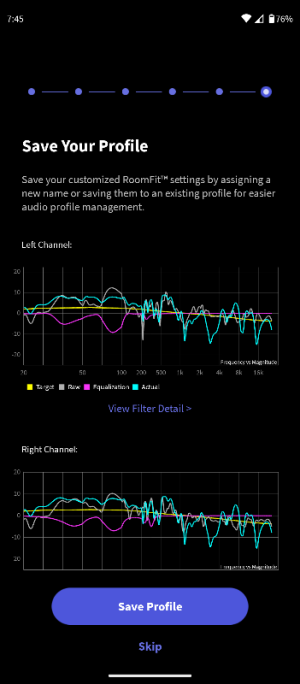
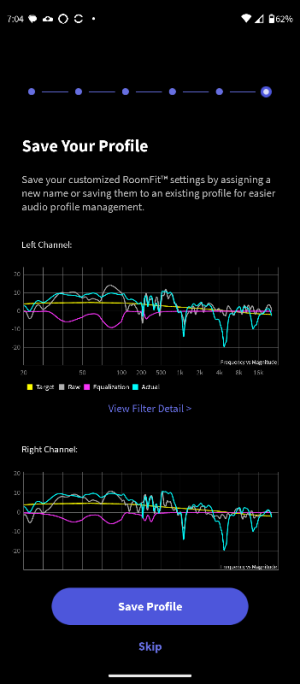
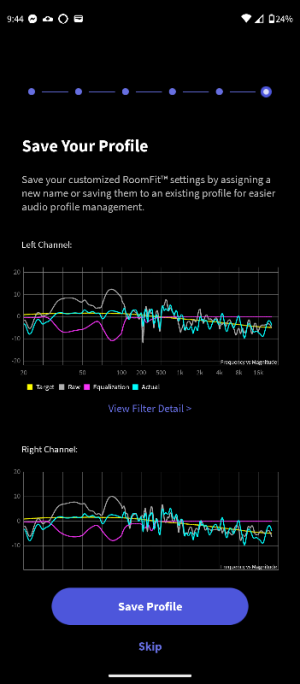
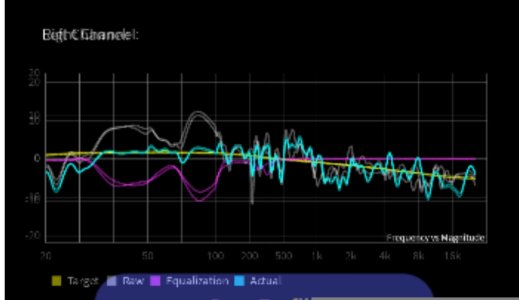
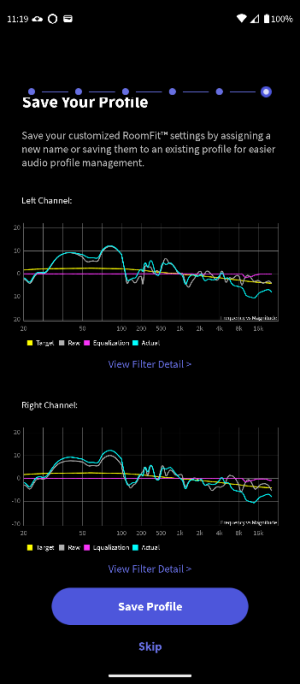
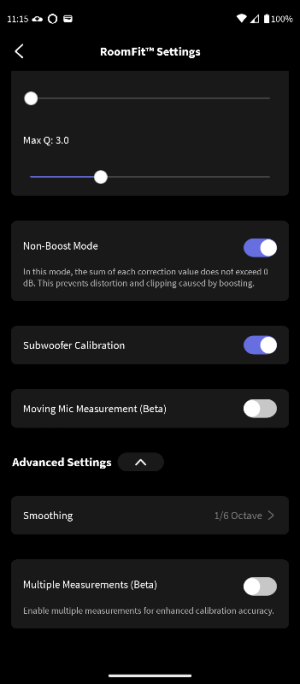
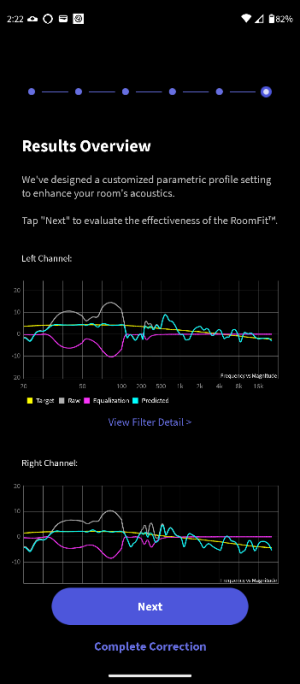
I don't understand why I see large dips (~around the 3-4k) in the verification 'actual' response? I apply correction up to 400hz so i thought the before and after would be similar above that freq. I see them in both individual and stereo measurements. I tried q3 and q10, crossovers 70,90,100,120. Any suggestions?

Roomeq Settings:
30-400hz
q3
crossover 120hz
single measurement

dayton usb C imm 6c calibrated

KEF LSX 2 LT
Linn 10.25 Sizmik Sub
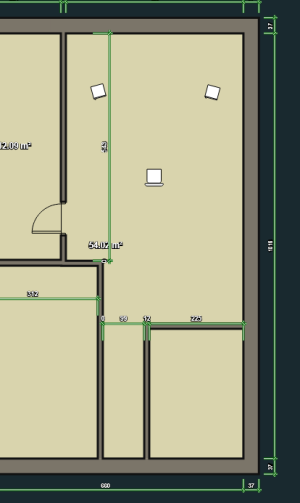
Absorbers placed at all SBIRs
 

Attachments
  • Screenshot 2025-12-13 191244.png
    Screenshot 2025-12-13 191244.png
    18.2 KB · Views: 22
  • Screenshot_20251209-194549.png
    Screenshot_20251209-194549.png
    58.8 KB · Views: 18
  • Screenshot_20251130-190426.png
    Screenshot_20251130-190426.png
    57.5 KB · Views: 14
  • Screenshot_20251111-163507.png
    Screenshot_20251111-163507.png
    47.3 KB · Views: 15
Last edited:
I don't understand why I see large dips (~around the 3-4k) in the verification 'actual' response? I apply correction up to 400hz so i thought the before and after would be similar above that freq. I see them in both individual and stereo measurements. I tried q3 and q10, crossovers 70,90,100,120. Any suggestions?

Roomeq Settings:
30-400hz
q3
crossover 120hz
single measurement

KEF LSX 2 LT
Linn 10.25 Sizmik Sub
Absorbers placed at all SBIRs

Hi

Yes, I definitely think this is an abnormal result. Discrepancies are visible not only around 3kHz but also at other frequencies.

This is the result of running RoomFit on my Ultra using the tablet's microphone. (Correction frequency range: 9900Hz-20000Hz)
617.jpg
When no correction is applied, the gray and blue lines match perfectly.


Which microphone are you using?

While the cause of your issue is unclear, could you please try the following?

  • Clear the WiiM app cache or reinstall it.
  • Reboot the phone
  • Unplug the Ultra device's power cable, leave it disconnected for a while, then reconnect it.
  • Verify that the amplifier and speaker cables are wired correctly.

If these steps do not resolve the issue, I recommend submitting a ticket via the WiiM app's feedback section.
(Other > Feedback)
Device logs will be sent, which will assist in resolving the issue.
 
Last edited:
I don't understand why I see large dips (~around the 3-4k) in the verification 'actual' response? I apply correction up to 400hz so i thought the before and after would be similar above that freq. I see them in both individual and stereo measurements. I tried q3 and q10, crossovers 70,90,100,120. Any suggestions?

Roomeq Settings:
30-400hz
q3
crossover 120hz
single measurement

dayton usb C imm 6c calibrated

KEF LSX 2 LT
Linn 10.25 Sizmik Sub
Absorbers placed at all SBIRs

Looking closely at the first image you posted, the corrected response appears to be identical for both left and right speakers. (The blue lines for the left and right speakers have the same shape.)

I believe this is an error in RoomFit.
(Probably temporary.)

@WiiM Team, @WiiM Support
 
Wow, I reinstalled the app and unplugged the wiim. It seems to have fixed the problem. It's more what I was expecting. Previously, I was hearing a small ringing in upper freq notes but I think it's gone now. Thanks for the suggestion, I never would have thought to try that. Does it seem reasonable now?

30-500hz q3. dayton usb C imm 6c with calibrated file.
 

Attachments

  • Screenshot_20251213-214411.png
    Screenshot_20251213-214411.png
    59.2 KB · Views: 23
Wow, I reinstalled the app and unplugged the wiim. It seems to have fixed the problem. It's more what I was expecting. Previously, I was hearing a small ringing in upper freq notes but I think it's gone now. Thanks for the suggestion, I never would have thought to try that. Does it seem reasonable now?

30-500hz q3. dayton usb C imm 6c with calibrated file.
The 3kHz dip has indeed disappeared, but it seems the issue hasn't been fully resolved.

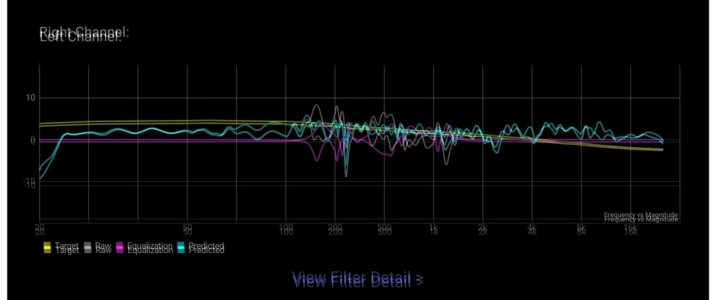
This is your image with two layers overlaid. I've combined the correction results for the left and right speakers.
1601.jpg

The post-correction response (blue line) is perfectly identical on both sides. This is unusual. The blue line likely isn't accurately reflecting the response of the right speaker (or possibly the left speaker).


Could you please change the correction frequency range to 9900Hz~20000Hz and run RoomFit again? The gray line and blue line should match, just like in the results I posted earlier.
 
@dsb_mac

Here are my RoomFit results for the Amp Ultra. I just measured it to see if I could reproduce your issue.

619.jpg

When overlay the correction results for the left and right speakers, you can see the blue lines are different. (This is normal.)
 
Wow, I reinstalled the app and unplugged the wiim. It seems to have fixed the problem. It's more what I was expecting. Previously, I was hearing a small ringing in upper freq notes but I think it's gone now. Thanks for the suggestion, I never would have thought to try that. Does it seem reasonable now?

30-500hz q3. dayton usb C imm 6c with calibrated file.
It's possible that in your RoomFit results, an error may be causing the blue line to display the stereo measurement response. In the 500Hz to 20kHz range, the gray and blue lines do not match for either the left or right channel. Here, they should ideally match perfectly, making the gray line invisible.
 
It's possible that in your RoomFit results, an error may be causing the blue line to display the stereo measurement response. In the 500Hz to 20kHz range, the gray and blue lines do not match for either the left or right channel. Here, they should ideally match perfectly, making the gray line invisible.
I just tried a new RoomFit measurement with the latest app. You can see the blue and grey lines match perfectly above 500Hz so something strange is happening for @dsb_mac
Screenshot_20251214-122907.png
Screenshot_20251214-123013.png
 
I just tried a new RoomFit measurement with the latest app. You can see the blue and grey lines match perfectly above 500Hz so something strange is happening for @dsb_mac
View attachment 30958
View attachment 30959

I'm certain this is an internal error in RoomFit, but it's strange that we can't reproduce the same issue. Maybe it's something that happens when a specific toggle is turned on (or off) in the RoomFit settings.

Could there be any other possible causes besides RoomFit?
Nothing comes to mind...
 
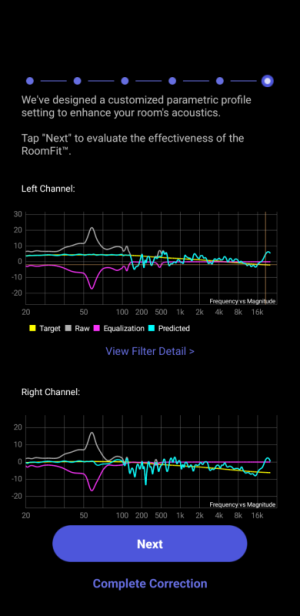
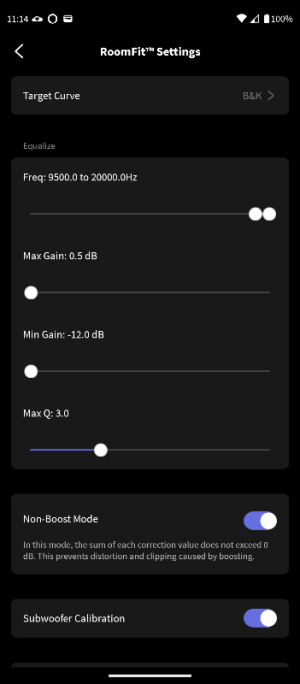
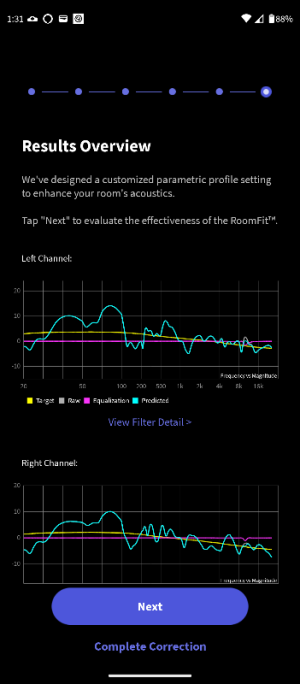
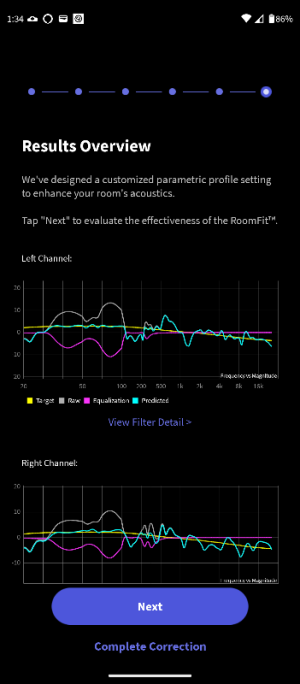
Here is the result. I couldn't get the slider to go to 9900hz as the knobs block the input. I had to run it at 9500-20000hz.
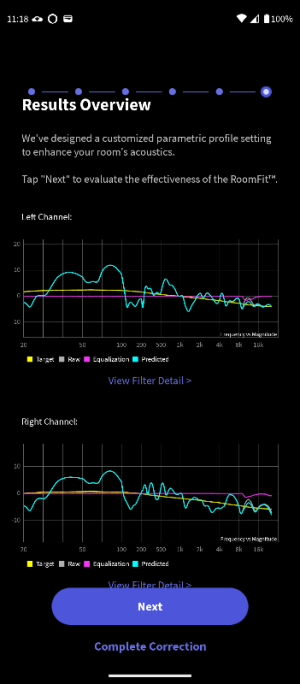
I understand what you're saying about the curves being identical, and I agree, but I'm not quite following because my pictures were from the final 'verification' phase while yours, I believe, are from the Results Overview 'prediction'. I thought those phases were different and their respective blue lines show different things. In any case, I posted the photos from both test phases.
 

Attachments

  • Screenshot_20251214-111914.png
    Screenshot_20251214-111914.png
    55.6 KB · Views: 7
  • Screenshot_20251214-111840.png
    Screenshot_20251214-111840.png
    55.2 KB · Views: 9
  • Screenshot_20251214-111507.png
    Screenshot_20251214-111507.png
    36.6 KB · Views: 9
  • Screenshot_20251214-111400.png
    Screenshot_20251214-111400.png
    32.7 KB · Views: 9
Here is the result. I couldn't get the slider to go to 9900hz as the knobs block the input. I had to run it at 9500-20000hz.
I understand what you're saying about the curves being identical, and I agree, but I'm not quite following because my pictures were from the final 'verification' phase while yours, I believe, are from the Results Overview 'prediction'. I thought those phases were different and their respective blue lines show different things. In any case, I posted the photos from both test phases.
Why have you set the range 9500-20000Hz?
 
I redid the 9500-20000 test because I think I forgot to balance the channels beforehand. And a 30-400hz measurement.
 

Attachments

  • Screenshot_20251214-133126.png
    Screenshot_20251214-133126.png
    51.8 KB · Views: 6
  • Screenshot_20251214-133155.png
    Screenshot_20251214-133155.png
    51.6 KB · Views: 7
  • Screenshot_20251214-133434.png
    Screenshot_20251214-133434.png
    54.4 KB · Views: 8
  • Screenshot_20251214-133502.png
    Screenshot_20251214-133502.png
    53.8 KB · Views: 11
I redid the 9500-20000 test because I think I forgot to balance the channels beforehand. And a 30-400hz measurement.
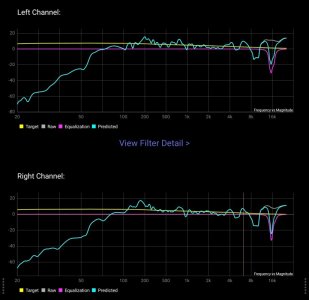
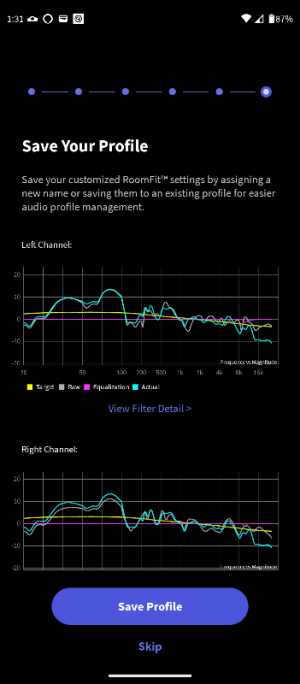
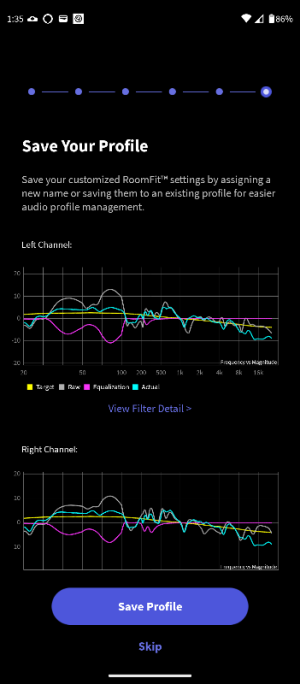
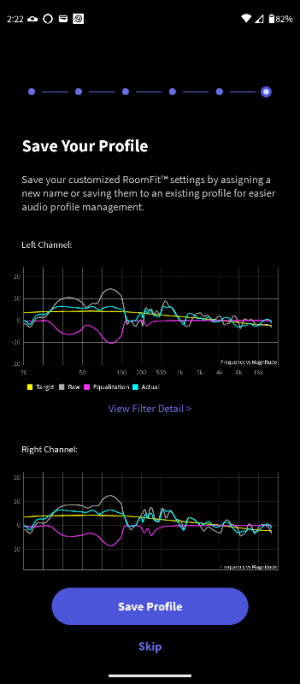
What is the fourth screenshot? I don't remembering seeing a screen showing left and right channels titled "save your profile"
 
What is the fourth screenshot? I don't remembering seeing a screen showing left and right channels titled "save your profile"
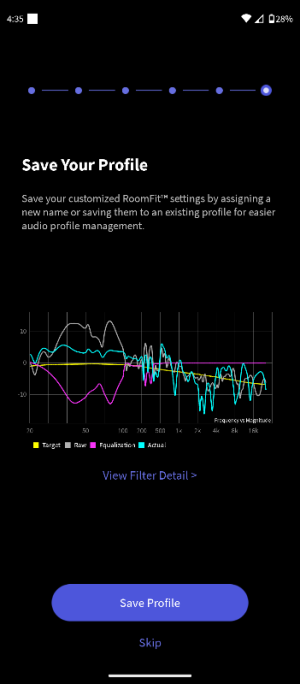
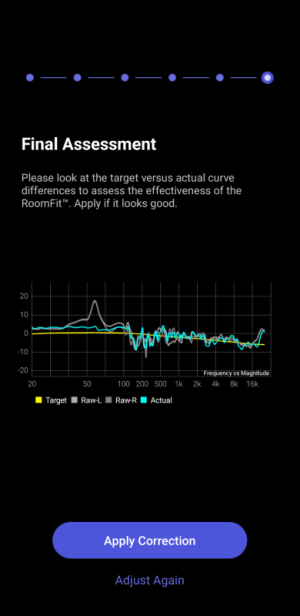
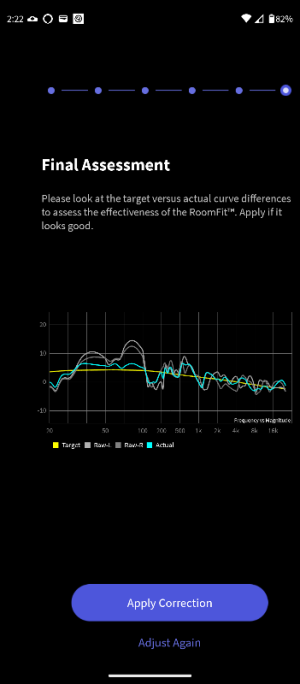
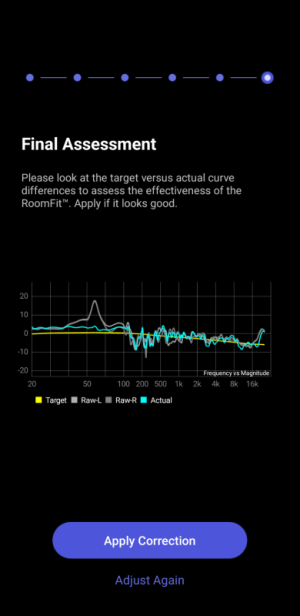
On my system, there is an optional verification phase, after the initial measurement phase, where it plays a single sweep (I assume with the new correction applied) and displays it as a blue line labelled 'actual'. I thought everyone has this feature, with current firmware, as I'm not enrolled in beta program.

Here is the workflow. In this case, 3 sweeps were played and recorded. The initial L/R (2) and after the correction is calculated 1 for verification. I assumed it was a stereo sweep, which is why it doesn't match exactly the individual channel lines.

This is why I decided to post both graphs from the 2 phases as it seems everyone was referring to the intial 'measurement' graph.

So to answer your question, the fourth screenshot is the verification response from the 30-300hz test. I'm on Android.
 

Attachments

  • 6.png
    6.png
    29.4 KB · Views: 7
  • 5.png
    5.png
    53.5 KB · Views: 7
  • 4.png
    4.png
    40.1 KB · Views: 7
  • 3.png
    3.png
    35.6 KB · Views: 8
  • 2.png
    2.png
    54.3 KB · Views: 8
  • 1.png
    1.png
    34.3 KB · Views: 7
Last edited:
I thought everyone has this feature, with current firmware, as I'm not enrolled in beta program.
This feature has been included in WiiM room correction from the very beginning.

Edit:
If you are using independent left and right channel correction, the all important difference is that the final assessment always shows the combined response from the left and the right channel. This can be quite different from the individual left and right measurements.
 
On my system, there is an optional verification phase, after the initial measurement phase, where it plays a single sweep (I assume with the new correction applied) and displays it as a blue line labelled 'actual'. I thought everyone has this feature, with current firmware, as I'm not enrolled in beta program.

Here is the workflow. In this case, 3 sweeps were played and recorded. The initial L/R (2) and 1 for the verification -after the correction is calculated. I assumed it was a stereo sweep, which is why it doesn't match exactly the individual channel lines.

This is why I decided to post both graphs from the 2 phases as it seems everyone was referring to the intial 'measurement' graph.
OK the verification sweep on my Android displays differently. It only shows one graph.
This probably explains why we were confused by the blue lines not lying directly on top of the grey lines.

Screenshot_20251214-123013.png
 
Back
Top