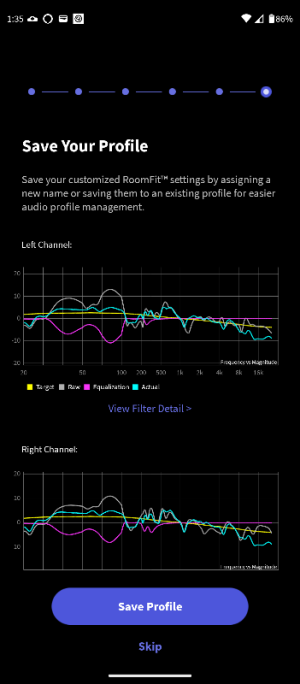
Why do I get these dips near 3k for room correction?

This feature has been included in WiiM room correction from the very beginning.

Edit:
If you are using independent left and right channel correction, the all important difference is that the final assessment always shows the combined response from the left and the right channel. This can be quite different from the individual left and right measurements.
On his device the Final Assessment is displayed as a separate graph for left and right channels but with the same combined measured response overlaid on each one. I have never seen that before.
 
On his device the Final Assessment is displayed as a separate graph for left and right channels but with the same combined measured response overlaid on each one. I have never seen that before.
No, I don't see that on any of their screenshots including the heading "Final Assessment".
 
On my system, there is an optional verification phase, after the initial measurement phase, where it plays a single sweep (I assume with the new correction applied) and displays it as a blue line labelled 'actual'. I thought everyone has this feature, with current firmware, as I'm not enrolled in beta program.

Here is the workflow. In this case, 3 sweeps were played and recorded. The initial L/R (2) and after the correction is calculated 1 for verification. I assumed it was a stereo sweep, which is why it doesn't match exactly the individual channel lines.

This is why I decided to post both graphs from the 2 phases as it seems everyone was referring to the intial 'measurement' graph.

So to answer your question, the fourth screenshot is the verification response from the 30-300hz test. I'm on Android.

So I wonder why your verification displays on Android are different to mine.
 
Well they aren't even labelled Final Assessment they are labelled "Save your profile"
See here, file 4.png. It's clearly labelled "Final Assessment" and it shows a combined measurement of both channels.

@dsb_mac, you can edit any of your RoomFit profiles at any time and while you're on the edit page you will find a button labelled "Evaluate" at the bottom of the screen. This will repeat just the "Final Assessment" as often as you want to. No matter if you did make a change to the profile or not. But it's always just one measurement with both channels driven, not the individual channels.
 
See here, file 4.png. It's clearly labelled "Final Assessment" and it shows a combined measurement of both channels.
Well OK but that is the first time a Final Assessment image was posted by the OP and that was after I questioned the posted images. If he had posted that screenshot previously that would have avoided all of the confusion in this thread.
 
Here is the result. I couldn't get the slider to go to 9900hz as the knobs block the input. I had to run it at 9500-20000hz.
I understand what you're saying about the curves being identical, and I agree, but I'm not quite following because my pictures were from the final 'verification' phase while yours, I believe, are from the Results Overview 'prediction'. I thought those phases were different and their respective blue lines show different things. In any case, I posted the photos from both test phases.

Absolutely you are right!
I finally understand. It was my misunderstanding.
No problem at all. Sorry!

To be honest, I've never paid attention to the graph on the save screen before..
 
Last edited:
Back
Top