
WiiM Amp Pro channel imbalance?

TimVG

New Member
Joined
Apr 2, 2026
Messages
5
Hi

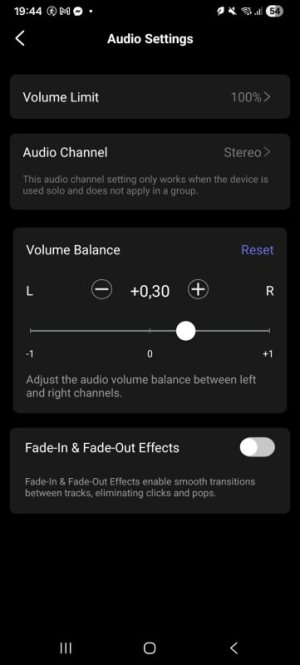
I've just purchased and installed a WiiM Amp Pro. Based on (accurate) measurements of the same loudspeaker in the same position (simply swapped the speaker cables) this is the balance I landed on to match both channels in terms of level.
289619c0-c6f7-492b-8f27-f3ac085bad8f.jpg

Is this normal behaviour for this unit? Or should I ask for a swap?
 
Swap speakers and see what you get, unfortunately room contents are not symmetrical and windows, curtains, pictures etc. all have an impact.
 
Swap speakers and see what you get, unfortunately room contents are not symmetrical and windows, curtains, pictures etc. all have an impact.

As explained already: I eventually swapped the speaker cables, the problem moves along with it, I've also measured it. So the imbalance is in the amplifier. With my previous amplifier this wasn't an issue, but I've switched to a WiiM ecosystem in my home and I'm wondering if there are more things I could do before returning it.
 
I feel like I'm talking to a wall here, but here goes: if there is an imbalance (image is shifting left in my case), and subsequently you swap the speaker cables between speakers (left is now right, and vice versa), and the image is now shifting right. This means there is an imbalance of the amplifier. I hope this is clear. I do not need to move the speakers themselves, there was no issue with my previous amplifier. I'm asking if this is normal behaviour for a WiiM Amp Pro unit, or not.
 
Is this normal behaviour for this unit? Or should I ask for a swap?
No, this is not expected behaviour.

What kind of signal did you use?.Are you sure it's really identical at the input?

Try setting the WiiM Amp Pro to mono first, then repeat your test swapping the cables on the amp.
 
No, this is not expected behaviour.

What kind of signal did you use?.Are you sure it's really identical at the input?

Try setting the WiiM Amp Pro to mono first, then repeat your test swapping the cables on the amp.

Should have mentioned but as soon as I thought something was off I used a mono test (signal and music) to verify. Tested using RCA input and streaming (Wifi). Subsequently set up a mic in a fixed location, ran a nearfield sweep, swapped L/R speaker cables and repeated the measurement. the right channel definitely had a couple of dB lower output, using the app I was able to restore the balance, but I feel this should not be neccesary.

If there's nothing I can do I'll probably return this unit and ask for a replacement.
 
Just to rule out any other cause: Did you test if switching the the WiiM Amp Pro to mono or left or right does make a difference?

Did you double check that RoomFit and EQ are switched off?

It's not that I'm not trusting your setup. But returning the device and waiting for a replacement is certainly not what you want, if it doesn't cure the problem.

If the channel imbalance is really due to the hardware, it's certainly not within specs and needs to be replaced.
 
Just to rule out any other cause: Did you test if switching the the WiiM Amp Pro to mono or left or right does make a difference?

Did you double check that RoomFit and EQ are switched off?

It's not that I'm not trusting your setup. But returning the device and waiting for a replacement is certainly not what you want, if it doesn't cure the problem.

If the channel imbalance is really due to the hardware, it's certainly not within specs and needs to be replaced.

Hi

Just a small update. This morning I decided to investigate further with a voltage meter. To my surprise the issue has somehow fixed itself. The unit stayed powered on at night, I have no idea what changed. In any case thank you for thinking along with me.
 
Back
Top