WiiM ease of use for music collection?

Pat_in_VA

New member
Joined
Jan 25, 2026
Messages
2
Hi Community!,
I want to upgrade my audio listening setup and am considering the WiiM ecosystem. I'm almost exclusively using my local music collection (flac) kept on my Synology NAS or (duplicated) on my smart phone. Occasionally I use Pandora, but this is rare, such as for Christmas tunes on the holidays.

I know that WiiM devices support connection to NAS devices via SMB shares or DLNA and to USB drives directly connected (to the Wiim device). For any of those connection options:

1) does with WiiM app always allow browsing my music collection by the existing filesystem structure (i.e. not using any tagging)?
2) Will it let me add any combination of folders, individual files, or playlists to a queue?
3) Will it let me turn that queue into a playlist if I wish? Create a playlist another way?
4) Do any WiiM devices support a "dumb" bluetooth connection to my phone, whereby any audio from my phone is pushed to some pre-established configuration of WiiM devices? For example, someone not having the WiiM Home App could connect to a WiiM device via common bluetooth connection, then play music via their phone's "Foldplay" app and that music gets shoved to every WiiM device that's configured as part of the "dumb bluetooth group".

My current setup is a 3rd gen Chromecast plugged in to a 5.1 surround avr, which I use to "cast" via the Synology DS Audio app. The Synology app is ok, but I find that using the NAS (spinning hard drives) sometimes requires multiples app start attempts as it can time out while the NAS is still waking up. I have some Fluance bluetooth speakers and love the instantaneous responsiveness when playing from my phone using any app I like. From this experience, I've considered that a NAS as the music source might not be the best choice; perhaps the NAS is better as a locker and I clone the music collection to some USB SSD that is attached to a WiiM device.

Thank you for your input!
Pat
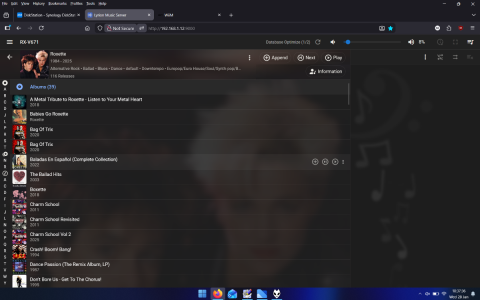
 
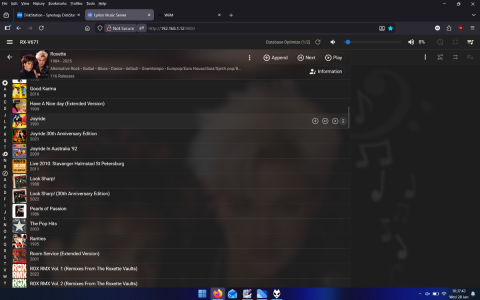
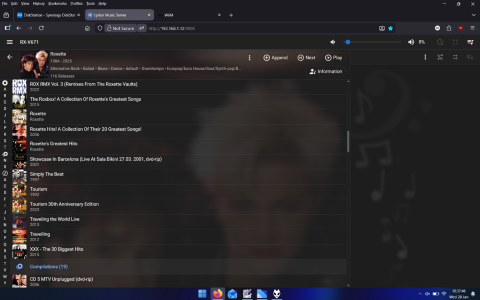
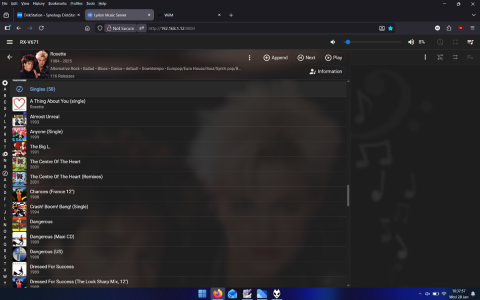
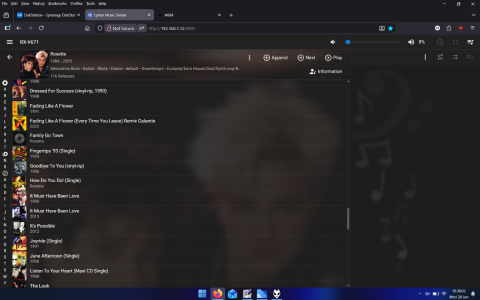
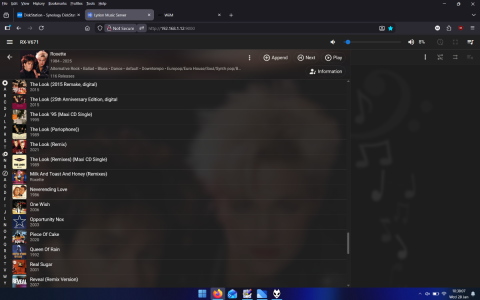
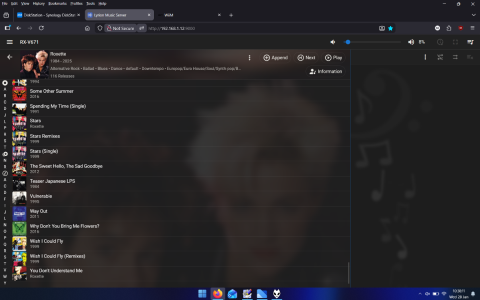
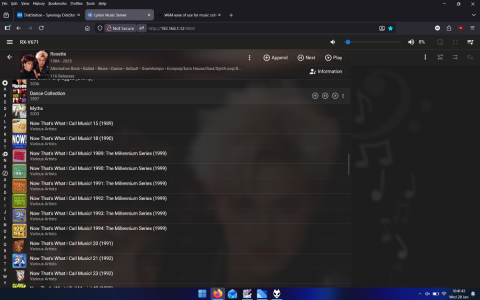
And within LMS, note how albums and singles are seperated. (there is also a compilation list but I just copied my entire Roxette lossy/lossless directories, not the files that are within \various\best of 80's etc. So using Synology There would be another 19 in that list, so that would be in the Audio station list as well!!
 

Attachments

  • Screenshot (93).png
    Screenshot (93).png
    399.7 KB · Views: 6
  • Screenshot (94).png
    Screenshot (94).png
    409.4 KB · Views: 7
  • Screenshot (95).png
    Screenshot (95).png
    403.1 KB · Views: 6
  • Screenshot (96).png
    Screenshot (96).png
    392.7 KB · Views: 6
  • Screenshot (97).png
    Screenshot (97).png
    401.5 KB · Views: 5
  • Screenshot (98).png
    Screenshot (98).png
    401.2 KB · Views: 5
  • Screenshot (99).png
    Screenshot (99).png
    394.6 KB · Views: 5
  • Screenshot (100).png
    Screenshot (100).png
    440.7 KB · Views: 6
I'm actually quite satisfied with WHA. I only play locally stored (flac) files, appr. 350Gb. These files are stored on my 1Tb USB disk attached to the Wiim Ultra. Initially I accessed the music through the Folder-option, but gradually I shifted to the Album, Artist, Genre and Composer options.
I control playing the music from my (Android) phone and/or tablet. These two devices also contain the duplicated music (large SD-cards), but in general I play from the attached USB-device. I use the local music from my phone/tablet mostly upstairs when I play with WHA to the Wiim-mini --> optical -->Vibelink. Occasionally I use Mediamonkey/Symfonium to Upnp-stream my local phone/tablet music to the Ultra or Mini, when I want more options regarding track multi-selection or playlists.
My main 'problems' with WHA when playing locally stored files are:
- I have to disconnect the USB-disk to take it upstairs in order to update the music collection (Wiim has mentioned in the 2026 roadmap a future option to update the USB-music from a network-share?). For me this is not a major concern, because my collection is quite static.
- you cannot multi-select tracks to add to the playing queue
 
I'm actually quite satisfied with WHA. I only play locally stored (flac) files, appr. 350Gb. These files are stored on my 1Tb USB disk attached to the Wiim Ultra. Initially I accessed the music through the Folder-option, but gradually I shifted to the Album, Artist, Genre and Composer options.
I control playing the music from my (Android) phone and/or tablet. These two devices also contain the duplicated music (large SD-cards), but in general I play from the attached USB-device. I use the local music from my phone/tablet mostly upstairs when I play with WHA to the Wiim-mini --> optical -->Vibelink. Occasionally I use Mediamonkey/Symfonium to Upnp-stream my local phone/tablet music to the Ultra or Mini, when I want more options regarding track multi-selection or playlists.
My main 'problems' with WHA when playing locally stored files are:
- I have to disconnect the USB-disk to take it upstairs in order to update the music collection (Wiim has mentioned in the 2026 roadmap a future option to update the USB-music from a network-share?). For me this is not a major concern, because my collection is quite static.
- you cannot multi-select tracks to add to the playing queue

My music collection is around 9TB so need a good system. Tagging is paramount, but then so is decent music scanner.

for larger collections a better music management is a must, browsing by "All artists" is totally impractical on mine, for example all artists might include

Roxette featuring Lady Gaga
Roxette featuring Queen
and dozen more

Compared to Album Artists which'll show "Roxette" and all those tracks with Gaga and Queen as well.

Also browsing by folder means you won't find tracks that are elseware ie

\various\Now Best of album\roxette- live the look
\roxette

If you browse by folder to \roxette it won't include the tracks by roxette in the now best of album

Mediamonkey allows to you use the Album Artist branch you have to add a node & field so can view in PC and from phone/mediamonkey app. Couldn't see where you can control end point play to music though it was just playing from speaker phone, couldn't see where the five media players are, so I had to go back to WHA....
 
Tagging is paramount, but then so is decent music scanner.

for larger collections a better music management is a must, browsing by "All artists" is totally impractical on mine, for example all artists might include

Roxette featuring Lady Gaga
Roxette featuring Queen
and dozen more
If tagged correctly you wouldn't see those collaborations in your "All artists" index making it much more manageable - though at 300,000+ tracks it would still be unusable!

Were those tracks tagged in Picard with default settings?
 
Completely agree with you: it all starts with good tagging! For me the following personal 'rules' have helped me enormously:
- I' m not using 'featured' etc. in the artist field, I will always use the multi-artist option. In your case I would only see Roxette 1 time as an Artist. WHA will then show me all albums with tracks from Roxette or Lady Gaga or Queen through the Artist option.
- When I copy my music from the Win11/Mediamonkey master to the Wiim-attached USB-disk I will of course maintain the same folder structure. I use the freeware program Pathsync to only copy the changed files. When I (wifi) synchronize my music with Mediamonkey to my phone/tablet I maintain that same folder-structure with the 'music\path' option, so I can access my music with WHA through my familiar folder structure (if I want to).
- In Symfonium I use the 'Album grouping' field to add a different perspective to my albums, as addition to the Genre. I add the Album grouping tag with Mp3tag on the Win11 PC.

I play Mediamonkey/Symfonium from my phone/tablet to the Wiim-ultra and mini through the standard Cast-symbol.
 
If tagged correctly you wouldn't see those collaborations in your "All artists" index making it much more manageable - though at 300,000+ tracks it would still be unusable!

Were those tracks tagged in Picard with default settings?

Is there anyway of mass tagging? Maybe through media monkey to retrieve tags?
 
Yes, you can mass tag with Mediamonkey. Click in the left pane on a folder/artist/album/genre etc. Select all shown tracks in the main window (control a), right click for properties and then change the tags you want to change for all the selected tracks. For many tracks it may take some minutes. You don't have to save the results.
 
Yes, you can mass tag with Mediamonkey. Click in the left pane on a folder/artist/album/genre etc. Select all shown tracks in the main window (control a), right click for properties and then change the tags you want to change for all the selected tracks. For many tracks it may take some minutes. You don't have to save the results.ger

I prefer using foobar but you explain which tag field need add or modify and what to trim down so "all artists " branch is neater,
 
I prefer using foobar but you explain which tag field need add or modify and what to trim down so "all artists " branch is neater,
In their default configuration, MusicBrainz Picard and the foo_musicbrainz64 foobar plugin create the following artist tags:
Code:
ARTIST:     Elton John & Dua Lipa
ARTISTS:    Elton John
ARTISTS:    Dua Lipa
My servers (Lightweight Music Server and MinimServer) support these tags, using ARTIST in track listings and ARTISTS for index creation.

If your server doesn't support them you're better off with a single multi-value ARTIST tag. The following configuration will produce multi-value tags in Picard:
Code:
$setmulti(albumartist,%_albumartists%)
$setmulti(albumartistsort,%_albumartists_sort%)

$setmulti(artist,%artists%)
$setmulti(artistsort,%_artists_sort%)
$delete(artists)
This produces 6 multi-value (Album)artist(sort) tags.

foo_musicbrainz64 only outputs the multi-value tag ARTISTS, which can be copied to ARTIST, but the remaining tags needs to be transformed manually (or via script).
 
I don't use Foobar, but in Mediamonkey I change the Artist-tag as follows:
Karol G feat. Becky G ---> Karol G; Becky G
Reid featuring Karol G ---> Feid; Karol G
Karol G & Shakira --> Karol G; Shakira
Ozuna and Karol G --> Ozuna; Karol G
etc.

Like you I keep the Album Artist always the same: only the main artist.

Wiim will recognize the semicolon and will split the Artists.
 
Wiim will recognize the semicolon and will split the Artists.
Adding the semicolon, or delimiter specified in Tools > Options > Library > Fields / Columns: Split multiple-value fields with, instructs MediaMonkey to produce true multi-value tags, so it's not necessary for WiiM to split the tags, just to parse the tags according to the tagging standard.
 
Thank you everyone for the feedback!

Regarding Synology album art bloat, I certainly don't want it, but it's been a long time since I've dug deep into whatever service the NAS is actually using. It could be DS Audio app is using a different service; at least I don't recall a prolonged hangup with it creating a folder but I haven't inspected the NAS closely and this would have been years ago now.

As an aside, album art is outside the scope of any of my ambitions; it's sorta nice sometimes when I see it, but my preference is strictly utilitarian: neatness and compactness and nothing there that doesn't need to be there for navigation and execution.

I'll have to take a look at LMS although I'm not sure what I can do with it at the moment. My 3rd gen Chromecast doesn't support app installation. It only runs apps that it was designed with at the time of release - so I understand.

"I think the way for you to look at this is that you are really looking for 2 upgrades here, first for the endpoint/hardware replacement for the chromecast and second for the interface/software for the Synology DS Audio app."

This is absolutely true, but another upgrade I'm looking for (but held back mentioning so as not to overwhelm) is replacing the 5.1 L/R surround speakers with WiiM Sound Lite speakers and eventually overhaul the entirety of the 5.1 avr setup as a longterm goal. Currently, each L/R surround speaker is made wireless via a separate Rocketfish device for each. Rather cludgey, but robust. But to swap the rear surround with Wiims, I'd need a WiiM Ultra / Amp - like device to essentially replace the avr because I don't think you can hybridize the 5.1 signal to two controlling "brains". "Hybridize" meaning: have WiiM Ultra pass rear surround to a set of WiiM Sound Lites, while also sharing the 5.1 signal to the avr which distributes to Front L/R/Center. Maybe it could work, but surely some syncing issues? If 100% Wiim configuration then either have phantom center (and need a WiiM Amp Ultra, I think) or pay for another WiiM Sound lite to sit easily within wired range. It would be a chunk of money later and little practical difference - other than an assumed improvement in sound quality. There's no WiiM soundbar, but there could be eventually. So for now I'm thinking to start small-ish: Wiim Ultra to feed into avr with a Sound Lite in an adjacent room for whole home audio flavor, but with the idea of future investment to overhaul the 5.1 setup.

With this in mind, I want to be convinced the ecosystem - configuration flexibility, app options, as well as hardware - are all going to be as headache free as possible.

I saw lots of other comments here but have to get to some other things this evening. I'll check back later. Thanks
 
Thank you everyone for the feedback!

Regarding Synology album art bloat, I certainly don't want it, but it's been a long time since I've dug deep into whatever service the NAS is actually using. It could be DS Audio app is using a different service; at least I don't recall a prolonged hangup with it creating a folder but I haven't inspected the NAS closely and this would have been years ago now.

As an aside, album art is outside the scope of any of my ambitions; it's sorta nice sometimes when I see it, but my preference is strictly utilitarian: neatness and compactness and nothing there that doesn't need to be there for navigation and execution.

I'll have to take a look at LMS although I'm not sure what I can do with it at the moment. My 3rd gen Chromecast doesn't support app installation. It only runs apps that it was designed with at the time of release - so I understand.


This is absolutely true, but another upgrade I'm looking for (but held back mentioning so as not to overwhelm) is replacing the 5.1 L/R surround speakers with WiiM Sound Lite speakers and eventually overhaul the entirety of the 5.1 avr setup as a longterm goal. Currently, each L/R surround speaker is made wireless via a separate Rocketfish device for each. Rather cludgey, but robust. But to swap the rear surround with Wiims, I'd need a WiiM Ultra / Amp - like device to essentially replace the avr because I don't think you can hybridize the 5.1 signal to two controlling "brains". "Hybridize" meaning: have WiiM Ultra pass rear surround to a set of WiiM Sound Lites, while also sharing the 5.1 signal to the avr which distributes to Front L/R/Center. Maybe it could work, but surely some syncing issues? If 100% Wiim configuration then either have phantom center (and need a WiiM Amp Ultra, I think) or pay for another WiiM Sound lite to sit easily within wired range. It would be a chunk of money later and little practical difference - other than an assumed improvement in sound quality. There's no WiiM soundbar, but there could be eventually. So for now I'm thinking to start small-ish: Wiim Ultra to feed into avr with a Sound Lite in an adjacent room for whole home audio flavor, but with the idea of future investment to overhaul the 5.1 setup.

With this in mind, I want to be convinced the ecosystem - configuration flexibility, app options, as well as hardware - are all going to be as headache free as possible.

I saw lots of other comments here but have to get to some other things this evening. I'll check back later. Thanks

If you still want a multi channel system keep whst you have
 
Back
Top