


Your monthly roundup of what's new, what's improved, and what the community's been buzzing about.
 What's New This Month
April was a busy month for us between app updates, firmware releases, and a TV app expansion, there was plenty landing for every part of the WiiM lineup. Read up on what you might have missed here! WiiM Home TV App — New Home Page for Android TV & Fire TV
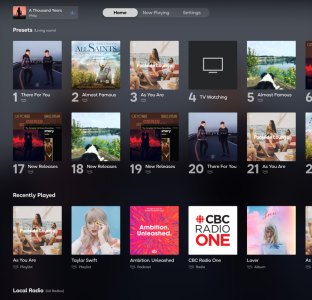
The biggest app-facing announcement of the month: the WiiM Home TV App got a meaningful update for Android TV and Fire TV users, headlined by an all-new Home page. From the moment you open the app you now get quick access to your Presets, Recently Played, Local Radio, Popular Music Stations, and BBC Radio — no digging required. The Now Playing screen also got a polish pass: when lyrics aren't available, it now shows a full-size album cover for a cleaner look. Navigation with your TV remote is smoother too, thanks to improved focus handling throughout the app. (Apple TV Home page support is on the way.)
 Full TV App update thread | TV App Help Center guide
 WiiM Home App v3.5.7 — Sub Calibration, TV Remote Volume Step & More (Apr 21)
App v3.5.7 dropped late in the month with a couple of features worth calling out:
- Sub Calibration – A new one-tap tool that automatically aligns the level and timing between your subwoofer and main speakers at your listening position. This pairs with upcoming firmware to work fully, but the groundwork is in.
- TV Remote Volume Step – You can now customize the volume increment when using your TV remote via HDMI CEC. Find it under the HDMI ARC input settings once the associated firmware lands.
- [Android] Incremental Search – Faster, smoother search results on Android.
- Additional fixes for Synology Advanced Mode folder access, iOS search with special characters, USB playlist track order, and Stereo Pair iPad UI.
Full v3.5.7 release notes WiiM Ultra Firmware v5.2.813259 — A Big One (Apr 8)
This was described by more than a few community members as the most significant Ultra update in months, and it's hard to argue. Highlights include:
- Sub & Main Speaker Sync (reworked) – The previous approach measured timing from inside the device, which wasn't actually useful. This update fixes it properly: calibration now happens at your listening position using your phone's mic. A real improvement for anyone running a sub.
- Headphone EQ – Independent EQ for the headphone output, finally.
- Standby Source Mode – Automatically switch to a selected input when entering standby, so your preferred source is ready when you come back.
- Spotify Smart Play – Resume your latest Spotify session with a single tap.
- Vinyl-style playback screen – A new display option for Ultra owners who like a bit of visual flair.
- EQ now works during Dolby 5.1 playback – A long-requested fix.
- Plus: TIDAL Connect SDK upgrade, Deezer and Qobuz Connect fixes, TuneIn improvements, Wi-Fi 7 compatibility improvements, and a fix for the HDMI ARC standby behavior.
Full Ultra firmware notes WiiM Sound Firmware v5.2.813247 (Apr 8)
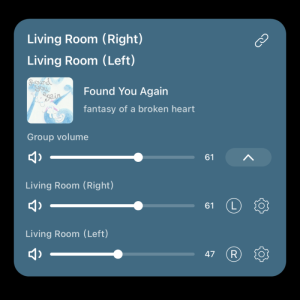
The Sound got a solid update in parallel with the Ultra, sharing much of the same core work:
- Simplified Stereo Pair setup
- Spotify Smart Play
- Reduced playback latency
- EQ improvements including Dolby 5.1 support
- TIDAL Connect, Deezer, TuneIn, Qobuz Connect fixes
- Wi-Fi stability improvements, Roon crash fix, alarm fixes
Full WiiM Sound firmware notes WiiM Amp Ultra Firmware v5.2.813343 (Apr 9)
The Amp Ultra picked up the same wave of updates — sub/main sync, Spotify Smart Play, streaming service fixes, Wi-Fi improvements, and more.
Full Amp Ultra firmware notes WiiM Sub Pro — Sound Mode (Beta)
Sub Pro owners got something worth exploring this month: Sound Mode, a DSP preset switcher that lets you choose between a Music mode (low-latency, tight bass for Hi-Fi listening) and a Movie mode (more depth and impact for home theater). There's also an Auto mode that switches between the two based on your active input — Movie for HDMI, Music for everything else. A small feature with a noticeable effect if you're switching between use cases regularly.
Sub Pro firmware thread | Sound Mode Help Center guide Help Center Highlights
April's Help Center updates were packed. A few worth singling out:
- Home Assistant Integration – A brand-new guide covering how to connect and control WiiM devices through Home Assistant, added in response to the official WiiM integration.
- Center Speaker Setup & Surround Speaker Setup – Step-by-step guides for building out a WiiM home theater with center and surround channels.
- Subwoofer Calibration Guide – Updated to cover the new one-tap sync feature.
- RoomFit™ Smoothing Settings – Three new smoothing options added: Variable, Psychoacoustic, and ERB — more control over how room correction gets applied.
- WiiM Preset Feature Guide – A thorough new article covering how to save tracks, albums, playlists, radio stations, and even playback configurations as presets.
All April Help Center highlights Community Buzz

A few threads worth catching up on if you've been heads-down: Wireless Home Theater & Dolby 5.1 with WiiM
Users spent a lot of April experimenting with surround setups using WiiM Amp Ultra and other WiiM devices for wireless rear channels, phantom center configurations, and TV-focused whole-room audio setups without traditional AVR hardware. A lot of great discussion around sync behavior, latency expectations, and practical setup tradeoffs.
Join the conversation. TV App Reactions The new Home page got a warm reception — community members noted the usability jump and started asking for the next round of features (streaming service browsing, DLNA, Sound Profiles for groups). Good feedback thread if you want to add your voice. Join the conversation Home Theater Without an AVR Still going strong — users building out 4.1 and 5.1-style setups with WiiM gear continue to share their configs, especially with the new center and surround documentation making things easier to follow. Join the conversation
  Tech Tuesday: Multi-Room Audio & Real-World Sync Discussions
April saw a lot of practical discussion around multi-room playback behavior, especially for vinyl setups, TV audio distribution, and grouped playback across mixed wired and wireless environments. Users shared real-world experiences troubleshooting sync and stability issues in larger homes.
Tech Tuesday discussion:  Feature Requests & Quality-of-Life Ideas
Smaller usability improvements continue to generate strong engagement — things like easier group management, cleaner onboarding flows, and simplifying surround setup for less technical users. These threads have become a useful pulse check for everyday user friction points.
Beta surround setup improvements. Get Involved
Want to go deeper? The Community Curators Program is always open — join a group of passionate WiiM users helping shape where things go next.Have a feature idea or feedback? Drop it in the feedback & suggestions section.
Thanks for being part of this — the water's nice.


