


Your monthly roundup of what's new, what's improved, and what the community's been buzzing about. Keep an eye out, our community feedback survey will be going live this week to get your voice brought directly to WiiM leadership and development!
 WiiM News This Month
WiiM Amp Ultra and Ultra Awarded SoundStage! Network Product of the Year
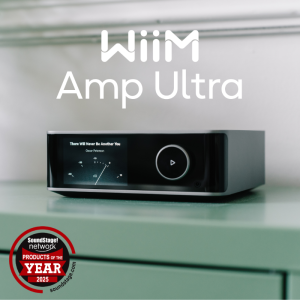
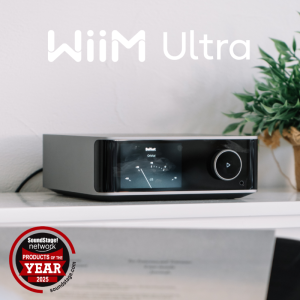
Both the WiiM Amp Ultra and the WiiM Ultra were recognized for Exceptional Value in their categories, streaming integrated amplifiers and streaming preamplifiers.
It’s a simple label, but it carries weight. “Exceptional value” only lands if the fundamentals are right. Sound quality, usability, and features that actually matter. And the price has to stay grounded too. That balance is what we were aiming for and we're happy it hit just right.
 Read more here
 What's New This Month
WiiM Home App v3.5.2 dropped on March 13 with a couple of genuinely exciting beta features and some solid under-the-hood improvements:
- Simultaneous Output (Beta) – You can now run Optical/Coaxial and Line Out at the same time. Perfect if you're feeding a DAC and a powered sub from the same device. Enable it in Audio Output settings. (Currently requires the Ultra beta firmware.)
- Simplified Stereo Pair Setup (Beta) – The pairing flow just got a lot less fiddly.
- Per-Input Screen Control – Turn the display on or off depending on the active source.
- Delay Firmware Updates – You can now hold off on auto-updates if timing matters to you.
- NAS browsing cache improvements and better handling of Custom Radio file names on iOS round out the release.
Full App v3.5.2 release notesWiiM Amp Ultra Firmware v5.2.809633 (March 3) brought the same display upgrades that Ultra owners got in February plus a big round of streaming and playback fixes:
- Per-Input Now Playing, new cover layouts (Immersive Cover), and Dolby Visuals (VU Meter + Spectrum during Dolby playback)
- Fixes across TIDAL Connect, Pandora, iHeartRadio, Plex, Napster, Amazon Music, and more
- Optical In dropout fix, improved short-track transitions, and USB connect/disconnect notifications
Full Amp Ultra firmware notes Help Center Highlights
March's Help Center updates brought new device control options, expanded app documentation for the PC app, and deeper audio configuration guides. Check out new features like input-based screen display and 12V trigger setup options, to RoomFit™ target curve explanations and expanded surround sound configs.
New this month:
- Introducing the WiiM Home App for PC – Get started managing WiiM from your desktop
- Spotify Smart Play on WiiM Ultra – Resume Spotify with a single button press
- Input-Based Screen Display Control – Configure your screen behavior per source
- 12V Trigger Setup Guide – Automate connected equipment
- Simplify Stereo Pair Setup [Beta] – Streamlined stereo pair guide
- RoomFit™ Settings Deep Dive – Now with Flat, B&K, and Harman curve explanations + graphs
All March Help Center highlights Community Buzz

If you haven't checked the forums or r/wiim lately, here are a few conversations worth catching up on: Home Theater with WiiM (No AVR Required) Users are building clean 4.1-style setups with Amp Ultra, wireless surrounds, and subs. Lots of good discussion around HDMI ARC, phantom center channels, and getting great movie sound without a traditional AVR. Join the conversation:
 Vinyl Meets Multi-Room Real-world setups running turntables through WiiM devices and distributing audio across zones. Great discussion around external phono stages and getting the best from line-in. Join the conversation.
 Custom RoomFit Target Curves Power users sharing their approaches to dialing in sound beyond the defaults — an ongoing thread since September that keeps getting better. Join the conversation.
 Quick Wins: Everyday Feature Ideas Simple ideas like one-tap "All WiiMs" group buttons are gaining traction here. Good place to drop ideas and see what resonates with others. Join the conversation.
 Get Involved
Want to go deeper? The Community Curators Program is always open — join a group of passionate WiiM users helping shape where things go next.Have a feature idea or feedback? Drop it in the feedback & suggestions section.
Thanks for being part of this — the water's nice.

Last edited:


