WiiM Pro No Audio on Marantz NR1609 (Optical/RCA Silent Despite Red Light & App Playing) - Test Tone Fails in Setup Loop - Ethernet Setup - Help from

bonkers

Member
Joined
Nov 24, 2025
Messages
14
Hey WiiM community,
Frustrated after a Black Friday buy gone wrong—hoping someone with a Marantz/Denon AVR (specifically NR1609) has seen this and can point me to a fix. Replacement arrives Saturday, but want to avoid round 2 of troubleshooting hell. App shows tracks playing (test tone, radio, Amazon Music HD/Ultra HD), volume at 100% fixed, but zero sound through my Klipsch RP-600M speakers. HEOS built-in works perfectly on the same Marantz chain, so AVR/DAC/speakers/cables are good.
Quick Setup:
WiiM Pro connected via Ethernet (Cat 6 direct to TP-Link Deco AX2000 node)—no Wi-Fi used, rock-solid stability.
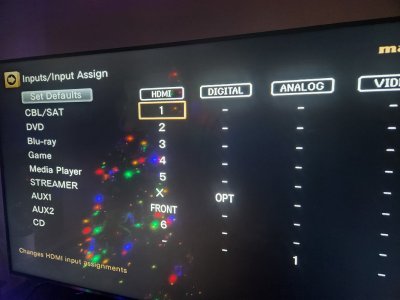
  • Optical out (Monster TOSLINK, red light pulses visibly when unplugged) to NR1609's single OPT input (assigned/renamed to "STREAMER" source—see attached photo of input menu; no eARC TV conflict).
  • Fallback: RCA analog out to NR1609's CD input—same silence.
  • App: Latest WiiM Home (v4.8.x), checked for updates post-reset.
  • Goal: Bit-perfect Amazon HD/Ultra HD (up to 192kHz/24bit) via Marantz DAC.
Issue Details:
  • App queues test tone/radio/Amazon tracks ("playing" indicator), but Marantz front display stays blank—no "PCM" or sample rate signal.
  • During initial setup, test tone "plays" in app but no audible output or AVR detection—had to hit "Yes" to skip the verification loop ( "No" bounces back to bitrate menu endlessly).
  • Post-setup: App > Device > Test Audio (bypass Amazon)—still silent, no display change.
Steps Tried (All No Dice):
  1. App Tweaks: Audio Output > Optical selected > PCM format > Exclusive Mode ON > SPDIF Resolution at 48kHz/16bit (low-res handshake) > Volume Fixed at 100% (toggled off/on). Tried Auto/192kHz max too.
  2. Marantz Side: "STREAMER" input selected > Sound Mode: Pure Direct, Direct, or Stereo > Volume 40–50 > Mute off > Audyssey MultEQ XT disabled (Menu > Speakers > Audyssey > Off) > Power cycled AVR (unplug 2 mins to reset optical decoder).
  3. Analog Test: Switched to Line Out (2.0V max) > RCA to CD input > Same silence on test tone/Amazon tracks.
  4. Resets: Factory reset 2x (hold Play/Pause 10 sec on hardware—heard "Restore to factory settings" voice prompt, LED red+white flash) > Full re-setup each time > Same silent tone loop.
  5. Other Checks: Cable ends swapped/ports blown out (dust-free); no multi-room grouping; input re-assigned/renamed from "TV Audio" to avoid eARC eirdness.
WiiM support replied quickly but generically (asked about reset prompt—which I confirmed—and suggested Bluetooth/Wi-Fi tests, ignoring the wired Ethernet/optical focus). , but no beta firmware yet.

Anyone with NR1609 (or similar Marantz slimline) run WiiM Pro successfully? Is this the known AVR optical handshake bug (PCM not decoding stereo from WiiM)? Any firmware tweaks, app hacks, or Marantz menu buried setting I missed? Open to anything—tried everything short of RMA.

Thanks in advance—dying to ditch HEOS app suck for that full Amazon library bliss.

Attached: NR1609 Input Assign screenshot (OPT confirmed for STREAMER). Also tested to see if RCA works still same issue, silence change CD to analog 1 as my input.

Cheers,
 

Attachments

  • 20251125_171101.jpg
    20251125_171101.jpg
    88.8 KB · Views: 21
@bonkers
Yes, optical prevents ground loops. Coax may cause a ground loop. Never has for me, but it may.
Optical may max out at 96khz. Can be caused by the cable itself, by the cable being too tightly bent or the device at either end.
I don't think I've ever seen / heard of coax doing that.

All that aside, I'm pretty sure your problem lies in the input assignment menu.
Looks like you renamed TV Audio to STREAMER.
Because you have HDMI Control / ARC enabled you can't choose HDMI in that line, hence the X.
With this configuration, whenever the TV is on it will only use the hdmi connecton, you won't be able to use the optical input.
I think you need to move the OPT assignment to a different line, such as CD.

My expectation is that if you turn the TV on the Marantz will auto switch to TV Audio (hdmi), but that you should always be able to manually switch to another line with the tv still on.

So the only bit that's still bothering me is "Fallback: RCA analog out to NR1609's CD input—same silence."
I think you should have been able to switch the marantz to CD input and the pro to line out while the tv was on and hear the music.
Thanks for your reply, Unfortunately I have only one optical port and that is for TV/AUDIO, which I just renamed to Streamer, so I am unable to assign it to a different port so its correctly set up for Optical with the Wiim Pro. RCA same mute issue, like the last one that I returned, I am using a Monster toslink optical cable and have test it with TOTO 99 album to make sure and verified that I am getting music up to 24/192 and it did show up as that in the Wiim menu. Here is what I found out via AI

"The mute happens because of the HDMI-CEC/eARC handshake between your LG TV and the Marantz NR1609 — it has nothing to do with whether the WiiM is connected via optical, coax, or even HDMI audio.
  • The TV wakes up → sends a CEC “I’m alive, give me audio” command over the eARC HDMI cable.
  • The Marantz receives that command and prioritizes the HDMI ARC over everything else, including any digital input (optical or coax).
  • Result: WiiM audio dies until you reboot the AVR with the TV off.
Coax is still a digital SPDIF input — the Marantz treats it exactly the same as optical when the CEC conflict hits. Thousands of NR1609 owners have tried coax instead of optical and the mute is still there.

The only things that actually stop the mute are:
  1. Keep the TV completely off when listening to music (your current workaround).
  2. Add a HDMI CEC blocker in the eARC cable (proven 100 % fix.
  3. Upgrade to a newer AVR that handles CEC better (2022+ models mostly solved it).
Coax = same great sound quality, same CEC problem.Stick with optical (it’s actually slightly better for noise isolation in your rack) and either live with TV-off for music or grab the blocker if you want TV art without reboots."

So looking to buy a HDMI Blocker and see if that works. Thanks again my friend for your help! Will let you know if options 2 works and picking one up on Amazon.
"
 
I still find it very hard to believe that once the tv is turned on it effectively renders the avr unable to be switched to another input. I've never seen any avr do that.
As you have the tv and marantz connected via hdmi you won't be using the optical output from the tv, so there's no need to align the optical input to the tv audio line; that's just the default config.
Did you try moving it in the input assignment menu, or are you only going by what AI tells you?
You also don't have the coax input assigned to any line, so maybe add that / try it. All you need for testing is an rca cable, even half of the wiim supplied one.

I honestly believe it's a setup / config issue.
 
I still find it very hard to believe that once the tv is turned on it effectively renders the avr unable to be switched to another input. I've never seen any avr do that.
As you have the tv and marantz connected via hdmi you won't be using the optical output from the tv, so there's no need to align the optical input to the tv audio line; that's just the default config.
Did you try moving it in the input assignment menu, or are you only going by what AI tells you?
You also don't have the coax input assigned to any line, so maybe add that / try it. All you need for testing is an rca cable, even half of the wiim supplied one.

I honestly believe it's a setup / config issue.
It is a config issue tried every permutation. If you read above, I only have one optical port in my AVR and that is set to Streamer I cannot assign any other input as Optical besides that one my AVR will not allow me to. I did try RCA and with both WIIM this one and the one I returned. it probably actually worked because I was only using it with the TV on and it was not a malfunctioning WIIM. Well, you should start believing that you can't have both optical and HDMI at the same time because I am proof that is the case. Look above I tired what you suggested and to no avail on the one I returned and this new one. I am relying on AI now because no one here knows how to fix this issue and everything AI has provided is accurate and actually makes sense.
 
Last edited:
And yet on my Marantz nr1510, which is surely very similar to the nr1609 and has the same input assignment screen, I can do all that I describe.
The optical input should not be tied to the tv audio line. You should be able to remove it from that line then link it with another.
 
Last edited:
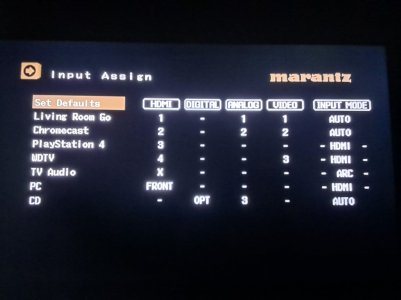
@bonkers you're after something like this.
Move to where OPT is now, press Enter and it should get arrows around it. Press left or right till it goes to a dash. Press Enter to confirm.
Then go to CD line, Digital column and do the same to choose Opt.
You should be able to manually switch to the CD input while the tv is on to hear the pro via optical.
1000000723.jpg
 
Last edited:
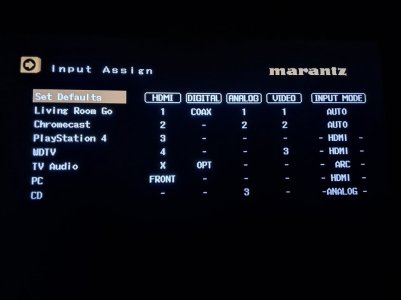
btw, here's what happens when I press Set Defaults.
Note that Opt is on the tv audio line but the input mode is still ARC. i.e. the optical input cannot be used.
By simply moving Opt to the CD line the CD line's input mode changes to Auto (see post above), as there's now more than one option set for that input.
What that means is that I can (and have) connect a pro via both rca and optical and once I'm on the CD input I can change the pro's output in the wiim app between optical and line out and the marantz auto switches to whichever pro output I'm using.
I guess that makes me living proof that it is possible, and that I'm smarter than AI :ROFLMAO: (C'mon, laugh along with me!)

1000000724.jpg
 
CHECK MY SCREENSSHOT AGAIN AND I DON"T HAVE INPUT MODE ON MY AVR LIKE YOURS AND UNABLE TO CHANGE INPUT TO ARC. ITS ONE INPUT OR THE OTHER. WHEN I SWTICH INPUT IT COMPLETELY SWITCHES, ANOTHER FAIL AGAIN! UNABLE TO USE BOTH TV AND OPTICAL AT THE SAME TIME IF I TURN THE TV AND IT SWTICHES TO ARC IT MUTES THE WIIM.? GUESS AI WAS RIGHT HUH???
 

Attachments

  • 1765287146128.png
    1765287146128.png
    793.7 KB · Views: 6
Last edited:
CHECK MY SCREENSSHOT AGAIN AND I DON"T HAVE INPUT MODE ON MY AVR LIKE YOURS AND UNABLE TO CHANGE IMPUT TO ARC. ITS ONE INPUT OR THE OTHER WHEN I SWTICH INPUT IT COMPLETELY SWITCHES, ANOTHER FAIL AGAIN! UNABLE TO USE BOTH TV AND OPTICAL AT THE SAME TIME IF I TURN THE TV AND IT SWTICHES TO ARC IT MUTES THE WIIM.? GUESS AI WAS RIGHT HUH???
What is different about your screenshot? It looks very similar to me.
 
1765296877852.pngMy AVR does not have Input mode so I can assign it to ARC to TV Audio like he has above my model is different from his model. So, I can't assign arc and use both TV and Optical at the same time. When I switch it to TV optical is turned off and switches to HDMI, so I can't get the album art and status via firestick TV. I can either listen to Music via the phone/tablet, or watch TV, can't have both inputs going concurrently like his does.
 
Last edited:
View attachment 30714My AVR does not have Input mode so I can assign it to ARC to TV Audio like he has above my model is different from his model. So, I can't assign arc and use both TV and Optical at the same time. When I switch it to TV optical is turned off and switches to HDMI, so I can't get the album art and status via firestick TV. I can either listen to Music via the phone/tablet, or watch TV, can't have both inputs going concurrently like his does.

Is this helpful?
 
CHECK MY SCREENSSHOT AGAIN AND I DON"T HAVE INPUT MODE ON MY AVR LIKE YOURS AND UNABLE TO CHANGE INPUT TO ARC. ITS ONE INPUT OR THE OTHER. WHEN I SWTICH INPUT IT COMPLETELY SWITCHES, ANOTHER FAIL AGAIN! UNABLE TO USE BOTH TV AND OPTICAL AT THE SAME TIME IF I TURN THE TV AND IT SWTICHES TO ARC IT MUTES THE WIIM.? GUESS AI WAS RIGHT HUH???

Why are you screaming in all caps? Very poor form, and AI sucks by the way, not very intelligent at all and quite prone to hallucinations.
 
And yet there is a separate Input Select (mode) screen in the 1609, it just happens to be combined into the input assign screen in the 1510
One purpose for that screen is specifically to allow the video to come from the tv and the sound to come from whatever is connected optically, such as a settop box optical output.

And you're adamant that Opt and Coax cannot be moved to different lines?
If Opt and Coax really cannot be moved and are fixed to TV Audio and Game respectively, then I would still expect that with the tv turned on you could switch to the Game input and use the coax signal, especially if you set that input to Digital in the Input Select screen.

As a last resort, maybe try reading the manual (ok, sarcasm...) or looking up a Marantz tech support number for your country.
I've spoken to Marantz support here in Oz a few times this way and they were very helpful. Likely more so than AI.
 
Last edited:
Back
Top