WiiM Ultra Firmware v5.2.807149 Update - Feb 9, 2026

Please review the WiiM Ultra update release notes below. If you encounter any issues, feel free to reach out to us. This firmware update is being rolled out in stages, with devices updating sequentially over the next few days.

5.2.807149 (In Progress)

Release date:

Feb 9, 2026

Display & UI:
  1. Per-Input Now Playing: Customize the Now Playing screen for each input source.
  2. New Cover Layouts: Added larger album-art views for a more immersive playback screen, with Home and Music Source icons hidden.
  3. Dolby Visuals: VU Meter and Audio Spectrum now work during Dolby playback.
Playback & Audio:
  1. Optical In: Fixed dropouts caused by input stream format changes.
  2. Short-Track Transitions: Improved near-end handling to prevent skipping or audio “leakage.”
  3. Track Skips: Resolved multiple cases of unexpected skipping / premature track changes across services.
Radio & Streaming Services:
  1. Live Metadata: Added ICY support for richer “now playing” info on TuneIn, iHeartRadio, and BBC Radio.
  2. Qobuz: Added Track Radio / Artist Radio / Album Radio.
  3. vTuner: Improved reliability with backup stream URL fallback.
  4. SoundCloud: Added third-party login support.
  5. TuneIn: Fixed alarms occasionally starting late or failing to start playback.
  6. iHeartRadio / Pandora: Fixed intermittent stops and unexpected skipping.
  7. Napster: Fixed My Music playback failures, incorrect station controls, and a disconnect-on-no-internet crash.
  8. Plex: Fixed alarm progress display, station history playback failures, and occasional early skips.
  9. Amazon Music: Fixed interruptions when playing short playlists.
USB & NAS:
  1. USB Notifications: Added connect/disconnect pop-ups.
  2. Faster Browsing: Reduced app timeouts when browsing USB drives.
  3. NAS Playback: Fixed playback and display issues for NAS sources.

 
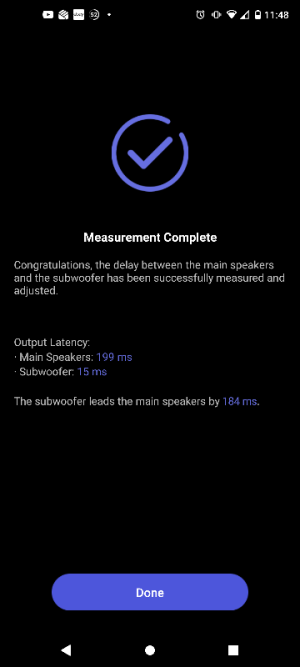
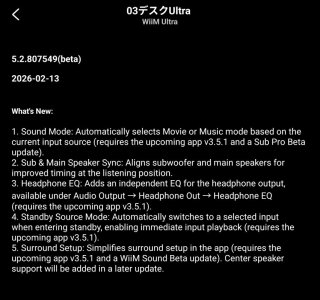
I don't understand where the screenshots showing sub/speaker sync are coming from then. It certainly doesn't work on my WiiM Amp.
Unless it’s a closed beta rather than one you’d expect to see in the app. It would be helpful if the poster revealed how they got this.
 
I think it might only be for WiiM Sub owners, perhaps?

I just tried it and it’s completely wrong. Should be ~4ms delay to speakers but auto calibration got 5ms delay to sub due to the WiiM literally sitting right on top of the sub.

-Ed
 
Just done it but couldn't see the option where it used the umik
 

Attachments

  • 1000024758.png
    1000024758.png
    30.8 KB · Views: 16
Wow that's a huge speaker delay!

-Ed

Cable is wiim sub output, into minidsp HD, then onto SVS subwoofer (digital plate amp)

Normally I go outlaw icbm-1 sub out, into minidsp hd, then onto svs sub

audio siginal for L/R goes through the icbm-1 as well
 
I think it might only be for WiiM Sub owners, perhaps?

I just tried it and it’s completely wrong. Should be ~4ms delay to speakers but auto calibration got 5ms delay to sub due to the WiiM literally sitting right on top of the sub.

-Ed
So is yours still using the device mic? The post only showing screenshots with no other details asks more questions than it answers.
 
So is yours still using the device mic? The post only showing screenshots with no other details asks more questions than it answers.
Mine is definitely using the mic in the WiiM Ultra.

I am on the latest app version from this morning's update with various beta things that have nothing to do with BassFit.

-Ed
 
Unless it’s a closed beta rather than one you’d expect to see in the app. It would be helpful if the poster revealed how they got this.

I asked about using my mic to align sub and they pushed this, it works! I asked if okay to post, I'm sure they are on holiday for a couple weeks, took a chance.
 
I asked about using my mic to align sub and they pushed this, it works! I asked if okay to post, I'm sure they are on holiday for a couple weeks, took a chance.
So you have beta firmware that nobody else has. If it works it might as well go directly into official firmware for all devices and forget about beta firmware.
 
If it works it might as well go directly into official firmware for all devices and forget about beta firmware.
Pushing software to all devices because it works in their labs and on one user's machine? You cannot be serious. :)

All this is not related to this firmware release, btw. :)
 
Last edited:
Pushiz software to all devices because it works in their labs and on one user's machine? You cannot be serious. :)

All this is not related to this firmware release, btw. :)
At least it would get more testing then 🙂. This is only correcting a feature which was never fit for purpose from the beginning.
 
At least we always had manual correction along with the imperfect automated feat

yeah you could use REW, use the calculations from that, then enter those into WHA manually.

I used WHA room correction then entered in those values into my AV pre amp
 
Back
Top