WiiM Ultra stuck in update for over 30 minutes

Freshman1966

Member
Joined
Dec 15, 2024
Messages
6
Usually I get a message on my WiiM app that tells me that an update is available.

Today, the unit turned off (or at least the screen went black) and so I pressed the power button on the remote. That's when the update started and it's going on and on.

Does anyone have any idea what's happening and how to solve this? there's not much information to be found on the net.

Thanks for your help, Stefan
 
Usually I get a message on my WiiM app that tells me that an update is available.

Today, the unit turned off (or at least the screen went black) and so I pressed the power button on the remote. That's when the update started and it's going on and on.

Does anyone have any idea what's happening and how to solve this? there's not much information to be found on the net.

Thanks for your help, Stefan
Hard to tell without logs. It seems like you stopped the update unintentionally, but it was recoverable. Plug pulling isn't the usual path -- but it worked, so lucky you! :)

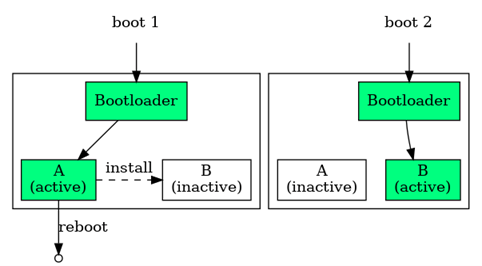
Newer hardware devices (gross generalization) will often have an A and B partition on their local storage with the first boot being directed to the A partition at first boot. A firmware update will go into the B partitoin and then the bootloader is toggled to boot from the B partition. If the B partition doesn't successfully boot, then it can fall back to the A partition. Successful firmware updates should normally toggle between A and B through the life cycle of updates. The details are specific to every implementation, but some devices have a bit of robustness to bad updates. With WiiM occasionally mentioning about reverting from a firmware, it suggests that they have something like this under the covers.

Rabbit hole at the link below :)
 
Back
Top