Windows 11

RickdD123

New Member
Joined
Jan 19, 2026
Messages
1
I am trying to control my WiiM system from my desktop. It was working fine, but now when I open the desktop WiiM app it says the app must be on the same network as the computer. It is and the app doesn’t go to the home page.

I deleted the app and reinstalled it, and still no response.

The system works great if I use the mobile app which is also on the same network.

Any help is appreciated
 
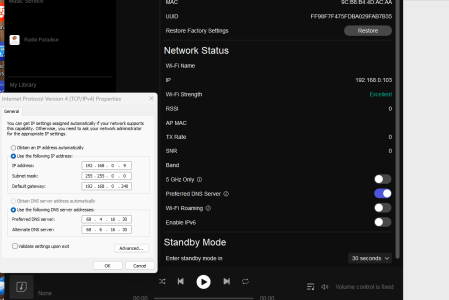
For example... running Windows 11. PC and Ultra in this case are both wired on ethernet, but it doesn't make that much of a difference.

Note how my PC uses a static IP address while the Ultra grabs it from a DHCP server.

Did you change something in your network configuration?

I've never tried it, but can you specify a static IP address for your WiiM?

1777146478471.png
 
You must mean the same SSID?

Hmmm... not really. They have to be on the same LAN. This is determined by your IP ADDR and sub net mask.

Worst case, if you don't know how to do this, just run everything using DHCP and have just ONE DHCP server in your LAN. That will configure it automatically for you.

The LAN can easily straddle all kinds of datalink interfaces. My home LAN runs GigE wired, 2.4Ghz WiFi, 5Ghz WiFi, etc... they all see each other. I can control my WiiM Ultras with my wired PC and wireless devices.

My android phone can easily run all WiiM Devices in the house. One of them is wireless, the others are wired. My PCs, all wired, can address them too.
 
Neither the same SSID nor the same frequency band should be a requirement to control the WiiM device from its app.

That is correct.

The same subnet mask.

It's an IP layer interface.

It could be the OP is running a wireless AP (Access Point) with its own DHCP server and another one elsewhere in his LAN?

Once upon a time, this happened to me when I put up a new AP upstairs and invertedly I forgot to disable the DHCP server in that unit... Since most of my machines run static IP address I didn't realize this. This was back in '04 when we didn't have fancy phones and I was using 802.11b for one laptop that I used outdoors to browse the web while smoking cigars. (The term "WiFi" didn't exist then).

Long story short, there was no crossover so effectively I had defaulted to two VLANs. I had the correct gateway, etc... but I never printed from that one laptop.

My BiL showed up and I gave him the SSID... sure enough... he wanted to print.

It took us one long day debugging to figure out we had two dueling DHCP server with different time-to-live and.... anyhow, you can figure out...

OP ought to look at his IP configurations and see if he changed anything in his router/switch/AP.
 
Last edited:
The same subnet mask.
Thats not strictly correct either.

Dons pedant's hat 😇

Mutiple subnets can have the same subnet mask.

A subnet mask is just the mechanism to segment a range of IP addresses into different subnets.

Typically all your devices would need to be on the same subnet unless you deliberately engineer your network into differing subnets and route the network traffic appropriately between them.
 
Back
Top