FF/REW issues playing from NAS

I‘m afraid the OP is completely restistant to advice and either not willing or capable to reconsider his technical approach.
Whatever we post here, it‘ll be like talking to a wall.

I remember a mate asked if he can recover his music

tens of thousands of files in a single directory
Random filenames
No metadata in the files

I just looked at him and told him to delete the lot.
 
I remember a mate asked if he can recover his music

tens of thousands of files in a single directory
Random filenames
No metadata in the files

I just looked at him and told him to delete the lot.
What a resemblance to my mom and her photos😂.
 
What a resemblance to my mom and her photos😂.

My music layout is

\Artists\A\Artist\Album\track - title

foobar
%tracknumber% . %title%

So even if I delete my tags or they get corrupted I can recover them from the filename. Or if filename gets messed up, recover filename from tag.

Worst case scenario lose all tags, mass tag of a whole artist branch so not a problem. Then tag of each album that would take a while manually but not impossible(wonder if method to recover album tag using directory name?) Individual files would be, so use tag & rename to retrieve details. Mediamonkey I think can recover track title, by using on line database of that album for the track length..not sure how good that is. Will lose genre/year but not a big deal. Then use albumartdownloader for batch album art

Problem with wave/cue files if you delete cue files or rename the wave files, then you just have one single long album track.

The only benefit of one file per album is for some reason your media player is limited to so many files, ie Sonos, so having 1 file instead of 12-20 could be a workaround.
 
yeah he needs to use server simple as.

Also if he's got lots of files in a directory that'll slow it down. samba is slower than nfs, and doesn't support long filenames/special characters afaik.

He needs to modernise his setup, laughable 140TB of music and complete mess, I guess if it's wave, no cue file he's just outta luck the work involved tagging that up will be an arduous task
He doesn't have 140TB of music he has 140TB of storage 🤦‍♂️
 
why would someone reference his total storage when it comes to his music?

That does does not compute
No idea, bragging rights? 🤣
See this post
 
I use NFS quite a bit - Raspberry Pi as Lyrion server with NAS storage mounted via NFS. That is quick even though I have 65k files to deal with. My players/renderers include multiple WiiMs. I have never experienced a seek problem.

However the NAS also serves the same files via SMB to my PC's. If I open the top level folder in Windows Explorer it can take close to a minute to show the entire file structure. Large files, and multiple folders accessed via Windows slows things down considerably. My money is on this being the bottleneck.
The Windows WHA will have already indexed the share, so it's just file retrieval during playback which shouldn't be too much of a bottleneck.

I think I read that TonyE already uses a Plex server. If he were to point it at his music files then the Plex integration in WHA, altrhough flawed, is sufficiently OK for this purpose. However has the Plex integration made its way to the Windows version of WHA?
The only services available in the latest Windows WHA (v0.2.4) are Qobuz and Radio Paradise.

There doesn't appear to be a way to add a SMB/NFS share, and all playback is over http (UPnP) so I don't think there's any chance the player will be pulling directly from the NAS.

It's likely a Windows WHA issue.
 
20TB of music is a lot, I have about 10TB.

Although if he's done a lot of 24 bit 192khz recording from vinyl, way bigger than regular 16 bit 44khz 400MB versus 1.6GB
 
Worst case scenario lose all tags, mass tag of a whole artist branch so not a problem. Then tag of each album that would take a while manually but not impossible(wonder if method to recover album tag using directory name?) Individual files would be, so use tag & rename to retrieve details. Mediamonkey I think can recover track title, by using on line database of that album for the track length..not sure how good that is. Will lose genre/year but not a big deal. Then use albumartdownloader for batch album art
If losing your tags is really something that concerns you - which I assume it isn't - you should use metaflac/ffmpeg to export them. I've done this a number of times during mass tag updates, knowing that it would be trivial to re-import them should something go wrong - though I'd likey just restore a backup.
Problem with wave/cue files if you delete cue files or rename the wave files, then you just have one single long album track.
wav files do support ID3 tags and I don't think he's ever mentioned cue sheets, so I think he's just ripping tracks to wav.
 
If losing your tags is really something that concerns you - which I assume it isn't - you should use metaflac/ffmpeg to export them. I've done this a number of times during mass tag updates, knowing that it would be trivial to re-import them should something go wrong - though I'd likey just restore a backup.

wav files do support ID3 tags and I don't think he's ever mentioned cue sheets, so I think he's just ripping tracks to wav.
He is talking about wav files bigger than 1GB though from digitising vinyl. Probably hasn't bothered to split into tracks or make cue sheets.
 
The Windows WHA will have already indexed the share, so it's just file retrieval during playback which shouldn't be too much of a bottleneck.


The only services available in the latest Windows WHA (v0.2.4) are Qobuz and Radio Paradise.

There doesn't appear to be a way to add a SMB/NFS share, and all playback is over http (UPnP) so I don't think there's any chance the player will be pulling directly from the NAS.

It's likely a Windows WHA issue.
Can’t you add a mapped network drive to the windows WHA, although there’s something at the back of my mind that suggests there might be issues accessing the files that way?
 
Can’t you add a mapped network drive to the windows WHA, although there’s something at the back of my mind that suggests there might be issues accessing the files that way?
You can add a mounted network drive but that's essentially still a local folder so couldn't be shared directly over SMB, which is all I was really checking.

If there was an open SMB share the Windows WHA might be able to hand out the address directly (given WiiM devices can already play from SMB addresses), but that would only work for WiiM devices, not other UPnP renderers (when using the WHA as a DLNA Server).
 
There is no support within the WiiM Home app for NFS (is there?) so there must be something else serving the files to WiiM via SMB. If I am reading the earlier posts correctly then whatever it is has to get the file via NFS before providing it to the WiiM via SMB. This cannot be very efficient.

TonyE seems oblivious to the many suggestions to use a proper music server which will sort the issue once and for all.

I‘m afraid the OP is completely restistant to advice and either not willing or capable to reconsider his technical approach.
Whatever we post here, it‘ll be like talking to a wall.

It amazes me how rude people in Internet forums can get. It might be a case of thinking they know everything... You are assuming a lot about me. Heck, I don't even know who you are, but you sure seem to "know" a lot about me...

Folks.... I use the WiiM Ultra for Tidal Connect, it works great. Bit perfect audio. Something that Android and Chromebooks should do!

Then I got a very nice turntable.

So for audio, I really don't have the need to have a complex database system. Been there, done that. I enjoy grabbing an LP, cleaning it, putting on the turntable, and listening to it. I have one preamp with a remote.... volume.... but the one that I've been using in the last two years is a dual mono with no remote. I have to get up every 18 minutes or so.

For digital, Tidal Connect is my go to. Our cell phones and tablets and Chromebooks have 1TB SDcards in them (yep, we're sticking to older phones, no cloud storage). It works great for playing music, specially when you run their curated play lists. I have 100+ hours of Zappa in my playlist.

I use Plex for video, although I see it loads the pictures and audio files in my shared drives. I use Plex because it came for free with the PR4100... before that, around 2000, I wrote my own front end using Tcl/TK, Each video file had an assigned metadata entry in the database which the front end used for parsing, building the menus, etc... This utility worked fantastic, I had full control over how the video was being handled. I thought about porting it to Python but then I got the NAS and after the configuration, I saw no need to continue developing my own solution for video.

My LAN storage is used primarily for data. I did rip a few hundred DVDs over the year that I hooked up to Plex. I also did a bunch of CD ripping eons ago ( WAV by default ) and a bunch of LP recording. These files were done about 20 years ago, when "server" technology was still being defined.

And, READ before you POST. I noted I have 20TB of music/video.... the ENTIRE effective storage is in the 140TB-170TB (depends of what is plugged in that day) range. This includes duplication of resources ( parity, redundant hardware, etc ) for an effective logical storage of 40% of physical. Expensive? Sure... but I'm not going to suffer losing three years of family pictures as it happened to us in 1998. I mentioned the size of the storage to claim some rights to knowing how to manage network storage...

Please do not infer ulterior motives to what I'm doing. I was surprised to see the behavior. I have not seen this behavior when running stuff like Foobar and Cubase in a PC. So I just asked. I am, after all, a software developer. Real Time Software. I have a professional interest on this.

And, no, I'm not going buy an expensive consumer grade server when I can grab one of my Raspberries and install and write whatever software is required. I've spent some years looking into it, btw. As a software developer, having done multimedia, there is no way I'm gonna pay for what I can put together myself. Buying a "media server" is not going to teach me how the internals of such things work. By internals, I mean the architectural design, not what they tell you in the brochure... and no.... the design is IP. They don't show you this...

So, unless you you know how to program an internetworking stack to drive media, then please, DON'T CALL ME AN IDIOT. OK?

Anyhow, to some of you who have spent some time looking at how it works, thanks. I will continue working this out and if I decide to automate a script to tie the WiiM Ultras to homeAssistant, I will -this is what started this thing. I already noticed that I can control the Ultra via homeAssistant. I posted some of that in the homeAssistant forums ( a different web site ).

BTW- I have some some behavior change between WAV and WMA files. I think the issue is still related to files size. I see the same behavior in the Android phones. But at this point, the WiiM Home applications are different so....

 
Last edited:
It amazes me how rude people in Internet forums can get. It might be a case of thinking they know everything... You are assuming a lot about me. Heck, I don't even know who you are, but you sure seem to "know" a lot about me...

Folks.... I use the WiiM Ultra for Tidal Connect, it works great. Bit perfect audio. Something that Android and Chromebooks should do!

Then I got a very nice turntable.

So for audio, I really don't have the need to have a complex database system. Been there, done that. I enjoy grabbing an LP, cleaning it, putting on the turntable, and listening to it. I have one preamp with a remote.... volume.... but the one that I've been using in the last two years is a dual mono with no remote. I have to get up every 18 minutes or so.

For digital, Tidal Connect is my go to. Our cell phones and tablets and Chromebooks have 1TB SDcards in them (yep, we're sticking to older phones, no cloud storage). It works great for playing music, specially when you run their curated play lists. I have 100+ hours of Zappa in my playlist.

I use Plex for video, although I see it loads the pictures and audio files in my shared drives. I use Plex because it came for free with the PR4100... before that, around 2000, I wrote my own front end using Tcl/TK, Each video file had an assigned metadata entry in the database which the front end used for parsing, building the menus, etc... This utility worked fantastic, I had full control over how the video was being handled. I thought about porting it to Python but then I got the NAS and after the configuration, I saw no need to continue developing my own solution for video.

My LAN storage is used primarily for data. I did rip a few hundred DVDs over the year that I hooked up to Plex. I also did a bunch of CD ripping eons ago ( WAV by default ) and a bunch of LP recording. These files were done about 20 years ago, when "server" technology was still being defined.

And, READ before you POST. I noted I have 20TB of music/video.... the ENTIRE effective storage is in the 140TB (or so) range. This includes duplication of resources ( parity, redundant hardware, etc ) for an effective logical storage of 40% of physical. Expensive? Sure... but I'm not going to suffer losing three years of family pictures as it happened to us in 1998.

Please do not infer ulterior motives to what I'm doing. I was surprised to see the behavior. I have not seen this behavior when running stuff like Foobar and Cubase in a PC. So I just asked. I am, after all, a software developer. Real Time Software. I have a professional interest on this.

And, no, I'm not going buy an expensive consumer grade server when I can grab one of my Raspberries and install and write whatever software is required. I've spent some years looking into it, btw. As a software developer, having done multimedia, there is no way I'm gonna pay for what I can put together myself. Buying a "media server" is not going to teach me how the internals of such things work. By internals, I mean the architectural design, not what they tell you in the brochure... and no.... the design is IP. They don't show you this...

So, unless you you know how to program an internetworking stack to drive media, then please, DON'T CALL ME AN IDIOT. OK?

Anyhow, to some of you who have spent some time looking at how it works, thanks. I will continue working this out and if I decide to automate a script to tie the WiiM Ultras to homeAssistant, I will -this is what started this thing. I already noticed that I can control the Ultra via homeAssistant. I posted some of that in the homeAssistant forums ( a different web site ).

Use a pi for PCP

 
And, no, I'm not going buy an expensive server when I can grab one of my Raspberries and install and write whatever software is required.
If we've mentioned "servers" we're referring to music server software, not hardware, the majority of which is free and can be installed on most platforms e.g. MinimServer, Lyrion e.t.c.
 
The Windows WHA will have already indexed the share, so it's just file retrieval during playback which shouldn't be too much of a bottleneck.


The only services available in the latest Windows WHA (v0.2.4) are Qobuz and Radio Paradise.

There doesn't appear to be a way to add a SMB/NFS share, and all playback is over http (UPnP) so I don't think there's any chance the player will be pulling directly from the NAS.

It's likely a Windows WHA issue.

I see this issue when using WiiM Home both in the PC (win11) and my Android phone. Is WiiM Home involved in the process of downloading data from the NAS to the renderer? Notice I don't use the DAC in the Ultra. I take the data from the NAS, transfer it into some kind of a stream and send them over USB to the DAC.

He is talking about wav files bigger than 1GB though from digitising vinyl. Probably hasn't bothered to split into tracks or make cue sheets.

Please read my -rather long- posts. In one of the screen shots It shows how I have the "side" file and the track files. I also noted that I'm using Cubase to do this. I don't need cue sheets. Indeed I used the size structure to determine that smaller files have no problems, while larger files do. I have seen such behavior often related to buffering. Normally it gets solved by making larger buffers. It's a common "communication software" technique: we call it Buffer Management.
 
I see this issue when using WiiM Home both in the PC (win11) and my Android phone. Is WiiM Home involved in the process of downloading data from the NAS to the renderer? Notice I don't use the DAC in the Ultra. I take the data from the NAS, transfer it into some kind of a stream and send them over USB to the DAC.


Please read my -rather long- posts. In one of the screen shots It shows how I have the "side" file and the track files. I also noted that I'm using Cubase to do this. I don't need cue sheets. Indeed I used the size structure to determine that smaller files have no problems, while larger files do. I have seen such behavior often related to buffering. Normally it gets solved by making larger buffers. It's a common "communication software" technique: we call it Buffer Management.

I played 700MB wave files fine through picoreplayer/lms app, so it's your system.

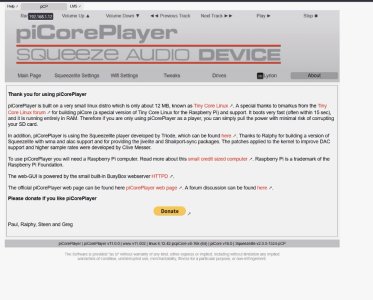
Try using a pi with picoreplayer, scan your music, you then can browse by tag or folder.

Wiim app is rubbish.
 
Once you install PCP on a Pi remote desktop to it and it'll look like this, follow instructions.

It's not the easiest to intstall, a bit difficult for noobs
 

Attachments

  • pcp.jpg
    pcp.jpg
    128.7 KB · Views: 5
If we've mentioned "servers" we're referring to music server software, not hardware, the majority of which is free and can be installed on most platforms e.g. MinimServer, Lyrion e.t.c.

OK. so I might as well grab the Raspberry?

Note that right now that playing those large 24/96 files in the NAS is not one of my biggest priorities as they reflect the status of my turntable about 20+ years ago...

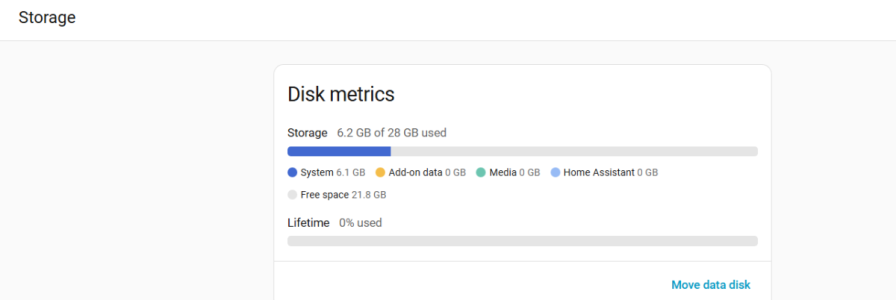
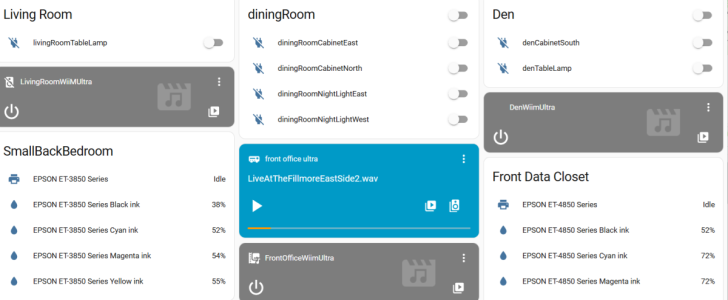
My biggest thing now is to get the WiiM Ultras to play over homeassistant. Check this out... you can load the "storage" into homeassistant and then configure the WiiM Ultras to play the data.

This is being done by a homeassistant Green server. No WiiM Home involved. (If you look carefully, the zone areas are a work in process... I started doing this a week ago.

THIS IS THE INTERFACE I'M MOST INTERESTED IN RIGHT NOW... it shows similar behavior, so I don't know if this is due to the control interface (exported device commands) or an intrinsic design of the Ultra. When I play the small files, I have full FF/REW control, but when I play the big ones, it takes a long time, so it makes playing the files sort of useless...

The "storage" mounts the audio files, as "files".

1767817669070.png


1767817579672.png
 
OK. so I might as well grab the Raspberry?

Note that right now that playing those large 24/96 files in the NAS is not one of my biggest priorities as they reflect the status of my turntable about 20+ years ago...

My biggest thing now is to get the WiiM Ultras to play over homeassistant. Check this out... you can load the "storage" into homeassistant and then configure the WiiM Ultras to play the data.

This is being done by a homeassistant Green server. No WiiM Home involved.

View attachment 32113


View attachment 32112

Wiims support squeezelite, so it's seen as Squeezebox - and directly works in LMS no problems.
 
Back
Top