
LAN/ Ethernet Port not working

Grodad

New Member
Joined
Jan 7, 2026
Messages
2
Am not sure if there are any solutions here as have been googling the heck out if it.
The ethernet port on my Pro-Plus is not recognising connection at all.
Done a reboot, plugged a laptop into the cable/ outlet the wiim is normally in and confirm the port and cable works.
Plugged the wiim directly into my router and it does not recognise it.

It just defaults to wifi with no option for ethernet connection. Works OK on wifi, but had this box since February 2024 and it's been solide on ethernet until now.

Dead port? Any suggestions?
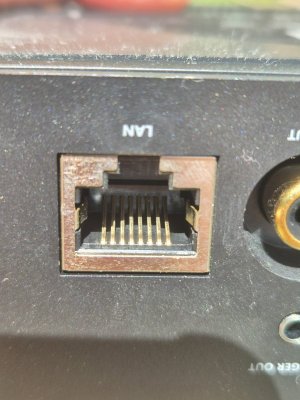
49462.jpg
 
Am not sure if there are any solutions here as have been googling the heck out if it.
The ethernet port on my Pro-Plus is not recognising connection at all.
Done a reboot, plugged a laptop into the cable/ outlet the wiim is normally in and confirm the port and cable works.
Plugged the wiim directly into my router and it does not recognise it.

It just defaults to wifi with no option for ethernet connection. Works OK on wifi, but had this box since February 2024 and it's been solide on ethernet until now.

Dead port? Any suggestions?
View attachment 33566
Hi

The network status screen in the WiiM app may not have been updated.

After connecting the Ethernet cable to ProPlus, can you reboot the device and the WiiM app, then check the connection status of the WiiM device in your router's management interface? (Is ProPlus still connected to Wi-Fi?)
 
Hi

The network status screen in the WiiM app may not have been updated.

After connecting the Ethernet cable to ProPlus, can you reboot the device and the WiiM app, then check the connection status of the WiiM device in your router's management interface? (Is ProPlus still connected to Wi-Fi?)
Thanks for your suggestion. Have just tried that reboot in a couple of locations and still not working.
A key clue for me is when I plug into my ethernet switch near my router, the port led is not blinking, when every other port on that switch blinks showing devices attached. Not the wiim though. Both app and router is reading connection by wifi only.
 
Thanks for your suggestion. Have just tried that reboot in a couple of locations and still not working.
A key clue for me is when I plug into my ethernet switch near my router, the port led is not blinking, when every other port on that switch blinks showing devices attached. Not the wiim though. Both app and router is reading connection by wifi only.

Normally, rebooting the WiiM device and WiiM app will change the network status to Ethernet. I think it's either a issue with the cable connection or a issue with the port.

I believe you've already confirmed the LAN cable is fine, but have you tried another cable?

Also, it might be worth trying to clean the Pro Plus LAN port.

If the problem persists,
I recommend submitting a ticket via the feedback section in the WiiM app.
(WiiM home > More > Feedback)

Your device logs will be sent, which will help resolve the issue.
 
Back
Top