

You are using an out of date browser. It may not display this or other websites correctly.
You should upgrade or use an alternative browser.
You should upgrade or use an alternative browser.
Laptop To Vintage Stereo
- Thread starter jcmusic
- Start date
-
- Tags
- amazon music

Get a WiiM remoteTBH I see this as a drawback of the WHA. When I receive a phone call on the phone that is running the the WHA I WANT the audio to stop. But it doesn‘t, which is quite a hassle. I‘m no good at multi-tasking, answering a call and stopping the audio on the same device simultaneously that is.

D
Deleted member 28380
Guest
Not quite. Casting means that the casting device, be it a phone or a PC, is active. They are the leading devices. Streaming is another thing. Here the phone is really just a remote as you suggested.Which is on your phone.
If you’ve initiated a stream, it’ll keep playing until it completes. The phone is just a remote control, unless you use a poor casting protocol like AirPlay or Bluetooth.
D
Deleted member 28380
Guest
Get a WiiM remote
 If only I had it where I need it when the phone rings.
You may disagree with my use of the word casting which to me is playing on a device other than the one running the app. If I’m using the amazon music app and playback is on my phone, that’s streaming to me. If I direct the audio elsewhere, I’m casting (“throwing”) it to that other device. YMMV…
Last edited:
D
Deleted member 28380
Guest
I‘d say that we‘re talking about the same thing.You may disagree with my use of the word casting which to me is playing on a device other than the one running the app. If I’m using the amazon music app and playback is on my phone, that’s streaming to me. If I direct the audio elsewhere, I’m casting (“throwing”) it to that other device. YMMV…
Hello Guys,
So after reading more and closer it seems that I can use a Wiim device connected to my vintage stereo without anything else to play Amazon Music? Would this be correct?
Personally I don't use subscriction services so I don't know how they function however I've used
Bluetooth receiver on the Wiim Ultra, so can stream audio from my phone and laptop to it.
Wiim app- for initial setup and the room EQ measurement and correction (and speaker presets)
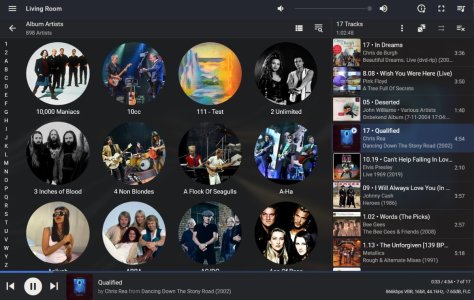
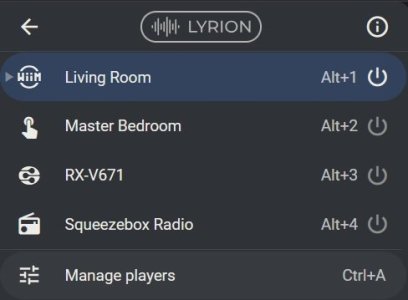
For audio streaming, I use a Raspberry Pi4 with picoreplayer, which is a audio server (Lyrion Music Server) so that scans and allows me to control the Wiim, and my other Logitech Squeezeboxes from one single app to each room. Music is on Network Attached Storage (NAS)
Yeah - you need the WiiM home app or Amazon Music app on your phone/tablet , and a WiiM streamer physically connected over rca, optical or coax into you stereo.Hello Guys,
So after reading more and closer it seems that I can use a Wiim device connected to my vintage stereo without anything else to play Amazon Music? Would this be correct?
Ok then I already have Amazon Music app on my phone I been using it via Bluetooth to my headphones and my car stereo.
Now that I have a nice music library on my phone vis the Amazon Music app I want to play this on my vintage home stereo.
I don't want or need any room eq correction all that is done already, I just need to know which device and how to control it?
I originally thought to use my laptop to free up my phone but, there is a question if that is possible? Because of the casting of the Amazon Music from my laptop?
Now that I have a nice music library on my phone vis the Amazon Music app I want to play this on my vintage home stereo.
I don't want or need any room eq correction all that is done already, I just need to know which device and how to control it?
I originally thought to use my laptop to free up my phone but, there is a question if that is possible? Because of the casting of the Amazon Music from my laptop?
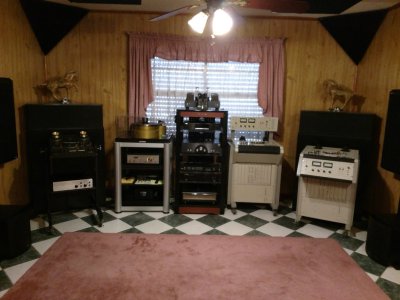
Ok then I already have Amazon Music app on my phone I been using it via Bluetooth to my headphones and my car stereo.
Now that I have a nice music library on my phone vis the Amazon Music app I want to play this on my vintage home stereo.
I don't want or need any room eq correction all that is done already, I just need to know which device and how to control it?
I originally thought to use my laptop to free up my phone but, there is a question if that is possible? Because of the casting of the Amazon Music from my laptop?
For subscription I can't help you as I don't use that.
But for local music, you'd have music somewhere, on a HDD . The Ultra allows you to connect a USB flash stick or USB HDD, I've tested it, it works ok. And is easy, just copy mp3/ogg/flac files to USB drive, connect to Ultra, let it scan the music.
or for streaming from a network device, You'd need music software somewhere this can be on your laptop -Mediamonkey is ok, then you'd need a UPNP app or the wiim home app, like bubble upnp on your phone. Or a Pi, or a NAS with audio server like minimserver
Then phone app, bubble, or I use Craig Drummonds LMS app.
If you rip/encode your own CD's then you can do this as well.
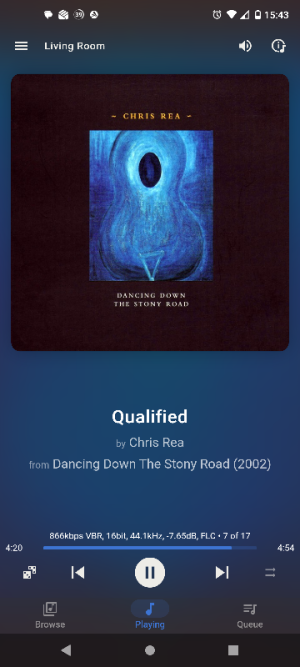
This is what my LMS server looks from accesing it over computer (I can use phone app also) and can control each room
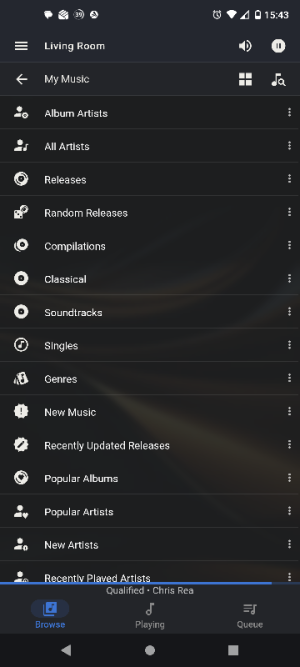
and how it looks from phone
Attachments
The amazon music PC app doesn't allow playback (aka casting) to another device - you'd need the phone or tablet app to do that.Ok then I already have Amazon Music app on my phone I been using it via Bluetooth to my headphones and my car stereo.
Now that I have a nice music library on my phone vis the Amazon Music app I want to play this on my vintage home stereo.
I don't want or need any room eq correction all that is done already, I just need to know which device and how to control it?
I originally thought to use my laptop to free up my phone but, there is a question if that is possible? Because of the casting of the Amazon Music from my laptop?
By Amazon Music library, I take it you mean a subscription based library, not files on your device as I think the feature to use local files in the Amazon Music app was deprecated a while back.
Edit: It seems that the feature to access local files is still in the Windows and Android Amazon Music apps, so the feature hasn't been entirely deprecated as I thought above. It would be useful if you could clarify what you exactly mean by your 'nice music library'
Last edited:
slartibartfast
Major Contributor
- Joined
- Apr 18, 2024
- Messages
- 6,162
My understanding is that all he wants to do is play Amazon Music, no local music.For subscription I can't help you as I don't use that.
But for local music, you'd have music somewhere, on a HDD . The Ultra allows you to connect a USB flash stick or USB HDD, I've tested it, it works ok. And is easy, just copy mp3/ogg/flac files to USB drive, connect to Ultra, let it scan the music.
or for streaming from a network device, You'd need music software somewhere this can be on your laptop -Mediamonkey is ok, then you'd need a UPNP app or the wiim home app, like bubble upnp on your phone. Or a Pi, or a NAS with audio server like minimserver
Then phone app, bubble, or I use Craig Drummonds LMS app.
If you rip/encode your own CD's then you can do this as well.
This is what my LMS server looks from accesing it over computer (I can use phone app also) and can control each room
and how it looks from phone
Given my edit to my previous response, it'd be good if the OP clarified what they meant when talking of their music library so we can rule out local music or not. I do agree it's perhaps confusing to talk of non-Amazon Music solutions until that's clarifiedMy understanding is that all he wants to do is play Amazon Music, no local music.
Given my edit to my previous response, it'd be good if the OP clarified what they meant when talking of their music library so we can rule out local music or not. I do agree it's perhaps confusing to talk of non-Amazon Music solutions until that's clarified
yeah just "you can do this also"
kinda shame having a streamer and only used 50% of it's features.
This would be correct!!! Sorry I wasn't more clear about the music. Right now I play music from my phone to my headphones and car stereo via Bluetooth, I want to be able to play the same music on my home vintage stereo system...My understanding is that all he wants to do is play Amazon Music, no local music.
Back to response #28 then - a phone and a WiiM streamer cabled to your stereo. While the Mini might suffice in the short term, a Pro Plus or Ultra would be what I’d go for particularly if all your vintage stereo has is analog RCA inputs - actually even if it has digital inputs, I’d go for either of those two WiiMs. The fact that the Ultra also has a headphone amp might lean you towards that.This would be correct!!! Sorry I wasn't more clear about the music. Right now I play music from my phone to my headphones and car stereo via Bluetooth, I want to be able to play the same music on my home vintage stereo system...
Back to response #28 then - a phone and a WiiM streamer cabled to your stereo. While the Mini might suffice in the short term, a Pro Plus or Ultra would be what I’d go for particularly if all your vintage stereo has is analog RCA inputs - actually even if it has digital inputs, I’d go for either of those two WiiMs. The fact that the Ultra also has a headphone amp might lean you towards that.
The kit he's got probably has a headphone amp, and most likely better quality than the one in the wiims (which are functional but nothing amazing)
Ultra will add a screen, but it's a bit small- so something like Eversolo or is a bit better here.
I’d hazard Eversolo wouldn’t support bit perfect casting from the Amazon Music app (even if thru the eversolo “remote” app), nor from Alexa. If you’re talking Amazon Music, I believe there’s nothing better on the market than WiiM devices.The kit he's got probably has a headphone amp, and most likely better quality than the one in the wiims (which are functional but nothing amazing)
Ultra will add a screen, but it's a bit small- so something like Eversolo or is a bit better here.
Similar threads
- Question
- Replies
- 8
- Views
- 1K

- Question
- Replies
- 22
- Views
- 1K
- Replies
- 4
- Views
- 415
- Replies
- 23
- Views
- 768
- Replies
- 4
- Views
- 719
