Move currently playing to another WiiM

Stessull

Active Member
Joined
Jan 20, 2023
Messages
59
It would be great to have the ability to transfer currently playing content in one room to another room seamlessly without, either having to start the playlist/album again or trying to search where you left off in the other room. I know you can have multi room but this would allow you to switch off one room and pickup in another. I hope this would be possible and could be considered.
 
Upvote 1
It would be great to have the ability to transfer currently playing content in one room to another room seamlessly without, either having to start the playlist/album again or trying to search where you left off in the other room. I know you can have multi room but this would allow you to switch off one room and pickup in another. I hope this would be possible and could be considered.
It’s already possible for radio iirc (touch the device name on the now playing screen to change to another device) and I seem to recall WiiM having it on their roadmap at one point for other services too.
 
Sorry for ressurecting an old thread but can't find a way to do this. Play from a mix of Spotify or Amazon music just wanna move I to the next room when I move through the house is there not a way in the app. When j was al Alexa could just say pause then say resume on the next device
 
Sorry for ressurecting an old thread but can't find a way to do this. Play from a mix of Spotify or Amazon music just wanna move I to the next room when I move through the house is there not a way in the app. When j was al Alexa could just say pause then say resume on the next device
If the stream was initiated by Alexa, then you can ask it to move the music to another speaker.

As it stands, when you select the speaker in the WiiM app now playing screen, you only get an option to add and sync to other speakers, so I guess you could add the device in the new room to sync with the original WiiM and then mute that
 
This is doable by Alexa when playback was intitiated by "her". I just say "Alexa move the music to Office"
"Office" being the name I gave in Alexa App to my Wiim mini
Or reversely "Alexa move the music to Speakers" being "Speakers" the name I gave to Wiim Ultranin the Alexa App.
Same works to move to/from Amazon echo devices or groups. You can do this within all Alexa enabled devices basically.

Regards
 
I can transfer a Spotify or Pandora stream to another Amazon and WiiM devices using an Alexa voice command but if I am steaming a station on TuneIn, iHeart radio etc. Alexa tells me "I can't find anything to move".
 
If you use the complete name of the "source" and of the "destination", usually it works.
For example, "Alexa, move the music from "office wiim" to "living room wiim" or viceversa.
 
I'm assuming that you mean for within the WiiM Home app? I currently get around this by using Tidal Connect or AirPlay for those times when I know that I'm going to be moving around--swap back to phone or switch it to another device. I could see myself also using the feature if it was available within the WiiM Home app.
 
I'm assuming that you mean for within the WiiM Home app? I currently get around this by using Tidal Connect or AirPlay for those times when I know that I'm going to be moving around--swap back to phone or switch it to another device. I could see myself also using the feature if it was available within the WiiM Home app.
As @Burnside mentioned, the easiest way right now is to always Multi-room group playback and switch by the mute button. In most cases, power consumption when muted is almost the same as when the device is in standby mode.
 
I can transfer a Spotify or Pandora stream to another Amazon and WiiM devices using an Alexa voice command but if I am steaming a station on TuneIn, iHeart radio etc. Alexa tells me "I can't find anything to move".
I think it only works if the playback was started by Alexa. If you started playing with Wiim Home App i think furher transfers won't work.
 
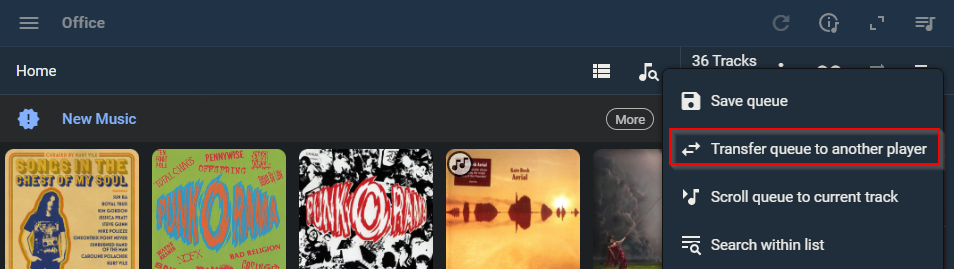
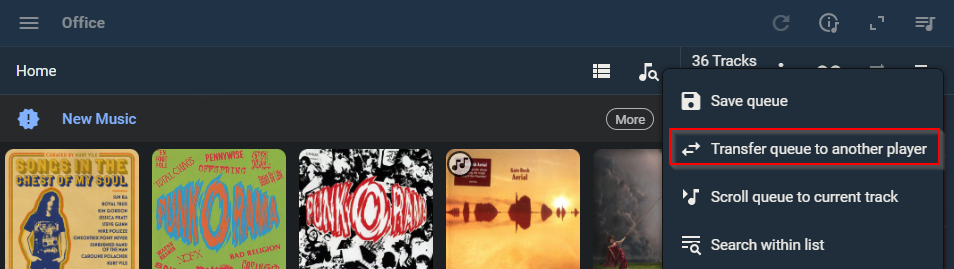
If you were to install Lyrion somewhere on your network and use the Material GUI for control instead of WHA then queue transfer between players is simplistic. Granted it does not support Amazon Music but it does support almost everything else.

This is screenshot from PC but it is virtually identical on a phone / tablet

1774884769902.png
 
As @Burnside mentioned, the easiest way right now is to always Multi-room group playback and switch by the mute button. In most cases, power consumption when muted is almost the same as when the device is in standby mode.
I've done that before, and it works fine. I generally have a room that is not in use that I could use as the "master" and keep muted while the rest are adjusted as needed.
 
I do this almost every morning. I have an Alexa routine that turns on my gear, some via smart plugs, and then runs a harmony activity which sets the inputs etc as well as running an http command via Home assistant to play my morning radio station on my Ultra from a Lyrion favourite. Some mornings it works while on others, the ultra hasn't fully loaded so Lyrion plays the stream on another WiiM that is available. If I get silence , I need to transfer the queue from that other WiiM to my Ultra. I really should just add a few more seconds delay before I issue that http request...
 
I do this almost every morning. I have an Alexa routine that turns on my gear, some via smart plugs, and then runs a harmony activity which sets the inputs etc as well as running an http command via Home assistant to play my morning radio station on my Ultra from a Lyrion favourite. Some mornings it works while on others, the ultra hasn't fully loaded so Lyrion plays the stream on another WiiM that is available. If I get silence , I need to transfer the queue from that other WiiM to my Ultra. I really should just add a few more seconds delay before I issue that http request...
My ambient listening is via a Show 8, which increasingly requires a loud shout to burst into life 🔊😁
 
Back
Top