Persistent group - persistent stereo mode?

KrimsonAudio

New Member
Joined
Jun 18, 2025
Messages
45
Is there a way to ensure that a persistent group is automatically in stereo mode whenever I re-engage it? It doesn’t seem to be doing that at the moment.
 
In which mode do you find your devices instead? And which devices are talking about?

Not sure if by stereo mode you mean each device playing one channel only or stereo as opposed to mono.
 
Lol yeah I could have provided a bit more info!

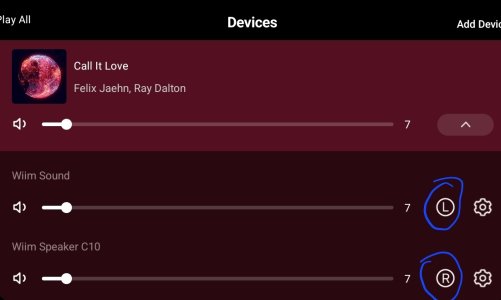
Yes, I want to use my Wiim Sound as my Left and my C10 wiim as my Right, but persistently (automatically?) when I engage the group. They default back to both speakers being L/R. Randomly, I disconnect the wiim sound to use as a L/R in other rooms as I move around and jam.

Thanks, and I hear you Mr Ee. I'm going to request this as a feature if it's not currently available because it's somewhat annoying that I have to go back into settings each time.
 
Lol yeah I could have provided a bit more info!

Yes, I want to use my Wiim Sound as my Left and my C10 wiim as my Right, but persistently (automatically?) when I engage the group. They default back to both speakers being L/R. Randomly, I disconnect the wiim sound to use as a L/R in other rooms as I move around and jam.

Thanks, and I hear you Mr Ee. I'm going to request this as a feature if it's not currently available because it's somewhat annoying that I have to go back into settings each time.
In the near future, once the Input Sound Profile feature is added to all devices, I believe this will become possible. Reconfiguring the group using the preset button will revert it back to a stereo pair.
 
it's somewhat annoying that I have to go back into settings each time.
Not sure quite what you mean by 'into settings'. The Audio Settings screen, Audio Channel?
If you leave this option in the Sound's settings to Stereo you can reasonably easily just use the Devices screen to cycle through the L, R, LR options.
When you quit the group the Sound should revert back to LR (stereo) as per the Audio Channel setting.
Not ideal I admit, but not too onerous.

Tap these:

1000000936.jpg
 
Last edited:
Not sure quite what you mean by 'into settings'. The Audio Settings screen, Audio Channel?
If you leave this option in the Sound's settings to Stereo you can reasonably easily just use the Devices screen to cycle through the L, R, LR options.
When you quit the group the Sound should revert back to LR (stereo) as per the Audio Channel setting.
Not ideal I admit, but not too onerous.

Tap these:

I agree it is not overly onerous. I do believe that to further optimize the ecosystem this feature would be nice.
 
I want to use my Wiim Sound as my Left and my C10 wiim as my Right
Just curious... why?
I have run these two both in Stereo mode right next door / literally on top of each other before and the pairing very nicely compensated for each others' (as I perceive them) weaknesses.
But as a Left / Right pair...?
 
I'm not sure I understand your question, but I think I can answer one way or another.

Yes, I would get better sound if the speakers were matched but I don't happen to have that set up right now. Maybe one day.

I don't put the speakers side by side because I enjoy how the room is better filled with sound and I can perceive the wider soundstage and stereo separation when they are further apart. This is especially the case in songs where the producer makes use of that effect.
 
Agreed, this is super annoying to deal with. IMO Wiim would benefit from overhauling how persistent groups work. I would love if there was an option to have grouped speakers behave similarly to how Google handles grouped speakers - e.g. 2 grouped speakers only show up as 1 entity. I have two A10s and only use them in a stereo pair. It's super annoying to have to go through multiple taps to play to them grouped and fix the stereo sound.
 
Another reason for this, is what I am exploring and I am suprised others arent doing this, is using two Amp Ultras to Bi Amp two speakers; instead of 100 wpc it would provide 200 wpc.

I tried this a month ago and it did not work well. I think the reason may have been as I was using one Amp Ultra to provide power to the left low and right low, and the other Amp Ultra to do left highs and right highs. As soon as the units went to "sleep", they would lose their connection. They would still be in a "group" but the two units would not be working together. It seems from my extensive research, one Amp Ultra needs to provide the right high AND low (even though Id be using the right and left outputs) and the other Amp Ultra would be designated as the left high and low. This creates a "persistent group" I guess.

Anyone do this and have success at keeping the two units syncd (grouped together) after they go into standby?
 
Another reason for this, is what I am exploring and I am suprised others arent doing this, is using two Amp Ultras to Bi Amp two speakers; instead of 100 wpc it would provide 200 wpc.

I tried this a month ago and it did not work well. I think the reason may have been as I was using one Amp Ultra to provide power to the left low and right low, and the other Amp Ultra to do left highs and right highs. As soon as the units went to "sleep", they would lose their connection. They would still be in a "group" but the two units would not be working together. It seems from my extensive research, one Amp Ultra needs to provide the right high AND low (even though Id be using the right and left outputs) and the other Amp Ultra would be designated as the left high and low. This creates a "persistent group" I guess.

Anyone do this and have success at keeping the two units syncd (grouped together) after they go into standby?

To my knowledge, persistent groups are independent of the output of each device. The group will function regardless of the output destination. Furthermore, the group is not broken when a device enters standby mode. The group is maintained even after a device reboot.
 
Back
Top