Rattling subwoofer

eetee85

Member
Joined
Dec 15, 2025
Messages
6
Hello fellow Wiimers,

I recently acquired a 2nd-hand wiim ultra and I'm having a hard time integrating it into my current setup. The issue is the subwoofer, no matter what settings I set it produces a disgusting rattling, distorted sound.
I have a Dali Trio AW8 sub which I connect through its sub in input to Wiim Ultra's sub output. (The rest of the system is two Kali Audio MM-6 speaker drive trough the optical output, no issues)

The dali sub is working fine in another setup driving with a yamamha amp sub out, love the sound! --> no issue

The wiim sub out is also tested with another subwoofer with the same sub-out --> sub-lfe-input route --> no issue

Here are my settings:
Wiim:
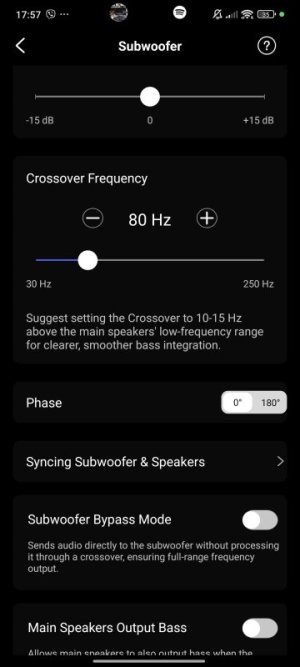
Crossover frequency: 80Hz
Sound level: +15dB (I tried all values within the available scale from -15 to +15, simply no sound below 0, and only timid rattling around 5-10dB range)
Bypass mode=off
EQ/Roomfit=off


Dali:
Crossover frequency: fully open at 150Hz
Level: at 9 o'clock position (tried all positions)

Conclusions:
I'm suspecting that the Wiim ultra doesn't outputs hot enough signal for the Dali. Based on my research the Wiim Ultra produces ~1Vrms signal (for comparison my Yamaha amp puts out 4Vrms) on it's sub out. So my 1st assumption is that the Wiim simply not producing enough signal to drive the Dali (input impedance 47 kOhm), hence this rattling sound.
The symptoms are improving when i use the Dali's line-inputs, the rattling sound disappears, but the sound still sound "higher" and not as controlled as it should be.

My 2nd theory (actually its chatgpt's 😁) is because:
"- the WiiM Sub Out may contain components around 0–10 Hz
- the DALI mono input is not AC-coupled
- this causes input instability / distortion
- this does not occur with Yamaha AVRs, because they already have infrasonic (high-pass) filtering built in
"

I tried literally every possible sub settings in Wiim app, still no improvement. ☹️

If anyone has run into something similar, please let me know.🙏
 
Last edited:
Hello fellow Wiimers,

I recently acquired a 2nd-hand wiim ultra and I'm having a hard time integrating it into my current setup. The issue is the subwoofer, no matter what settings I set it produces a disgusting rattling, distorted sound.
I have a Dali Trio AW8 sub which I connect through its sub in input to Wiim Ultra's sub output. (The rest of the system is two Kali Audio MM-6 speaker drived trough the optical output, no issues)

The dali sub is working fine in another setup driving with a yamamha amp sub out, love the sound! --> no issue

The wiim sub out is also tested with another subwoofer with the same sub-out-->sub-lfe-input route --> no issue

Here are my settings:
Wiim:
Crossover frequency: 80Hz
Sound level: +15dB (I tried all values within the available scale from -15 to +15, simply no sound below 0, and only timid rattling around 5-10dB range)
Bypass mode=off
EQ/Roomfit=off


Dali:
Crossover frequency: fully open at 150Hz
Level: at 9 o'clock position (tried all positions)

Conclusions:
I'm suspecting that the Wiim ultra doesn't outputs hot enough signal for the Dali. Based on my research the Wiim Ultra produces ~1Vrms signal (for comparison my Yamaha amp put ut 4Vrms) on it's sub out. So my 1st assumption is that the Wiim simply not producing enough signal to drive the Dali (input impedance 47 kOhm), hence this rattling sound.
The symptoms are improving when i use the Dalis line-inputs, the rattling sound disappears, but the sound still sound "higher" and not as controlled as it should be.

My 2nd theory (actually its chatgpt's 😁) is because:
"- the WiiM Sub Out may contain components around 0–10 Hz
- the DALI mono input is not AC-coupled
- this causes input instability / distortion
- this does not occur with Yamaha AVRs, because they already have infrasonic (high-pass) filtering built in
"

I tried literally every possible sub settings in Wiim app, still no improvement. ☹️

If anyone has run into something similar, please let me know.🙏
Hi

Could you please turn the volume knob on the Dali sub to 50% (12 o'clock) and return the sub level on the Ultra to 0dB, run RoomFit and post the results here?
 
@eetee85, which device is controlling the volume in your setup?
I'm using mainly two inputs:
- Ethernet cable from my router
- My TVs HDMI Arc out (configured to be PCM in the TV settings) connected with the wiim's hdmi cable

But for the sake of testing I've tried sourcing the music through bluetooth and wifi as well.
Spotify connect and YouTube were the source of the music.

Tried to connect the subwoofer main into a different power socket to eliminate the possibility of a ground loop.
 
I'm using mainly two inputs:
- Ethernet cable from my router
- My TVs HDMI Arc out (configured to be PCM in the TV settings) connected with the wiim's hdmi cable

But for the sake of testing I've tried sourcing the music through bluetooth and wifi as well.
Spotify connect and YouTube were the source of the music.

Tried to connect the subwoofer main into a different power socket to eliminate the possibility of a ground loop.
That's all interesting but not the answer to my question. ;)

Let me be more clear:
If you connect a subwoofer to the WiiM Ultra's subwoofer output then all other device in the chain after the Ultra must not control the volume setting.

In general, the WiiM Ultra should be the device controlling the volume. This will ensure that the subwoofer output level and the Ultra's analogue or digital output level are always in perfect sync. HDMI ARC with CEC is a special case because even if you use the TV remote to adjust the volume, the TV will really just tell the Ultra to adjust the volume.

But before I try to describe all possible configurations and the resulting implications it would be easier if you could describe your entire chain in detail.

The output voltage of the WiiM Ultra is not the problem. It's 2 Vrms, but changing with the volume setting, of course, and also influenced by the subwoofer level setting. +15 dB doesn't sound right in most cases.
 
That's all interesting but not the answer to my question. ;)

Let me be more clear:
If you connect a subwoofer to the WiiM Ultra's subwoofer output then all other device in the chain after the Ultra must not control the volume setting.

In general, the WiiM Ultra should be the device controlling the volume. This will ensure that the subwoofer output level and the Ultra's analogue or digital output level are always in perfect sync. HDMI ARC with CEC is a special case because even if you use the TV remote to adjust the volume, the TV will really just tell the Ultra to adjust the volume.

But before I try to describe all possible configurations and the resulting implications it would be easier if you could describe your entire chain in detail.

The output voltage of the WiiM Ultra is not the problem. It's 2 Vrms, but changing with the volume setting, of course, and also influenced by the subwoofer level setting. +15 dB doesn't sound right in most cases.
Oh, sorry for the confusion, and thanks for the explanation.
The chain looks like this :

Code:
WiiM Ultra
│
├── HDMI ARC input
│       ▲
│       └── HDMI cable (Wiim's own cable)── TV (HDMI eARC / ARC output through PCM)
│
├── Optical (TOSLINK) output
│       │
│       └── Optical cable ──► Kali Audio MM-6 (optical input)
│
├── Subwoofer output (RCA, mono)
│       │
│       └── RCA cable ──► DALI AW 8 subwoofer (mono / LFE line input)
│
└── Ethernet (UTP)
        │
        └── Router / LAN
 
Oh, sorry for the confusion, and thanks for the explanation.
The chain looks like this :

Code:
WiiM Ultra
│
├── HDMI ARC input
│       ▲
│       └── HDMI cable (Wiim's own cable)── TV (HDMI eARC / ARC output through PCM)
│
├── Optical (TOSLINK) output
│       │
│       └── Optical cable ──► Kali Audio MM-6 (optical input)
│
├── Subwoofer output (RCA, mono)
│       │
│       └── RCA cable ──► DALI AW 8 subwoofer (mono / LFE line input)
│
└── Ethernet (UTP)
        │
        └── Router / LAN

Cool, that's something to work with.

The all important bit is that after setting up your subwoofer you must not touch the MM-6 remote control or the gain knob on the back ever again. You must only use either the WiiM remote or the volume knob on the Ultra's front plate or the WiiM Home App or the TV remote to adjust the volume.

The relative volume between the subwoofer and the speakers must remain the same, no matter how loud you want to listen. If however the volume setting on the Ultra remains unchanged but you do change the volume of the speakers, then the subwoofer will simply continue to play at the very same level. The speakers have no way to even know about the subwoofer, let alone adjusting it's level.

Before going any further I'd like to have you confirm if this is what you already did.
If not, is my explanation clear why you'd have to change it?
 
Cool, that's something to work with.

The all important bit is that after setting up your subwoofer you must not touch the MM-6 remote control or the gain knob on the back ever again. You must only use either the WiiM remote or the volume knob on the Ultra's front plate or the WiiM Home App or the TV remote to adjust the volume.

The relative volume between the subwoofer and the speakers must remain the same, no matter how loud you want to listen. If however the volume setting on the Ultra remains unchanged but you do change the volume of the speakers, then the subwoofer will simply continue to play at the very same level. The speakers have no way to even know about the subwoofer, let alone adjusting it's level.

Before going any further I'd like to have you confirm if this is what you already did.
If not, is my explanation clear why you'd have to change it?
Thanks for the reply!
I increased the speakers volume to distortion-free max with their remote control while the Wiim volume was set 100. Didnt touch that remote since, I control the volume either from the wiim Android app, or with my tv remote with CEC.

For the sub I set its power level potmeter into 9o'clock (lets say 75%) position, with the crossover pot fully open at 150hz, to be able to control the crossover frequency with the Wiim. (Sub settings of the wiim were explained in my prev. post.)
I didnt run room correction yet, but only sub synchronisation (sub time compensation is 5ms)
 
Thanks for the reply!
I increased the speakers volume to distortion-free max with their remote control while the Wiim volume was set 100. Didnt touch that remote since, I control the volume either from the wiim Android app, or with my tv remote with CEC.

For the sub I set its power level potmeter into 9o'clock (lets say 75%) position, with the crossover pot fully open at 150hz, to be able to control the crossover frequency with the Wiim. (Sub settings of the wiim were explained in my prev. post.)
I didnt run room correction yet, but only sub synchronisation (sub time compensation is 5ms)
The manual for the Dali sub says the middle position for the volume control is 12 o'clock. So 9 o'clock isn't 75%.
Screenshot_20251217-132823.png
 
The manual for the Dali sub says the middle position for the volume control is 12 o'clock. So 9 o'clock isn't 75%.
View attachment 31095
good catch, let's mirror it then, so 3o'clock (if 7o'clock is 0 and 5o'clock is 100%), so ~70-75% still stands as physical sub level. (with application sub level set to +15dB (!) yeah, I know..)

Let me explain a little bit what I did and how I ended up with this rather unconventional settings:
At the 1st connection of the Dali sub its physical level potmeter was set to 0, the application sub level setting was at 0dB all along. Then I slowly increased it by turning the physical level pot. in the back panel until I reached the so called 75% position. The sound went from mute into quiet rattle then moderate rattle (at 75%). It was never a healthy subby sound :/ (During this test, the main Kali speakers were muted/unmuted for volume level comparisons from their dedicated remote control).
Then, I started to increase application level too, to match the speaker level sound level at to the point where it reached the +15dB setting.
For the crossover my though process was that since the crossover freq. controlled from the Wiim (set to 80Hz), I set the physical crossover frequency to be fully open.

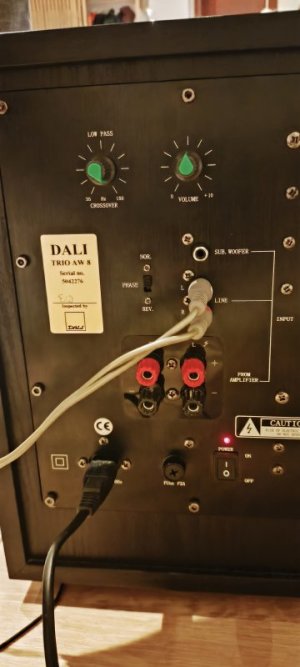
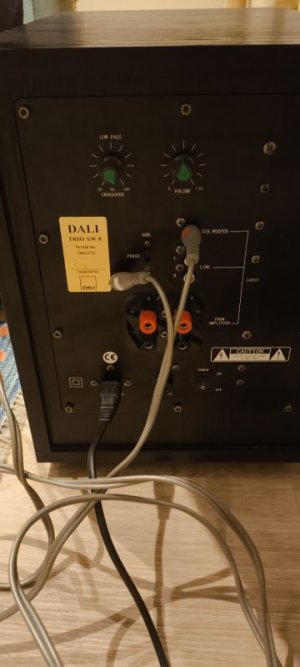
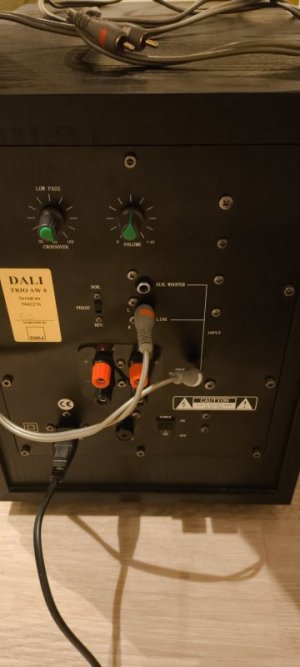
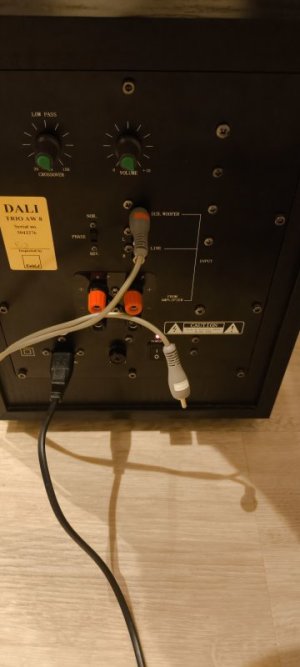
I will send a sound sample, picture from the sub back panel as well as print screens abt the Wiim sub settings when I get home.

Could you please validate your recommended procedure for sub integration?
1. Put the Dali sub physical potmeter (both level and crosover freq.) into the central (12o'clock) position
2. Wiim sub settings: sub level to 0dB, crossover lets say to 80Hz. Where should I put the Wiim's main volume level?
3. THEN run a RoomFIT?

Thanks again for your time and support! I'm super grateful!

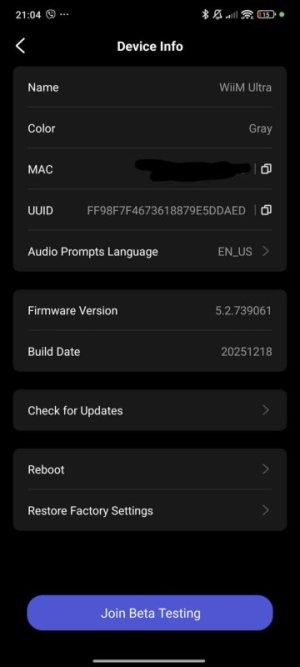
p.s: wiim ultra's FW is the latest one. (Im not a beta tester or anything like that.)
 
I did run the roomfit with the suggested settings,
on the subwoofer settings1000011336.jpg
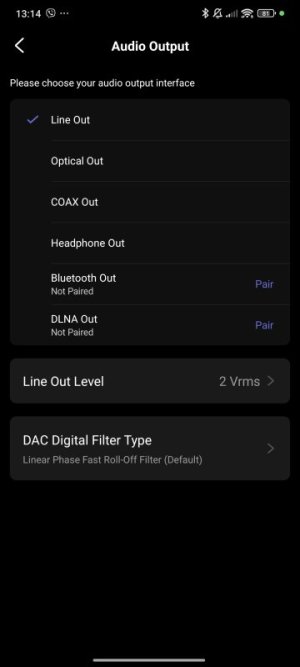
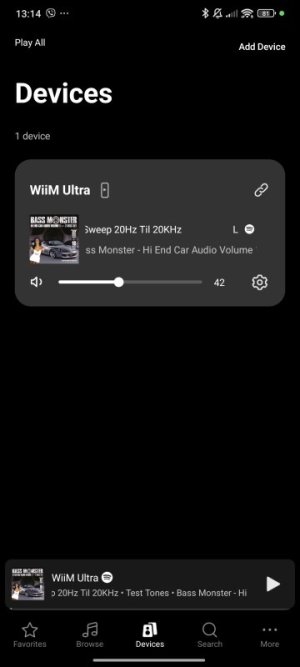
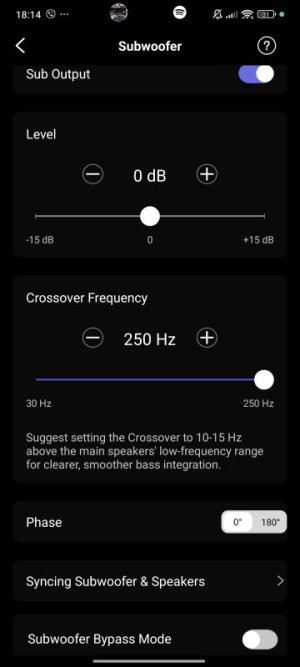
Wiim sub settings:
1000011329.jpg
1000011330.jpg
Roomfit settings:
1000011338.jpg
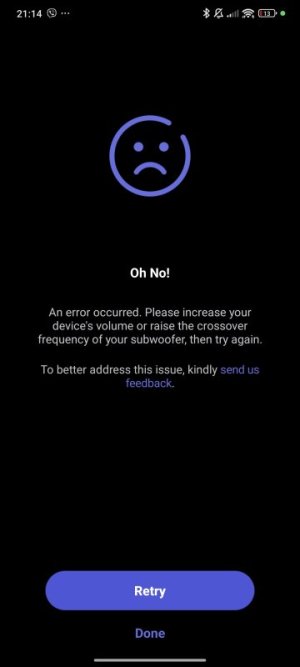
After the test:
1000011337.jpg
How it sounds (no sound from the woofer at all)
In the end I crank up the physical level to max, I still nothing:
View attachment 1000011334.mp4
Here's how it sounds with wiim sub level to the max (roomfit settings still active)

View attachment 1000011326.mp4
Here is how it sounds with
  • Dali level at max
  • Dali crossover fully opened az 150Hz
  • Wiim sub level +15dB
  • Wiim co. freq: 80hz
  • Roomfit: off
  • Speaker outputs bass: off:
View attachment 1000011340.mp4


Same sub, same cable with yamaha amp connected with it's sub out: it works. I don't get it...

My device info:
1000011342.jpg
Every suggestion is greatly appreciated!
 
Back
Top