RoomFit Status Invisible with Tidal & Spotify Connect

TD1

New member
Joined
Aug 4, 2024
Messages
4
Recently started using Tidal Connect & Spotify Connect with my WiiM Pro Plus. Previously, I activated the WiiM app (on an Android phone) and used Tidal as my streaming source.

Starting with Tidal or Spotify, and then attaching to the WiiM, I am then unable to see whether RoomFit is enabled and which set of parameters is in use. I am able to see basic EQ status.

Operator error or is this a software limitation?

TIA for any help...

Tim
 
You are asking that the Tidal and Spotify apps should somehow display WiiM's RoomFit? Not sure how that would work...
 
Recently started using Tidal Connect & Spotify Connect with my WiiM Pro Plus. Previously, I activated the WiiM app (on an Android phone) and used Tidal as my streaming source.

Starting with Tidal or Spotify, and then attaching to the WiiM, I am then unable to see whether RoomFit is enabled and which set of parameters is in use. I am able to see basic EQ status.

Operator error or is this a software limitation?

TIA for any help...

Tim
Hi

Are you referring to the RoomFit status displayed on the WiiM app's device settings screen?
1537.jpg
In my case, it appears even while playing via Spotify Connect. You might try checking for updates to the WiiM app; if it's already the latest version, clearing the cache (Android) or reinstalling (iOS) could help.
 
Do you mean you see eq on the WiiM app now playing screen, but not whether roomfit is applied or not?

I think most people (there will be exceptions of course) will run roomfit , turn it on and forget it - it’s not something I personally see necessary to occupy space on the now playing screen, it’s easily checked under settings. Showing EQ is logical as it’s more dynamic and you might want to check or change that, but I don’t see that as the case with roomfit status.
 
Last edited:
Starting with Tidal or Spotify, and then attaching to the WiiM, I am then unable to see whether RoomFit is enabled and which set of parameters is in use. I am able to see basic EQ status.

Operator error or is this a software limitation?
It's the same, no matter if you use Tidal Connect or the Tidal integration within the WiiM Home App.

Room correction results had been stored as EQ presets before RoomFit profiles were introduced. Could it be that this is what you're missing?
 
Thanks for the helpful replies. The information is there, if you look in the right place.

Workflow, Android 14 / OneUI 6.0 on SGS22, WiiM Home app v3.4.0.
  • Start Spotify app, play a song
  • Select WiiM device, output switches to WiiM
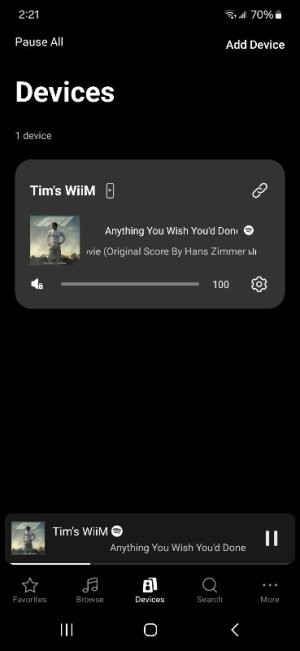
  • Activate WiiM app, Devices page appears (1st image)
  • Select bottom pane, song pane raises (2nd image). Spotify source shown at top.
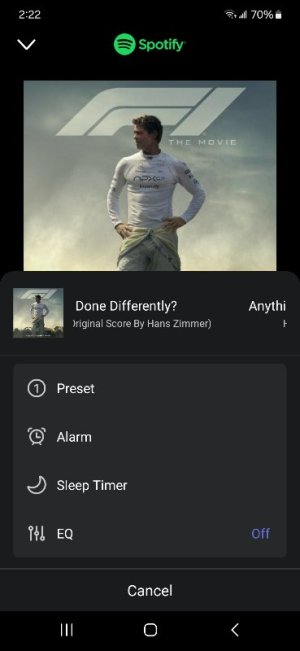
  • Select dots on top pane next to song title, a panel raises, this panel includes "EQ" (3rd image)
  • Return twice to Devices page
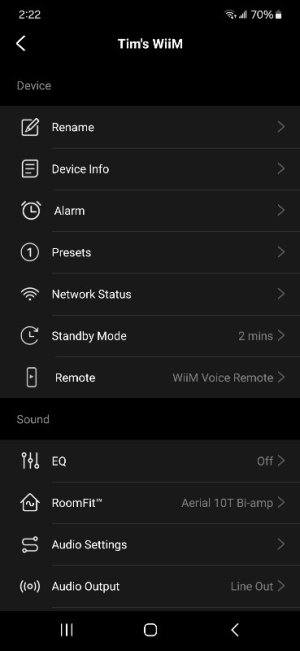
  • Select Settings gear in top box, this raises a Settings page (4th image)
  • RoomFit is visible here.
No, I would not expect Spotify, Tidal, or any app to have a UI to the WiiM RoomFit interface, but there's a UI for everything these days, and that level of integration certainly isn't unheard of.

As for RoomFit, I have multiple RoomFit curves which reflect multiple possible system configurations (amps, preamp present / absent, bi-amp or not, speaker pair in use). I agree a given RoomFit configuration is likely to stay in use once selected, but it is nice to know which one is in use at a given moment. It is also nice to have a confirmation that some RoomFit EQ is active, given it isn't shown along with "EQ" in the 3rd image.

Last, yes, I appreciate that RoomFit came later, and was added without presenting it, graphical EQ, and parametric EQ in a single unified interface.

Thanks again
Tim
 

Attachments

  • Screenshot_20251203_142144_WiiM Home.jpg
    Screenshot_20251203_142144_WiiM Home.jpg
    27 KB · Views: 4
  • Screenshot_20251203_142152_WiiM Home.jpg
    Screenshot_20251203_142152_WiiM Home.jpg
    39.7 KB · Views: 5
  • Screenshot_20251203_142202_WiiM Home.jpg
    Screenshot_20251203_142202_WiiM Home.jpg
    31.5 KB · Views: 7
  • Screenshot_20251203_142244_WiiM Home.jpg
    Screenshot_20251203_142244_WiiM Home.jpg
    29.3 KB · Views: 7
Last edited:
Last, yes, I appreciate that RoomFit came later, and was added without presenting it, graphical EQ, and parametric EQ in a single unified interface.
There's a constant fight between users asking for more information to be visible and those complaining that it's too much, already. :)

You can start a feature request for what seems to be your preference, but expect others to not support it.
 
Very difficult to please everyone, especially when it comes to a UI.

To be clear, I'm not asking for anything. The information is already available, but it is available in a way which seems to reflect implementation order and not a unified design. It very likely came to market faster this way, which is a plus.

Thanks
Tim
 
Very difficult to please everyone, especially when it comes to a UI.
Thanks for clarification.

To be clear, I'm not asking for anything. The information is already available, but it is available in a way which seems to reflect implementation order and not a unified design. It very likely came to market faster this way, which is a plus.
I still don't think I fully agree with this. RoomFit already underwent several iterations and the current UI supporting multiple profiles looks pretty much in line with all the other settings in the WiiM Home App to me. There are probably more things to come and have been asked for, e.g. RoomFit profiles as part of smart presets. This might or might not be the way WiiM choose to implement it, maybe we will see more generalised listening profiles instead.

The new My Lyngdorf app does give access to all the RoomPerfect profiles you have right from the start page (which is not the now playing screen) and this start screen is even fully customisable. From my view this app is the current state of the art. But I'm sure that others won't like their concept. As you said, hard to please everyone.
 
Back
Top