Scroll Feature Button ~

vinod_david

Member
Joined
Dec 27, 2025
Messages
14
- Attached screenshot of Sonos App scrolling method. Very easy. Wiim's moving index finger to scroll down/up is difficult.
- In screenshot far right top corner you see that round up/down arrow button. We need to just press index finger on it and slide down that button. This makes scrolling up/down so easy from A to Z and Z to A.
- Can it be done.
 

Attachments

  • Screenshot_2025-12-28-16-44-44-641_com.sonos.acr2.jpg
    Screenshot_2025-12-28-16-44-44-641_com.sonos.acr2.jpg
    24.7 KB · Views: 13
Upvote 0
- Attached screenshot of Sonos App scrolling method. Very easy. Wiim's moving index finger to scroll down/up is difficult.
- In screenshot far right top corner you see that round up/down arrow button. We need to just press index finger on it and slide down that button. This makes scrolling up/down so easy from A to Z and Z to A.
- Can it be done.
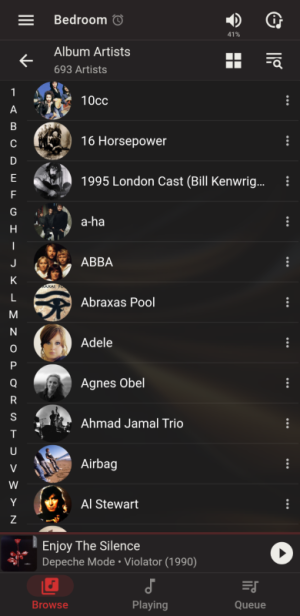
Lyrion is arguably even easier. Just click on the letter on the left side.
Screenshot_20251228-150125.png
 
Lyrion is arguably even easier. Just click on the letter on the left side.
View attachment 31567

I don't think it's very useful outside English-speaking countries. There are many characters beyond the alphabet. 🙂

The scroll icons used by Qobuz and Spotify are smart.

When sorting the list alphabetically, the initial letter appears next to the scroll icon.
1710.jpg


When sorting by the date added, the date is displayed.
1712.jpg
 
I don't think it's very useful outside English-speaking countries. There are many characters beyond the alphabet. 🙂

The scroll icons used by Qobuz and Spotify are smart.

When sorting the list alphabetically, the initial letter appears next to the scroll icon.
View attachment 31568


When sorting by the date added, the date is displayed.
View attachment 31569
True. I have no idea how it would work with Japanese characters.
 
Back
Top