There's a thing.. that I haven't tried yet, called "Controller for Wiim" that sends all your Windows audio to the Wiim... Sounds pretty much what you want.
But I have to say, every single widget I've tried in the past to send just all Windows audio to a remote audio device has either failed to work or been very flaky. But that was years ago before I had the Wiim. The Wiim has been slick so far, and there's a lot of renewed interest in DLNA so maybe things work better now.. I hope so!
You have to realize that DLNA is not about sending audio from HERE (where you are) to THERE (where the speaker is connected). It's about CONTROLLING the devices. You're telling THERE (the Wiim), to play back an audio file stored to a different THERE (a media server somewhere), and the Wiim connects to the media server and fetches the data and starts playing it.
So, all the plugins that work to send computer audio via DLNA work by pretending to be a media server.. that serves only one file.. that happens to be whatever is coming out of your computer audio device right now. It's a bit of a hack that is unsurprisingly not always reliable.
(ATTN WIIM: It would be nice if someone took the bull by the horns and supported AES67 as a standard for real-time home audio streaming. There are already AES67 implementations for Windows and Mac.. but it's not supported by streaming devices. If Wiim implemented AES67 and also provided an AES67 audio device for Windows that was user friendly, you'd fix this problem forever and win a lot of customers)
But anyway, meanwhile.. there are three ways that definitely work for playing music from your computer to the Wiim wirelessly:
1) You can run a DLNA media server.. on Windows, there already is one.. within Windows Media Player.. you just have to go into the correct control panel and turn it on.. and tell it what folders you want to serve. Then you can use any DLNA controller app including the Wiim app, to play those files, as long as your computer is on and connected to the network, you can play them using your phone or whatever....
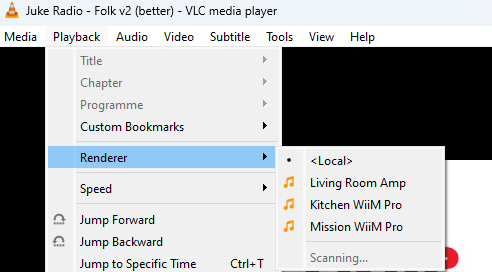
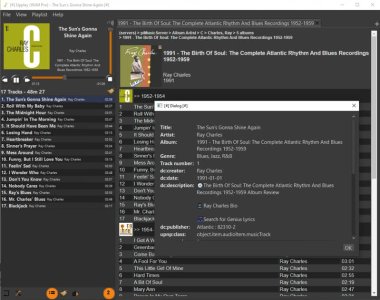
2) You can use a player like Foobar2000 or VLC, both of which have (using available official plugins) to connect to any DLNA renderer and play whatever you ask them to play. This isn't sending Windows audio, it's acting like a DLNA media server and a DLNA controller at the same time.. but it FEELS like the player is playing the music, and it LOOKS like it's playing it. Technically the Wiim is playing it and Foobar2000 (or whatever) is just controlling the Wiim and serving the media.. but hey, does it really matter?? It's more like what you want, and it works.... You don't need to worry about a media server and sharing folders, you can just click on any file and play it....
3) You can share your Music folder using SMB (regular windows file sharing), and connect to it using the Wiim, then you can use the Wiim app to browse that folder and play whatever you want. This has the advantage of simplicity. Once you get everything set up, anything you put in your Music folder will just be there, you don't have to worry about metadata and indexing and all that media server blahblah. And, because it's through the Wiim app, you can play your music without being in front of the computer.
4) Bluetooth obviously, but blaaaah.




 .
.