Streaming to WiiM over WiFi (Windows)

xxubiqts

New member
Joined
Aug 11, 2023
Messages
4
I previously owned a Macbook and would stream music from iTunes to my WiiM over WiFi.

I now own a Windows laptop and would like to stream music from MusicBee, my preferred media player, to my WiiM over WiFi.

Put even more simply, how do I send my PC audio to WiiM over WiFi? Please tell me this is possible. Why oh why did I switch to Windows?
 
For everyone, who wants to use foobar with the foo_upnp plug in but thinking foobar has an old user interface/optic, i can recommended the following skin. Easy to install, nice to use:


My installation:

foobar2000, ver. 1.6.18 (latest version before 2.x)

foo_upnp plugin

Georgia Reborn
See link above (updated)

Works flawlessly since years, with fun 🤘
 
Last edited by a moderator:
^Installing Squeezelite-X gives you the possibility of running the Squeezelite player on the PC, but you don't have to enable it. Squeezelite-X without the local player enabled functions as a very good controller for the Squeezelite player on your WiiM.
 
^Installing Squeezelite-X gives you the possibility of running the Squeezelite player on the PC, but you don't have to enable it. Squeezelite-X without the local player enabled functions as a very good controller for the Squeezelite player on your WiiM.
Material skin is already part of LMS. So again you don't need Squeezelite-X
 
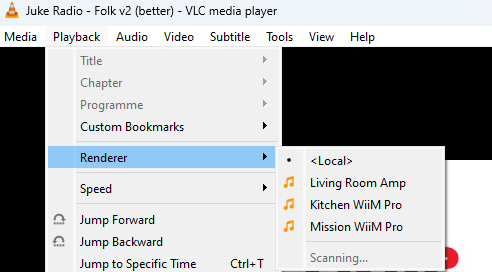
VLC seems only to support Chromecast so isn't gapless.

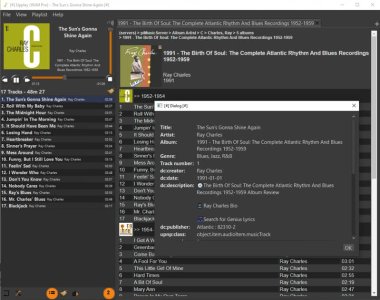
If you were looking to use it as a UPnP control point then upplay is a much better option, although just as graphically challenged :)

View attachment 15958

That's true, my mistake.

For streaming from PC, I'm really happy with foobar, no reason for change it 😉.

If I'm listening on PC/HTPC (not streaming) MusicBee is my favorite SW/App.

...but I'll check out upplay, next weekend. Thanks!
 
Why is Squeezelite-X better than a browser? You don't need to use your PC at all to control it of course, you can use a phone or tablet.
I find one good reason to prefer it over a normal browser: media keys. If I am at the office (working on the computer) I always prefer using the media keys on my keyboard. Other than that, not really.
 
I find one good reason to prefer it over a normal browser: media keys. If I am at the office (working on the computer) I always prefer using the media keys on my keyboard. Other than that, not really.
The Material skin allows use of Media keys via a browser
 
I previously owned a Macbook and would stream music from iTunes to my WiiM over WiFi.

I now own a Windows laptop and would like to stream music from MusicBee, my preferred media player, to my WiiM over WiFi.

Put even more simply, how do I send my PC audio to WiiM over WiFi? Please tell me this is possible. Why oh why did I switch to Windows?

Hi, the WiiM Home App for Windows (beta version, somewhat restricted, rarely updated) has a "My Music" folder that links to your "Music" folder in Windows. It should allow you to stream content from that folder directly to your WiiM over WiFi. Someone correct me if I'm wrong, please.
 
The Material skin allows use of Media keys via a browser
True, but the way it gets around it is kind of hacky:
To support this feature, this app needs to fool your browser into thinking it is playing audio. This is accomplished by playing a silent audio file in a loop. Most browsers block auto-playing of audio so this cannot start until you have interacted with the app (e.g. clicked somewhere). Alternatively you can configure your browser to allow auto-play of audio for the URL you use to access this app (192.168.68.133:9000).
So, while doable, I'd rather have a "proper" Windows app (which isn't quite "proper", since it's a browser with some wrapping around it) dealing with media keys, instead of having my browser play some quiet file. My sound setup is a bit complicated to have weird behaviours potentially getting in the way. But maybe it's just me being a control freak.
Normal browser + hacky implementation DOES give you back some RAM and CPU, that's for sure.
 
There's a thing.. that I haven't tried yet, called "Controller for Wiim" that sends all your Windows audio to the Wiim... Sounds pretty much what you want.

But I have to say, every single widget I've tried in the past to send just all Windows audio to a remote audio device has either failed to work or been very flaky. But that was years ago before I had the Wiim. The Wiim has been slick so far, and there's a lot of renewed interest in DLNA so maybe things work better now.. I hope so!

You have to realize that DLNA is not about sending audio from HERE (where you are) to THERE (where the speaker is connected). It's about CONTROLLING the devices. You're telling THERE (the Wiim), to play back an audio file stored to a different THERE (a media server somewhere), and the Wiim connects to the media server and fetches the data and starts playing it.

So, all the plugins that work to send computer audio via DLNA work by pretending to be a media server.. that serves only one file.. that happens to be whatever is coming out of your computer audio device right now. It's a bit of a hack that is unsurprisingly not always reliable.

(ATTN WIIM: It would be nice if someone took the bull by the horns and supported AES67 as a standard for real-time home audio streaming. There are already AES67 implementations for Windows and Mac.. but it's not supported by streaming devices. If Wiim implemented AES67 and also provided an AES67 audio device for Windows that was user friendly, you'd fix this problem forever and win a lot of customers)

But anyway, meanwhile.. there are three ways that definitely work for playing music from your computer to the Wiim wirelessly:

1) You can run a DLNA media server.. on Windows, there already is one.. within Windows Media Player.. you just have to go into the correct control panel and turn it on.. and tell it what folders you want to serve. Then you can use any DLNA controller app including the Wiim app, to play those files, as long as your computer is on and connected to the network, you can play them using your phone or whatever....

2) You can use a player like Foobar2000 or VLC, both of which have (using available official plugins) to connect to any DLNA renderer and play whatever you ask them to play. This isn't sending Windows audio, it's acting like a DLNA media server and a DLNA controller at the same time.. but it FEELS like the player is playing the music, and it LOOKS like it's playing it. Technically the Wiim is playing it and Foobar2000 (or whatever) is just controlling the Wiim and serving the media.. but hey, does it really matter?? It's more like what you want, and it works.... You don't need to worry about a media server and sharing folders, you can just click on any file and play it....

3) You can share your Music folder using SMB (regular windows file sharing), and connect to it using the Wiim, then you can use the Wiim app to browse that folder and play whatever you want. This has the advantage of simplicity. Once you get everything set up, anything you put in your Music folder will just be there, you don't have to worry about metadata and indexing and all that media server blahblah. And, because it's through the Wiim app, you can play your music without being in front of the computer.

4) Bluetooth obviously, but blaaaah.

 
There's a thing.. that I haven't tried yet, called "Controller for Wiim" that sends all your Windows audio to the Wiim... Sounds pretty much what you want.

But I have to say, every single widget I've tried in the past to send just all Windows audio to a remote audio device has either failed to work or been very flaky. But that was years ago before I had the Wiim. The Wiim has been slick so far, and there's a lot of renewed interest in DLNA so maybe things work better now.. I hope so!

You have to realize that DLNA is not about sending audio from HERE (where you are) to THERE (where the speaker is connected). It's about CONTROLLING the devices. You're telling THERE (the Wiim), to play back an audio file stored to a different THERE (a media server somewhere), and the Wiim connects to the media server and fetches the data and starts playing it.

So, all the plugins that work to send computer audio via DLNA work by pretending to be a media server.. that serves only one file.. that happens to be whatever is coming out of your computer audio device right now. It's a bit of a hack that is unsurprisingly not always reliable.

(ATTN WIIM: It would be nice if someone took the bull by the horns and supported AES67 as a standard for real-time home audio streaming. There are already AES67 implementations for Windows and Mac.. but it's not supported by streaming devices. If Wiim implemented AES67 and also provided an AES67 audio device for Windows that was user friendly, you'd fix this problem forever and win a lot of customers)

But anyway, meanwhile.. there are three ways that definitely work for playing music from your computer to the Wiim wirelessly:

1) You can run a DLNA media server.. on Windows, there already is one.. within Windows Media Player.. you just have to go into the correct control panel and turn it on.. and tell it what folders you want to serve. Then you can use any DLNA controller app including the Wiim app, to play those files, as long as your computer is on and connected to the network, you can play them using your phone or whatever....

2) You can use a player like Foobar2000 or VLC, both of which have (using available official plugins) to connect to any DLNA renderer and play whatever you ask them to play. This isn't sending Windows audio, it's acting like a DLNA media server and a DLNA controller at the same time.. but it FEELS like the player is playing the music, and it LOOKS like it's playing it. Technically the Wiim is playing it and Foobar2000 (or whatever) is just controlling the Wiim and serving the media.. but hey, does it really matter?? It's more like what you want, and it works.... You don't need to worry about a media server and sharing folders, you can just click on any file and play it....

3) You can share your Music folder using SMB (regular windows file sharing), and connect to it using the Wiim, then you can use the Wiim app to browse that folder and play whatever you want. This has the advantage of simplicity. Once you get everything set up, anything you put in your Music folder will just be there, you don't have to worry about metadata and indexing and all that media server blahblah. And, because it's through the Wiim app, you can play your music without being in front of the computer.

4) Bluetooth obviously, but blaaaah.
There is also “Stream What You Hear”. The original version has a memory leak but the version re-written in Rust works well. This will stream all audio that hits your PCs sound card
 
There is also “Stream What You Hear”. The original version has a memory leak but the version re-written in Rust works well. This will stream all audio that hits your PCs sound card

Yea, I tried "Stream What You Hear" ages ago, it couln't see my renderer (Dayton WBA51 at the time.. which is also LinkPlay based), so it was a total fail.

I tried "AirFoil" to stream to an Airport Express (I bought it just for that).. that worked great sometimes and then it would just stop working right when I needed it most.. so that sucked.

(When I got the Wiim I wanted to try AirFoil again but it's no longer sold, they suggested I try TuneBlade)..

So I tried TuneBlade. I can't remember the exact way it didn't work, only that it didn't work.

So then I just gave up and.. I have a setup with a headless VLC server running in a virtual machine.. that plays music off my NAS, controlled by VLCRemote on my phone. That worked GREAT, better than any media server solution I'd tried.. but obviously was limited to playing files off the NAS....

Finally, I decided to simplify and replaced the WBA51 with a Wiim and.. wow.. DLNA actually kind of works. It still flakes out sometimes. But now I use a DLNA media server to serve my music from the NAS to the Wiim and I can control it, it's not totally smooth but it's smooth enough and I stopped using VLCRemote.

Today I'm working at home and I'm playing music off my laptop via Foobar2000 with the upnp plugin and that's working fairly well.. it's pretty laggy responding to controls, but hey, it works! Except it stops playing when the screen times out so I've had to turn that off. But yea, I can play files from my laptop with relative faith that it'll work.. not perfect but almost.. without running a media server on the laptop, which is nice.

But ok, so maybe SWYH would actually work now??? It didn't before.. but as you point out, it's been improved.

Forgive me for being suspicious and somewhat bitter.. a decade of failed attempts will do that to a person.
But sure, maybe some of these things work better now.
 
2) You can use a player like Foobar2000 or VLC, both of which have (using available official plugins) to connect to any DLNA renderer and play whatever you ask them to play. This isn't sending Windows audio, it's acting like a DLNA media server and a DLNA controller at the same time.. but it FEELS like the player is playing the music, and it LOOKS like it's playing it. Technically the Wiim is playing it and Foobar2000 (or whatever) is just controlling the Wiim and serving the media.. but hey, does it really matter?? It's more like what you want, and it works.... You don't need to worry about a media server and sharing folders, you can just click on any file and play it....
This is what I call Casting. I think you have described the signal path correctly.
The only thing I bemoan is the ‚controlling‘ part. Ending a controller will usually not terminate the stream. This is not so with foobar2000. Close FB2k and the audio will stop.
It can see UPnP devices but not vice versa. So I would not call it a server, but a caster.
 
This is what I call Casting. I think you have described the signal path correctly.
The only thing I bemoan is the ‚controlling‘ part. Ending a controller will usually not terminate the stream. This is not so with foobar2000. Close FB2k and the audio will stop.
It can see UPnP devices but not vice versa. So I would not call it a server, but a caster.
Right yea. VLC or Foobar are playing the role of both the DLNA Controller and Media Server.. but the only media it will serve is the exact file it's telling the Wiim to play. It's a limited implementation. If it advertised itself as a media server (via multicast) it would have to do a lot more, so it doesn't advertise itself. That's why you can't see it.
 
Back
Top