
Tidal Connect volume issue from iPhone

BuTTuS

New Member
Joined
Mar 7, 2026
Messages
4
If I just launch Tidal from my iPhone 17 Pro on iOS 26.3.1 and send the music to my Wiim Sound using Tidal Connect I can not control the volume, nothing happens when pressing the physical volume buttons on the phone (other than that I can see the slider change).
But, if I then launch the Wiim Home app (with Tidal still running) it then starts to work if I switch to the Tidal app again... Even if I close the Wiim Home app it continues to work from within the Tidal app, until next time I use/relaunch it.
"Volume normalization" is disabled in both apps.
Any ideas on how to fix this?
 
If I just launch Tidal from my iPhone 17 Pro on iOS 26.3.1 and send the music to my Wiim Sound using Tidal Connect I can not control the volume, nothing happens when pressing the physical volume buttons on the phone (other than that I can see the slider change).
But, if I then launch the Wiim Home app (with Tidal still running) it then starts to work if I switch to the Tidal app again... Even if I close the Wiim Home app it continues to work from within the Tidal app, until next time I use/relaunch it.
"Volume normalization" is disabled in both apps.
Any ideas on how to fix this?
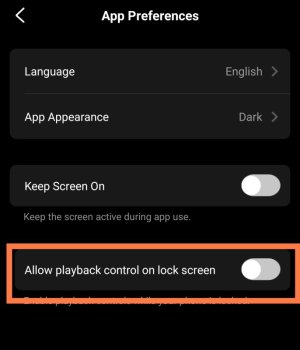
I haven’t used Tidal myself, so I’m not sure if this will help, but please check whether “Allow playback control on lock screen” is turned on in the “App Preferences” section of the “More” menu in the WiiM app. If this toggle is on, turn it off; if it’s off, turn it on.
2981.jpg
 
I haven’t used Tidal myself, so I’m not sure if this will help, but please check whether “Allow playback control on lock screen” is turned on in the “App Preferences” section of the “More” menu in the WiiM app. If this toggle is on, turn it off; if it’s off, turn it on.
View attachment 35393
I've already tried that and it makes no difference :-(
 
Back
Top