Updated WiiM Ultra and Amp Ultra Roadmaps Are Here

We just published an updated roadmap for the WiiM Ultra and the WiiM Amp Ultra, and we’ll be updating some other roadmaps soon. You can see the full details on our Help Center (Ultra| Amp Ultra), but here are some highlights and a quick look at where we're headed.

What This Roadmap Represents​

This is a transparent look at what we're actively building, what we're exploring, and what we've recently shipped. Some of these features will land exactly as described. Others might evolve as we work through technical realities and a few might not make it at all. You’ll also notice that there are no timelines, development is a long process and priorities shift throughout the year, so we’re not going to commit to specific timing right now.

We're sharing this openly because your feedback directly shapes our priorities. We watch all the forum conversations, app surveys, and feature requests you share, and use it all to feed into this. So check it out, and we hope there’s something in here you love the idea of!

These roadmaps focus on the Ultra and Amp Ultra first. They're our flagship devices with the hardware to support more advanced features. Where it makes sense and where it's technically feasible, we'll bring capabilities to other products in the lineup. Some features will be Ultra-specific by necessity.


What's Next​

1767386166484.jpeg

Display & Interface Upgrades

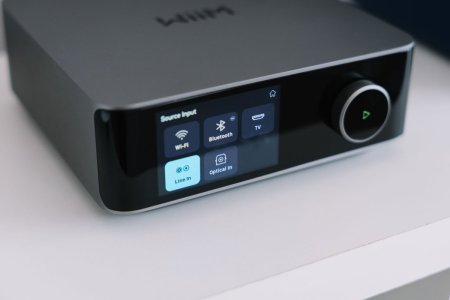
Input-specific screen layouts that remember your preferences and automatically switch based on active input. Black background mode for album art that blends seamlessly with the bezel. Standby and clock options including permanent clock display during playback with adjustable timeout durations. Direct USB and Favorites browsing on the touchscreen without needing your phone.

Next-Generation Room Correction

BassFit integration automatically aligns time and level between your main speakers and subwoofer for seamless low-end coherence. SurroundFit calibration provides precise automated alignment of front, surround, and subwoofer channels for immersive experiences. RoomFit+ evolution delivers tighter bass response and improved transient handling. CenterFit phantom center creates adjustable vocal enhancement for improved dialogue clarity. Context-aware bass management assigns independent crossover and gain settings per source. Discrete dual subwoofer control enables independent calibration to smooth out room modes.

Smarter Audio Processing

Scenario-based presets for Night, Dialog, and Sports modes powered by our 10-band PEQ engine. Adaptive dynamic loudness using Fletcher-Munson curves to preserve bass and treble at low volumes. Pro-grade filter import from REW or AutoEQ. Advanced profile management for transferring correction data across devices with Expert Mode for weighted measurements.
1767386166488.jpeg

Connectivity & Ecosystem

Adaptive source profiles let you customize EQ curves, volume, display layouts, and grouping logic per input that automatically engage when you switch sources. Universal hi-res multi-room with expanded support across Roon Ready and Google Cast endpoints. NAS Mode (SMB Write) transforms the devices into network music servers, managing and transferring files to your USB drive wirelessly. Native Plex integration with Plex control. Complete overhaul of the internet radio engine for faster buffering and higher bitrate streams. Expanded wireless subwoofer protocol to Roon and Google Cast. Support for USB libraries up to 200,000 tracks.

Smart Home Integration

Deeper Home Assistant integration with support for presets and alarms. Native Apple HomeKit and Shortcuts support. Smart input switching that preserves playback context and volume states.

Future Concepts Under Consideration

Specialized streaming integrations for Idagio (Classical), Nugs.net (Live Events), and SiriusXM. Personal cloud locker support for Dropbox, OneDrive, and iCloud, allowing you to stream your collection directly without a physical NAS or USB drive.
What We've Already Delivered​

1767386166492.jpeg
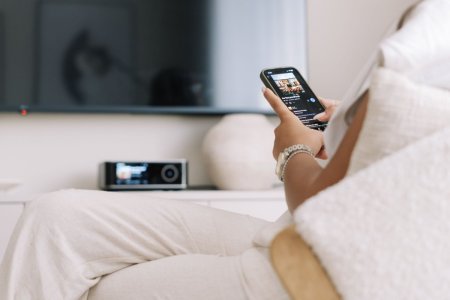
Visual personalization with new VU meter styles, dynamic music spectrums, and expanded clock faces. Native WiiM Home App on Apple TV, Google TV, and FireTV. On-glass navigation for local radio and recently played tracks. Home screen widgets for iOS and Android. Precision volume with customizable remote steps. Multi-point room calibration. Per-output EQ. Advanced DAC filter settings with user-selectable interpolation filters (Amp Ultra).

Flexible wireless home theater supporting scalable 4.0, 4.1, and 5.1 channel configurations. Smart presets that trigger complex routines—setting input, volume, EQ, and grouping simultaneously. Persistent grouping for fixed speaker zones. Native YouTube Music support. Completely rewritten USB media engine.

Your Suggestions!​

These roadmaps are a starting point. We're watching your responses, reading the threads, and paying attention to what resonates. If there's a feature you're interested in, say so. If something doesn't make sense for your use case, let us know, but be respectful. Not every feature is going to hit for every person, a feature you’ll never use might be exactly what someone else needs.

We're building this with you, not for you. The difference matters.

Check out the full roadmaps (Ultra | Amp Ultra).
 
We just published an updated roadmap for the WiiM Ultra and the WiiM Amp Ultra, and we’ll be updating some other roadmaps soon. You can see the full details on our Help Center (Ultra| Amp Ultra), but here are some highlights and a quick look at where we're headed.

What This Roadmap Represents​

This is a transparent look at what we're actively building, what we're exploring, and what we've recently shipped. Some of these features will land exactly as described. Others might evolve as we work through technical realities and a few might not make it at all. You’ll also notice that there are no timelines, development is a long process and priorities shift throughout the year, so we’re not going to commit to specific timing right now.

We're sharing this openly because your feedback directly shapes our priorities. We watch all the forum conversations, app surveys, and feature requests you share, and use it all to feed into this. So check it out, and we hope there’s something in here you love the idea of!

These roadmaps focus on the Ultra and Amp Ultra first. They're our flagship devices with the hardware to support more advanced features. Where it makes sense and where it's technically feasible, we'll bring capabilities to other products in the lineup. Some features will be Ultra-specific by necessity.


What's Next​

View attachment 31817

Display & Interface Upgrades

Input-specific screen layouts that remember your preferences and automatically switch based on active input. Black background mode for album art that blends seamlessly with the bezel. Standby and clock options including permanent clock display during playback with adjustable timeout durations. Direct USB and Favorites browsing on the touchscreen without needing your phone.

Next-Generation Room Correction

BassFit integration automatically aligns time and level between your main speakers and subwoofer for seamless low-end coherence. SurroundFit calibration provides precise automated alignment of front, surround, and subwoofer channels for immersive experiences. RoomFit+ evolution delivers tighter bass response and improved transient handling. CenterFit phantom center creates adjustable vocal enhancement for improved dialogue clarity. Context-aware bass management assigns independent crossover and gain settings per source. Discrete dual subwoofer control enables independent calibration to smooth out room modes.

Smarter Audio Processing

Scenario-based presets for Night, Dialog, and Sports modes powered by our 10-band PEQ engine. Adaptive dynamic loudness using Fletcher-Munson curves to preserve bass and treble at low volumes. Pro-grade filter import from REW or AutoEQ. Advanced profile management for transferring correction data across devices with Expert Mode for weighted measurements.

View attachment 31816

Connectivity & Ecosystem

Adaptive source profiles let you customize EQ curves, volume, display layouts, and grouping logic per input that automatically engage when you switch sources. Universal hi-res multi-room with expanded support across Roon Ready and Google Cast endpoints. NAS Mode (SMB Write) transforms the devices into network music servers, managing and transferring files to your USB drive wirelessly. Native Plex integration with Plex control. Complete overhaul of the internet radio engine for faster buffering and higher bitrate streams. Expanded wireless subwoofer protocol to Roon and Google Cast. Support for USB libraries up to 200,000 tracks.

Smart Home Integration

Deeper Home Assistant integration with support for presets and alarms. Native Apple HomeKit and Shortcuts support. Smart input switching that preserves playback context and volume states.

Future Concepts Under Consideration

Specialized streaming integrations for Idagio (Classical), Nugs.net (Live Events), and SiriusXM. Personal cloud locker support for Dropbox, OneDrive, and iCloud, allowing you to stream your collection directly without a physical NAS or USB drive.

What We've Already Delivered​

View attachment 31818
Visual personalization with new VU meter styles, dynamic music spectrums, and expanded clock faces. Native WiiM Home App on Apple TV, Google TV, and FireTV. On-glass navigation for local radio and recently played tracks. Home screen widgets for iOS and Android. Precision volume with customizable remote steps. Multi-point room calibration. Per-output EQ. Advanced DAC filter settings with user-selectable interpolation filters (Amp Ultra).

Flexible wireless home theater supporting scalable 4.0, 4.1, and 5.1 channel configurations. Smart presets that trigger complex routines—setting input, volume, EQ, and grouping simultaneously. Persistent grouping for fixed speaker zones. Native YouTube Music support. Completely rewritten USB media engine.

Your Suggestions!​

These roadmaps are a starting point. We're watching your responses, reading the threads, and paying attention to what resonates. If there's a feature you're interested in, say so. If something doesn't make sense for your use case, let us know, but be respectful. Not every feature is going to hit for every person, a feature you’ll never use might be exactly what someone else needs.

We're building this with you, not for you. The difference matters.

Check out the full roadmaps (Ultra | Amp Ultra).
First of all that is amazing how WiiM is pushing things, a huge congrats and thank you!
As a matter of addition: would be awesome to be able to play simultaneously to passive speakers and Bluetooth outputs at the same time (very helpful for some use cases and maybe not too complex to implement)
 
Last edited:
I'm going to say a feature that should be achievable on existing hardware. I have many of the older now useless chromecast devices. It would be great if the wiim itself could send the album art to the chromecast like roon is able to send things, Same for TVs with the inbuilt cast receiver. no audio, just a way to get the artwork on a bigger screen.
 
I'm going to say a feature that should be achievable on existing hardware. I have many of the older now useless chromecast devices. It would be great if the wiim itself could send the album art to the chromecast like roon is able to send things, Same for TVs with the inbuilt cast receiver. no audio, just a way to get the artwork on a bigger screen.
Are you aware of the WiiM Home TV app that runs on Apple, android and fire tv that removes the need to cast to a tv?

 
I'm going to say a feature that should be achievable on existing hardware. I have many of the older now useless chromecast devices. It would be great if the wiim itself could send the album art to the chromecast like roon is able to send things, Same for TVs with the inbuilt cast receiver. no audio, just a way to get the artwork on a bigger screen.
Hi welcome

Please note that WiiM have TV Apps that do exactly that.


This is not Chromecast but a native app. So unless you don't have any of the supported TV or a Google TV stick, just load the app.
 
Last edited:
Its very close to what I want, but it needs to be driven from the device rather than being something that just happens when you start to play. They have obviously got it 90% of the way there with this which is why having it launched to a cast target from the wiim itself isnt a huge additional step.

I am more wanting to use otherwise useless hardware that I already have, rather than dedicate another streamer box to this. My idea was to put a small HDMI monitor on the how playing stand and just have it light up and work when something is playing.
 
Its very close to what I want, but it needs to be driven from the device rather than being something that just happens when you start to play. They have obviously got it 90% of the way there with this which is why having it launched to a cast target from the wiim itself isnt a huge additional step.

I am more wanting to use otherwise useless hardware that I already have, rather than dedicate another streamer box to this. My idea was to put a small HDMI monitor on the how playing stand and just have it light up and work when something is playing.
Current WiiM devices are receivers, not transmitters, so I guess you’re asking for the WiiM app on Android or iOS to cast their screen to a tv which brings into question o/s and tv compatibility I.e. does your phone o/s support screen casting to your make/model of tv? If you already have an Android/Google tv then there’s no additional streamer hardware required to run the WiiM Home tv app.
 
WebOS_logo.webp
Many LG users would be happy, especially since the programming is actually quite simple.
 
Native Plex integration with Plex control.
It's good to see this is still in the works, although I've since switched to Symfonium as my music app instead of Plexamp.
Symfonium might be able to use this as well though, not sure.
 
I know. But that comes at the sacrifice of, for example, the size of the album cover.
I would like to be able to choose the classic screen #1 with the large album cover and increase the font size of the artist's name, which is much too small for me.
Even on a smartphone, the cover is displayed large enough. Very inexpensive tablets are also available. The individual symbols provide me with all the necessary information about the album, provided that the streaming service makes it available. The display size is perfectly adequate.

IMG_7726.png
IMG_7727.jpeg
IMG_7728.jpeg
IMG_7729.jpeg
 
Last edited:
We just published an updated roadmap for the WiiM Ultra and the WiiM Amp Ultra, and we’ll be updating some other roadmaps soon. You can see the full details on our Help Center (Ultra| Amp Ultra), but here are some highlights and a quick look at where we're headed.

What This Roadmap Represents​

This is a transparent look at what we're actively building, what we're exploring, and what we've recently shipped. Some of these features will land exactly as described. Others might evolve as we work through technical realities and a few might not make it at all. You’ll also notice that there are no timelines, development is a long process and priorities shift throughout the year, so we’re not going to commit to specific timing right now.

We're sharing this openly because your feedback directly shapes our priorities. We watch all the forum conversations, app surveys, and feature requests you share, and use it all to feed into this. So check it out, and we hope there’s something in here you love the idea of!

These roadmaps focus on the Ultra and Amp Ultra first. They're our flagship devices with the hardware to support more advanced features. Where it makes sense and where it's technically feasible, we'll bring capabilities to other products in the lineup. Some features will be Ultra-specific by necessity.


What's Next​

View attachment 31817

Display & Interface Upgrades

Input-specific screen layouts that remember your preferences and automatically switch based on active input. Black background mode for album art that blends seamlessly with the bezel. Standby and clock options including permanent clock display during playback with adjustable timeout durations. Direct USB and Favorites browsing on the touchscreen without needing your phone.

Next-Generation Room Correction

BassFit integration automatically aligns time and level between your main speakers and subwoofer for seamless low-end coherence. SurroundFit calibration provides precise automated alignment of front, surround, and subwoofer channels for immersive experiences. RoomFit+ evolution delivers tighter bass response and improved transient handling. CenterFit phantom center creates adjustable vocal enhancement for improved dialogue clarity. Context-aware bass management assigns independent crossover and gain settings per source. Discrete dual subwoofer control enables independent calibration to smooth out room modes.

Smarter Audio Processing

Scenario-based presets for Night, Dialog, and Sports modes powered by our 10-band PEQ engine. Adaptive dynamic loudness using Fletcher-Munson curves to preserve bass and treble at low volumes. Pro-grade filter import from REW or AutoEQ. Advanced profile management for transferring correction data across devices with Expert Mode for weighted measurements.

View attachment 31816

Connectivity & Ecosystem

Adaptive source profiles let you customize EQ curves, volume, display layouts, and grouping logic per input that automatically engage when you switch sources. Universal hi-res multi-room with expanded support across Roon Ready and Google Cast endpoints. NAS Mode (SMB Write) transforms the devices into network music servers, managing and transferring files to your USB drive wirelessly. Native Plex integration with Plex control. Complete overhaul of the internet radio engine for faster buffering and higher bitrate streams. Expanded wireless subwoofer protocol to Roon and Google Cast. Support for USB libraries up to 200,000 tracks.

Smart Home Integration

Deeper Home Assistant integration with support for presets and alarms. Native Apple HomeKit and Shortcuts support. Smart input switching that preserves playback context and volume states.

Future Concepts Under Consideration

Specialized streaming integrations for Idagio (Classical), Nugs.net (Live Events), and SiriusXM. Personal cloud locker support for Dropbox, OneDrive, and iCloud, allowing you to stream your collection directly without a physical NAS or USB drive.

What We've Already Delivered​

View attachment 31818
Visual personalization with new VU meter styles, dynamic music spectrums, and expanded clock faces. Native WiiM Home App on Apple TV, Google TV, and FireTV. On-glass navigation for local radio and recently played tracks. Home screen widgets for iOS and Android. Precision volume with customizable remote steps. Multi-point room calibration. Per-output EQ. Advanced DAC filter settings with user-selectable interpolation filters (Amp Ultra).

Flexible wireless home theater supporting scalable 4.0, 4.1, and 5.1 channel configurations. Smart presets that trigger complex routines—setting input, volume, EQ, and grouping simultaneously. Persistent grouping for fixed speaker zones. Native YouTube Music support. Completely rewritten USB media engine.

Your Suggestions!​

These roadmaps are a starting point. We're watching your responses, reading the threads, and paying attention to what resonates. If there's a feature you're interested in, say so. If something doesn't make sense for your use case, let us know, but be respectful. Not every feature is going to hit for every person, a feature you’ll never use might be exactly what someone else needs.

We're building this with you, not for you. The difference matters.

Check out the full roadmaps (Ultra | Amp Ultra).
With all due respect, basically playback functionality should be addressed and perfected before decorating this cake.
There's still a whole host if issues with basic playback from NAS/Servers.
I've been in direct contact with youand many attempts made, but still no permanent fix. I've spoken to Henley Audio that confirms it's firmware and my dealer has said this too. Some if us only use wiim products as an endpoint (meaning in it's raw playback control form). I'm even using it via cat8.
So could you please focus on perfecting basic functionality before progressing further please. Thank you
 
With all due respect, basically playback functionality should be addressed and perfected before decorating this cake.
There's still a whole host if issues with basic playback from NAS/Servers.
I've been in direct contact with youand many attempts made, but still no permanent fix. I've spoken to Henley Audio that confirms it's firmware and my dealer has said this too. Some if us only use wiim products as an endpoint (meaning in it's raw playback control form). I'm even using it via cat8.
So could you please focus on perfecting basic functionality before progressing further please. Thnk you
Welcome to the WiiM user forum.

Please note that this is not a WiiM support site, so you are not writing directly to WiiM here.

If other WiiM users can help you, please describe what your issue is.
 
Welcome to the WiiM user forum.

Please note that this is not a WiiM support site, so you are not writing directly to WiiM here.

If other WiiM users can help you, please describe what your issue is.
No, I'm aware of that.
It's a "features we'd like to see" thread. So basically functionality is something I'd like to see :)
 
No, I'm aware of that.
It's a "features we'd like to see" thread. So basically functionality is something I'd like to see :)
What is the "raw playback control" you mentioned. If it is Command Line Interface then you could try Lyrion which can be controlled by Command Line.
 
What is the "raw playback control" you mentioned. If it is Command Line Interface then you could try Lyrion which can be controlled by Command Line.
Raw playback, i guess a typo in context for me. I mean as in using none of the additional features. Audio in (LAN in my case), Digital output out. Using it as what is known as an endpoint.
Server side is sorted, completely happy. It's the Wiim hardware that's the fly in the ointment for me at the moment.
 
Raw playback, i guess a typo in context for me. I mean as in using none of the additional features. Audio in (LAN in my case), Digital output out. Using it as what is known as an endpoint.
Server side is sorted, completely happy. It's the Wiim hardware that's the fly in the ointment for me at the moment.
What are you using “server side”?
 
Back
Top