

Maybe the core of the audio pro speakers was based on WiiM mini firmware as they will have a Linkplay module too?Ah, you're absolutely right. Thanks for the correction.
I thought the OP had changed the Mini's name to C5. (Why does it say WiiM Mini?)

You are using an out of date browser. It may not display this or other websites correctly.
You should upgrade or use an alternative browser.
You should upgrade or use an alternative browser.
Why is this happening?
- Thread starter Alexandr_2023
- Start date
-
- Tags
- wiim ultra


I don't think it's related.I don't know why it says "mini" there. I have two network devices: the Wiim Ultra and the Audio Pro C5 mk II. Perhaps there's some kind of conflict between these devices!
Since the firmware your Ultra is trying to install isn't the latest version, it might be attempting to download something that no longer exists.
While the WiiM Team would need to verify, I expect it should install correctly once the next version (v5.2.739061) arrives.

Alexandr_2023
Active Member
Or maybe the problem is that the Ultra can't download the firmware from the server without a VPN? The thing is, the Russian authorities are blocking everything right now. I access this forum using a VPN. There's no other way.I don't think it's related.
Since the firmware your Ultra is trying to install isn't the latest version, it might be attempting to download something that no longer exists.
While the WiiM Team would need to verify, I expect it should install correctly once the next version (v5.2.739061) arrives.
D
Deleted member 29741
Guest
I did not want to mention this idea, but it was my first suspicion.Or maybe the problem is that the Ultra can't download the firmware from the server without a VPN? The thing is, the Russian authorities are blocking everything right now. I access this forum using a VPN. There's no other way.
Alexandr_2023
Active Member
Maybe try turning on a VPN on my iPhone and sharing Wi-Fi from it? Then connect to the iPhone's network and try updating? Do you think that will solve the problem?I did not want to mention this idea, but it was my first suspicion.
dudu
Valued Contributor
Reasonable point.Or maybe the problem is that the Ultra can't download the firmware from the server without a VPN? The thing is, the Russian authorities are blocking everything right now. I access this forum using a VPN. There's no other way.
You may check the dns server configuration of Ultra.
There's an option using the dns servers from Google.
May be toggeling the switch yields other results ...

HansD-NL
Valued Contributor
Yes almost sure about that.Maybe try turning on a VPN on my iPhone and sharing Wi-Fi from it? Then connect to the iPhone's network and try updating? Do you think that will solve the problem?
dudu
Valued Contributor
At least worth a try ...Maybe try turning on a VPN on my iPhone and sharing Wi-Fi from it? Then connect to the iPhone's network and try updating? Do you think that will solve the problem?
In any case, 5.2.738432 is already an old version, so I don't think you'll be able to install it. But please give it a try.Maybe try turning on a VPN on my iPhone and sharing Wi-Fi from it? Then connect to the iPhone's network and try updating? Do you think that will solve the problem?
(You might be able to install v5.2.739061.)
Alexandr_2023
Active Member
So, I created a Wi-Fi network on my iPhone, turned on VPN, and connected my iPad and Wiim to the network. But the firmware still wouldn't download. So, it's not a blocking issue. I'll try to talk to Russian Wiim users tomorrow, maybe they'll have some advice. Anyway, thank you all for your participation and for discussing this issue!
Attachments
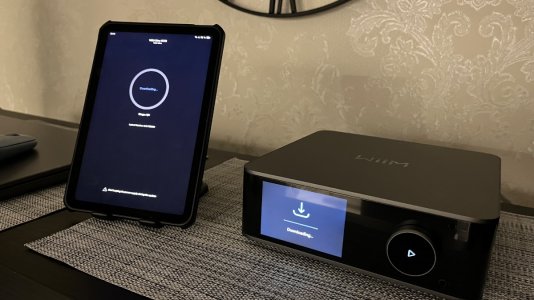
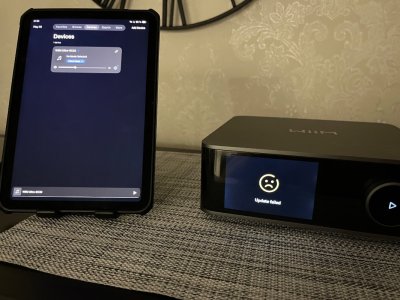
HansD-NL
Valued Contributor
That's unfortunate. Good luck.So, I created a Wi-Fi network on my iPhone, turned on VPN, and connected my iPad and Wiim to the network. But the firmware still wouldn't download. So, it's not a blocking issue. I'll try to talk to Russian Wiim users tomorrow, maybe they'll have some advice. Anyway, thank you all for your participation and for discussing this issue!
So, I created a Wi-Fi network on my iPhone, turned on VPN, and connected my iPad and Wiim to the network. But the firmware still wouldn't download. So, it's not a blocking issue. I'll try to talk to Russian Wiim users tomorrow, maybe they'll have some advice. Anyway, thank you all for your participation and for discussing this issue!
Again, you should receive the new firmware (v5.2.739061) within the next few days. My Ultra received it today.
If you are unable to install it, please submit another support ticket.
Alexandr_2023
Active Member
I wrote to support@wiimhome.com and attached a link to this forum thread.Again, you should receive the new firmware (v5.2.739061) within the next few days. My Ultra received it today.
If you are unable to install it, please submit another support ticket.
Can you submit a ticket from the feedback section of the WiiM Home App? Since device logs are sent, this makes it easier to identify the cause if there is a problem with your device.I wrote to support@wiimhome.com and attached a link to this forum thread.
Alexandr_2023
Active Member
I registered an account in Help CenterCan you submit a ticket from the feedback section of the WiiM Home App? Since device logs are sent, this makes it easier to identify the cause if there is a problem with your device.
Attachments
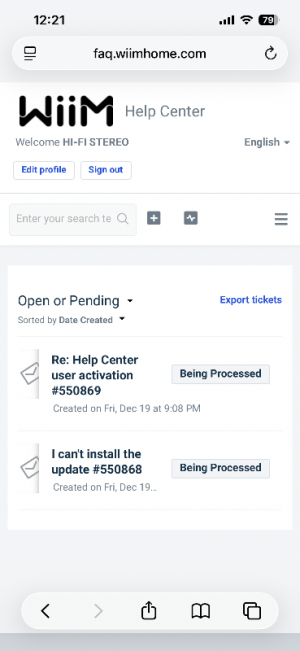
Alexandr_2023
Active Member
I finally realized that I can’t skip a firmware version)) It must have been a translation nuance — English isn’t my native language, sorry. Now it’s clear that support needs to provide me with the previous firmware so I can update to the next one)Can you submit a ticket from the feedback section of the WiiM Home App? Since device logs are sent, this makes it easier to identify the cause if there is a problem with your device.
Last edited:

What @Wiimer tried to make clear to you is this: You don't have to manually create a ticket in WiiM's Audio Help Center and you don't have to send emai to the support address. Just open the WiiM Home App, hit the rightmost tab (labelled "More..." in English) and tap on "Feedback".I registered an account in Help Center
This will create a ticket automatically and your device logs will be sent along, so WiiM engineers can actually see if your device recorded an error log.
It's both, faster and more useful for WiiM support.
Last edited:
Alexandr_2023
Active Member
I already did itWhat @Wiimer tried to make clear to you is this: You don't have to manually create a ticket in WiiM's Audio Help Center and you don't have to send emai to the support address. Just open the WiiM Home App, hit the rightmost tab (labelled "More..." in English) and tap on "Feedback".
This will create a ticket automatically and your device logs will be sent along, so WiiM engineers can actually see if your device recorded an error log.
It's both, faster and more useful for WiiM support.
Similar threads
- Replies
- 80
- Views
- 3K
- Replies
- 15
- Views
- 789


- Replies
- 13
- Views
- 2K
- Question
- Replies
- 3
- Views
- 912
