Wiim Home App affect battery life and volume selector request

dankandi

Member
Joined
Dec 10, 2025
Messages
48
A feedback on the phone app, if you power off the WAU from the mains, but you forgot to "close" the app in your phone.

The app will continously try to search for the WAU, and suck your phone battery life.

If you are outside and you accidentally open the app on your phone, since there is no home wifi. It still tries to search for your Wiim devices

I encountered this and got shock that the Wiim home app took down my iphone battery silently.

Suggestion : the app should not activate without a home wifi connection and the app should go to deep sleep if it is in background and cannot detect devices after 15 mins.

Another suggestion, is to have a stepped selector (up/down or left/right) for volume and roomfit freqency. Using my finger to slide to select, causes over/under shoot.
 
As a new WiiM user the power drain on my phone shocked me and though I haven't asked the question I have wondered what I am doing wrong to cause it. Having said that the phone I use is not used as a phone but a controller and I just leave it plugged in to the charger.
 
Maybe switching off the use of cellular data for the WHA will help, at least for when you're not at home.

As I rigorously close my apps after use I cannot really comment on battery use in the background. I will test this today and keep the WHA open in the background. As my WiiM are also powered off when not in use, this will hopefully recflect your use case.
I'll come back with a feedback tonight or tommorrow.
 
As a new WiiM user the power drain on my phone shocked me and though I haven't asked the question I have wondered what I am doing wrong to cause it. Having said that the phone I use is not used as a phone but a controller and I just leave it plugged in to the charger.
That's very surprising am sorry for you. Just checked and WiiM app = 1% of my battery consumption over the last 10 days (iPhone 13, iOS 18.7.2)
 
If I shut the app I lose the track last played so I leave it open. Having said that the length of time and why the last track played has a limited time before it times out has been discussed in another thread already. The power consumption/time out needs to be addressed as SONOS does not time out and I expected the same thing. Discussing this any further will derail the thread topic.

As I said above, I am new to this and it could be me doing something wrong.
 
  • Like
Reactions: hgb
If I shut the app I lose the track last played so I leave it open. Having said that the length of time and why the last track played has a limited time before it times out has been discussed in another thread already. The power consumption/time out needs to be addressed as SONOS does not time out and I expected the same thing. Discussing this any further will derail the thread topic.

As I said above, I am new to this and it could be me doing something wrong.
Great you flagged anyway and sorry to read
 
If I shut the app I lose the track last played so I leave it open. Having said that the length of time and why the last track played has a limited time before it times out has been discussed in another thread already. The power consumption/time out needs to be addressed as SONOS does not time out and I expected the same thing. Discussing this any further will derail the thread topic.

As I said above, I am new to this and it could be me doing something wrong.
Only having had the WHA open in the background on my iPhone for a few hours I can confirm the issue. I wouldn‘t call it dramatic but noticeable.
One other thing you should look out for is to not allow the WHA to use your location. This is only needed during setup of a new device. After that, switch it off.
 
  • Like
Reactions: hgb
Only having had the WHA open in the background on my iPhone for a few hours I can confirm the issue. I wouldn‘t call it dramatic but noticeable.
This is to be expected if the app is open and active. But the OP was talking about significant battery drain while away from home and after the WiiM device(s) were set to standby. This is where the mobile device OS, regardless of brand, should be using power management and moving the WHA to the background. I rarely force close any app including WHA and have not seen my battery levels dropping through the day unexpected.
 
This is to be expected if the app is open and active. But the OP was talking about significant battery drain while away from home and after the WiiM device(s) were set to standby. This is where the mobile device OS, regardless of brand, should be using power management and moving the WHA to the background. I rarely force close any app including WHA and have not seen my battery levels dropping through the day unexpected.
Yep, away from home and in the background. This is what I did.
Depending on how much people use their phone and for what the WHA battery consumption may be negligible in comparision.
 
This is to be expected if the app is open and active. But the OP was talking about significant battery drain while away from home and after the WiiM device(s) were set to standby. This is where the mobile device OS, regardless of brand, should be using power management and moving the WHA to the background. I rarely force close any app including WHA and have not seen my battery levels dropping through the day unexpected.

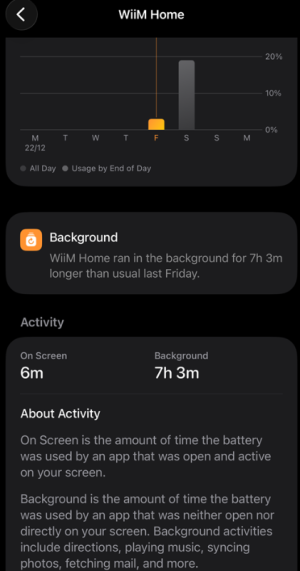
Basically this. We were out the whole of Friday, i accidentally open the app outside thinking i could update the firmware remotely.

Without thinking too much , i swipe past the WHA, like usual, to use my other app.

But it is sucking up the battery as shown
 

Attachments

  • draiy.png
    draiy.png
    135.3 KB · Views: 15
Basically this. We were out the whole of Friday, i accidentally open the app outside thinking i could update the firmware remotely.

Without thinking too much , i swipe past the WHA, like usual, to use my other app.

But it is sucking up the battery as shown
That seems to just show it was running in the background. How much battery did it use?
 
I see it takes 3% of battery but that is only doing 6m onscreen
That's 3% after 6 minutes in the foreground and over 7hours in the background. That is pretty insignificant considering the app is likely checking for a reconnection regularly. Consider what a navigation or social media app uses.
 
That's 3% after 6 minutes in the foreground and over 7hours in the background. That is pretty insignificant considering the app is likely checking for a reconnection regularly. Consider what a navigation or social media app uses.

That is thing, for a brief use, it took down 3% of my battery, that is around 150mah.

It should not be continually seeking for a non-existant home wifi as we are out and about on data 5g.
 
Back
Top