WiiM Home app for Windows PC ?

GaryA26

New Member
Joined
Mar 18, 2026
Messages
6
Okay all you WiiM users, please help me out here.

I have a WiiM Pro streamer. I currently am using Tidal for my streaming. I have both the Tidal mobile
app and the Tidal app for Windows on my laptop. When using my laptop Tidal app from the laptop, which
is almost always, I can connect to my WiiM Pro through Tidal Connect and then use the Tidal app interface
on my laptop.

So no problem there.

What I would like to do is connect the sound output from my laptop to my WiiM Pro via WiFi since both my
WiiM Pro and laptop are connected to the same WiFi Network. That way I could listen to YouTube music videos
through my home audio system by routing my laptop's output to my WiiM Pro.

The problem is that I can't figure out how to connect my laptop's output to my WiiM Pro via the WiFi connection.
I know I could try to use Bluetooth, but I also have issues with that and that's a completely different kettle of fish.

I have read online that I could connect my laptop's output by downloading the WiiM Home app for Windows
to my laptop.

But I can't find where that app is in order to download it. On WiiM's main download page it seems to only have
the download for the mobile app.

Has anyone here connected your Windows laptop or PC to your WiiM streamer ? And if so, what process did you
undertake to bring that to a success ?

Thanks !
 
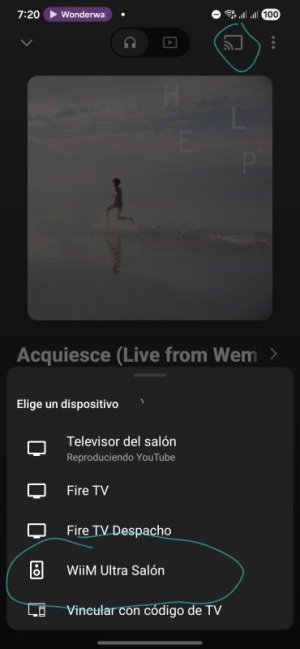
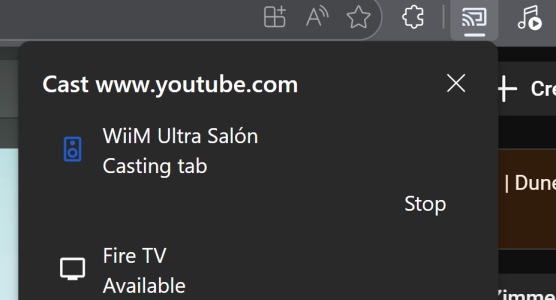
You shall enable Chromecast audio in your wiim pro and then cast the sound to it by using the casting icon you normally would see in YouTube, Chrome browser or other pc apps tha have cast support. That works also for mobile phones in your lan.
1000132957.jpg
 
omg....I saw that at the top but just thought it was a graphic and not a link....LOL
This beta version is not going to help you play YouTube over your WiiM Pro, though. It only brings a limited subset of features of the smartphone app to your desktop. In addition, it contains a media server for music stored on your PC.

@Wiimer and @hipoagumol gave the answer you need for your use case.
 
Last edited:
Okay all you WiiM users, please help me out here.

I have a WiiM Pro streamer. I currently am using Tidal for my streaming. I have both the Tidal mobile
app and the Tidal app for Windows on my laptop. When using my laptop Tidal app from the laptop, which
is almost always, I can connect to my WiiM Pro through Tidal Connect and then use the Tidal app interface
on my laptop.

So no problem there.

What I would like to do is connect the sound output from my laptop to my WiiM Pro via WiFi since both my
WiiM Pro and laptop are connected to the same WiFi Network. That way I could listen to YouTube music videos
through my home audio system by routing my laptop's output to my WiiM Pro.

The problem is that I can't figure out how to connect my laptop's output to my WiiM Pro via the WiFi connection.
I know I could try to use Bluetooth, but I also have issues with that and that's a completely different kettle of fish.

I have read online that I could connect my laptop's output by downloading the WiiM Home app for Windows
to my laptop.

But I can't find where that app is in order to download it. On WiiM's main download page it seems to only have
the download for the mobile app.

Has anyone here connected your Windows laptop or PC to your WiiM streamer ? And if so, what process did you
undertake to bring that to a success ?

Thanks !
Unfortunately, you won't be able to output audio from any program on your PC. Chromecast works intermittently on my laptop, or doesn't work at all, like it does on my PC. Interestingly, such a solution exists, as I wrote about here, but it apparently hasn't sparked any interest from the developers.
 
I have not tried it, but StreamWhatYouHear/SWYH should stream all Windows audio to your WiiM.


Regarding Chromecast flakiness, from my Windows 11 machines I have experienced sporadic problems with Chromecast seeing my WiiM devices on the network. When this happens, I simply disable WIFI on the Windows 11 machine not seeing the WiiMs and re-enable it. The WiiM are then visible.

So far this has worked 100% of the time.
 
Unfortunately, you won't be able to output audio from any program on your PC. Chromecast works intermittently on my laptop, or doesn't work at all, like it does on my PC. Interestingly, such a solution exists, as I wrote about here, but it apparently hasn't sparked any interest from the developers.
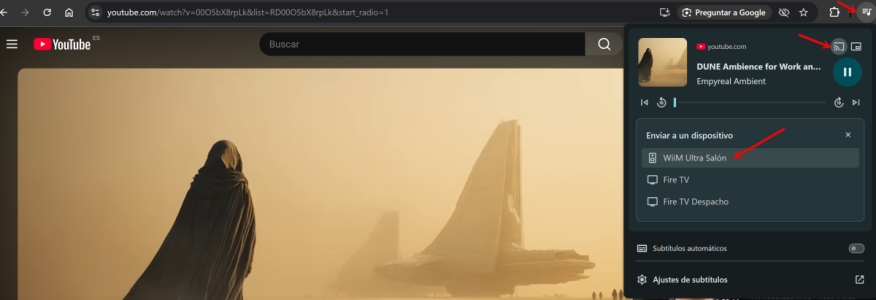
From Chrome browser it works perfectly
1773920213956.png
 
It doesn't work for everyone. Besides, the sound quality is terrible, even when it works. A Wiim would still be preferable as a sound card.
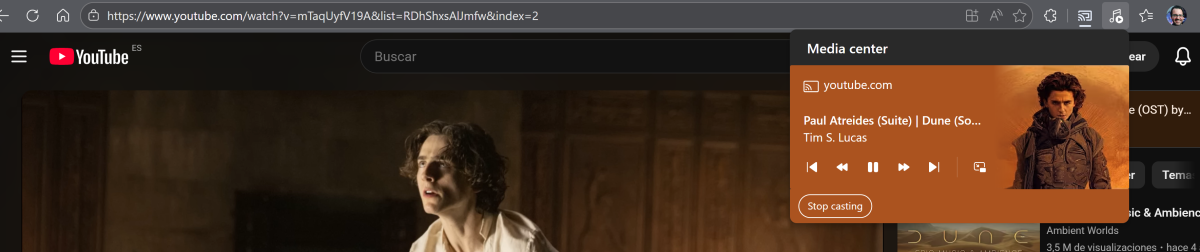
Not experiencing the same here...also EDGE browser allows seamless casting to my Wiim Ultra. No quality issues at all.
HP Laptop
Windows 11
Chrome
Version 146.0.7680.80 (Build oficial) (64 bits)
EDGE
Version 146.0.3856.62 (Official build) (64-bit)

This is how I did it from Edge. Not using this normally, but it worked.
1773922711671.png1773922873272.png
 
I tried Chromecast on my laptop for a bit, and I didn’t encounter any issues. The audio delay on YouTube was around 100 ms, and I didn’t notice any lip-sync issues. It works more smoothly than I expected. I hope it works out for the OP.
 
I've tried the same thing.

From my observations, the media player sits in the WiiM device... so it's not a "sound device" as we normally mount on a PC.

In the PC we run the media player in there and we connect to a "sound device"... this is how we run foobar, VLC, web browsers, Tidal, etc... Normally we interface with the "sound device" via a local driver, USB, Bluetooth, etc..

Now with the WiiM things are different. The WiiM has an executable called "Tidal Connect"... when you play Tidal in your PC, it will find over the local LAN a device that it can "cast to". So, what Tidal in the PC will do, is "cast" to Tidal Connect in the WiiM.

It is not a device level -physical- interface (look up OSI Data Layers)... it's a transport ( TCP - UDP ) layer interface. Very different.

....

So what to do?

Use Tidal Connect and cast from the PC (Android/Chromebook) to the WiiM device.

There are other casting options. I must say I've never been able to Chromecast from my PC to the Ultra.... Is there a Spotify? I don't know. I don't run YouTube to my WiiM machines, so I don't know. I assume there are casting options for that as well.

I might say it would be nice to cast YouTube to the WiiM speaker.... never bothered I guess. If I have youtube, then I have Tidal and I'd rather go with the higher bit rate.

....

For network music.... instead of running foobar or so in your PC... mount the NAS file system to the Ultra using WiiM Home. then select the music files and the WiiM will play the files by itself with its own player. The PC is not involved.
....

Hope that helps. I spent like three months looking into this before I decided to buy my first WiiM Ultra. It's a different way of looking at it... The WiiM method is not a "sound device", it's casting control to a media application running natively in the WiiM.

...

FOOTNOTE.... unfortunately the WiiM Home program for the PC is somewhat unstable -I believe this is an issue on how WiiM is handling the IP network.. which is different from Android (Unix).

When running Tidal in the PC casting to Tidal Connect in the WiiM, Tidal will lose synchronization a lot. You end up going into WiiM Home PC and toggling the DNS option in the WiiM device a lot. That seems to generate an IP request that is seen by the PC and then the WiiM device will re-appear in the Tidal list of casting options.

You get used to it... There is an open ticket for this... I found it sometime last year when I got my first Ultra and noticed this behavior.

In Android (and Chromebooks), the WiiM Home interface and the connection between Tidal and Tidal Connect are much more robust.

...

SOLUTION

Buy a Chromebook.
 
Last edited:
I don't know if this belongs here but I have tried looking at the PC app and it definitely needs a bit of TLC. I had another look at it last night and as usual it took at least five attempts to open it and when closing it down I had to use Task Manager because it refused to self close. Using Edge I can see all WiiM devices and my music library so I presume it will work ok. My original plan was to install it on my Laptop and use that as the management device but I remembered I had an old phone so it got the management gig instead. My primary cell phone sits in the console of my car as I live in the bush and if I get into trouble I can use it to get help. I never carry it and can go months without looking at it and it drives my family nuts which I sort of enjoy!
 
Thanks for all the input everyone. I decided to make the connection via Bluetooth. So that works pretty seamlessly. I can use that to send the
output from YouTube and the desktop version of SiriusXM to the WiiM Pro and into my Yamaha Integrated amp.

When streaming with Tidal, which I am now using, WiiM Pro supports Tidal Connect so I use that.

I may also try Qobuz to compare with Tidal and the WiiM Pro also supports Qobuz connect.
 
Does the Ultra support Bluetooth? I mean, not that I'd use it for HiRez music... it'd be interesting I guess.
From what I understand it does support Bluetooth. I have also listened to Tidal using Tidal Connect and Bluetooth to compare. I could
not hear that much of a difference with casual listening, if any. I will listen again more critically and see if there is a noticeable difference
in audio quality between Bluetooth and Tidal Connect.
 
Back
Top