WiiM Ultra RoomFit With External DAC?

Tunnelsnakes

New Member
Joined
Feb 15, 2026
Messages
2
Hello,

My question is: if I decided to add an external DAC to the WiiM Ultra via USB out, with the DAC set to "DAC mode" (fixed 100% volume), and then start Roomfit, would it know how loud the pink noise should be as to not blow out the speakers, or do I actually have to manually adjust the digital volume knob on the WiiM Ultra prior to running the room correction? Just want to be 100% sure so I don't damage any audio equipment. Currently running monoblock amps with no volume control adjustments to it either, so all the volume adjustments depends on the WiiM Ultra.
 
Hello,

My question is: if I decided to add an external DAC to the WiiM Ultra via USB out, with the DAC set to "DAC mode" (fixed 100% volume), and then start Roomfit, would it know how loud the pink noise should be as to not blow out the speakers, or do I actually have to manually adjust the digital volume knob on the WiiM Ultra prior to running the room correction? Just want to be 100% sure so I don't damage any audio equipment. Currently running monoblock amps with no volume control adjustments to it either, so all the volume adjustments depends on the WiiM Ultra.
The WiiM volume control also work on the USB output. So just set the WiiM volume to your normal listening volume before running the RoomFit.
 
Welcome.

Because I'm untrusting, I set my external dacs to variable output such that 100% wiim volume is very loud, but not blow your speakers loud.
And now I'm off to listen to Rock on the Radio by Firehouse.
🧑‍🎤
"
Like thunder, like dynamite
You know I'm gonna blow my speakers up tonight
"
 
I'd like to simplify by saying: As long as any device in your chain like a pre-amp after your external DAC or even a gain control on your power amplifier attenuates the output volume, neither your ears nor your speakers will be blown away. For this purpose it doesn't matter much which device is controlling the volume.
 
Thanks all, this info is much appreciated! One more question: if I use an external DAC via USB out, my subwoofer should still work right? I heard that recent patches allows this now, but I just want to be absolutely sure.
 
I just ran WiiM Home.... sure enough, the balance, room correction, equalizer, volume all work over the USB output.

So, my USB DAC has a volume on its analog output. I took the preamp out of the chain.. so I use that as volume control.

Running WiiM Ultra to USB DAC to amps. Volume set to my normal listening level, Ultra to fixed 100% volume at 2V, ran RoomFit several times, no problems. Didn't blow anything.

Subwoofers... hmm.. I run mine via an external crossover from the analog outputs of the DAC (via an Audioquest multi RCA plug) so I can adjust them at will and get a true stereo bass. That gives me control over level and knee frequency... fixed at 12db per octave. I have a fancy DSP box that I will soon... that will give me even more control.

It gets complicated fast. I ended up just leaving things the way they were, no RoomFit, as little processing as possible from the Ultra and use the crossover as a bass "loudness" thing.

And then, I do change amps and speakers often.. open the curtains, etc...

So... after so much.... blah, blah... yes it works over USB, no it won't blow your speakers, I'd however suggest you run an analog volume control and run the digital to 100% to have full dynamic range -no bits thrown away.
 
Last edited:
I'd however suggest you run an analog volume control and run the digital to 100% to have full dynamic range -no bits thrown away.
If you do that the sub connected to the Ultra sub out will be driven at the same high volume all the time and won't track the analog volume control.
 
If you do that the sub connected to the Ultra sub out will be driven at the same high volume all the time and won't track the analog volume control.

True, if you run a single subwoofer out of the Ultra.

I derive the sub from the outputs of the external USB DAC by running a low pass filter from the wideband signal. That gives me stereo bass, running two subwoofers.
 
Ultra to fixed 100% volume at 2V, ran RoomFit several times, no problems.
Note that when we run at maximum fixed volume on WiiM side, any kind of boost added by DSP (e.g. by RoomFit) will trigger the built-in limiter, causing dynamic compression and increasing distortion.
So to be safe, when using RoomFit with fixed volume output it's best to have the Non-Boost Mode enabled in RoomFit.

I'd however suggest you run an analog volume control and run the digital to 100% to have full dynamic range -no bits thrown away.
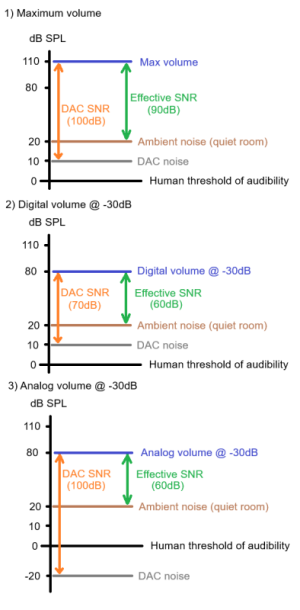
Perhaps it is worth mentioning here that WiiM digital volume control is 32-bit (reference). This means that quantization noise doesn't add-up when changing volume digitally, and consequently the total noise floor always remains constant regardless of volume level.

So assuming we can't hear the DAC's baseline noise floor at our listening position in the first place, we still won't hear it if we decrease volume digitally - regardless of the fact that DAC dynamic range/SNR is being reduced.
On the other hand, while using an analogue volume control (with fixed digital volume) in theory preserves maximum DAC SNR, it does so by pushing the DAC's noise floor further into inaudibility - making no difference to the actual, "effective" SNR perceived at our listening position.

Let me provide a simple example to illustrate this concept:
1771578758489.png
We see that in case 2) and 3) the "effective SNR" remains the same even if DAC SNR changes.
Main implication of all this is that using a well-implemented digital volume control doesn't really degrade sound quality in practice, while providing some extra convenience (e.g. we can specify volume for presets in WHA).

We also shouldn't forget that setting digital volume lower than 100% helps protect against clipping induced by inter-sample peaks (see this interesting analysis by Archimago) or by any boosts we may add in DSP, and that digital volume controls better preserve channel balance at low volumes compared to many analogue volume controls.
In this sense we can actually get better sound quality by using a digital volume control. I wrote more on all this recently in this post.

Hope this is helpful!
 
@dominikz Thanks for the write up... I didn't see the option to "Non Boost Mode"... In any event, I change the configuration of the Home Office system so much, amps, speakers, curtains, subwoofer crossover settings, that running the RoomFit in here makes little sense.

I did hear differences in the sound but pretty much I can do something similar by changing the crossover settings... there's also a peak around 9Khz that I can solve easily by closing the curtains behind the speakers ( they are against a wall with a large glass sliding door ).

So, I ended up not using RoomFit in this system.

The other systems are a lot more static, so I guess I should give them a try.

I did run RoomFit with the WiiM Sound and there I kept it... for the time being.

Oh, the analog output in the Nistch DAC is a specially dynamic and has a huge range... it can swing more than 2V... so that one works fine driven directly into the amp(s).

It's definitely an interesting feature. I was surprised that it kicks in when using the USB output.

Thanks
 
@dominikz Thanks for the write up...
No problem, I'm glad if some of it was interesting!
I didn't see the option to "Non Boost Mode"
You can find Non-Boost Mode option in RoomFit settings (gear icon in the top right when you access RoomFit screen.
In general, a good starting point for RoomFit configuration is described in this article - default settings in the app aren't optimal.
Variable smoothing and Moving Mic Measurement (MMM) options can also give a bit nicer results (see examples here) - but note that MMM is more sensitive to ambient noise (compared to sweep).
there's also a peak around 9Khz that I can solve easily by closing the curtains behind the speakers ( they are against a wall with a large glass sliding door ).
Perhaps it is useful to mention that a peak at 8-9kHz is a fairly typical resonance of mobile phone built-in microphones, which therefore completely goes away if a proper measurement microphone is used instead of the phone mic (see this post for an example)!

So if you used the phone's built-in microphone when running RoomFit, and saw a peak at 9kHz in your RoomFit results, that is probably an artifact of the phone mic and not an indication of any acoustical issue in your room.

It's definitely an interesting feature.
I think so too! But it is worth noting that EQ-based room correction like RoomFit can't solve every kind of acoustical issues. In case you're interested, I wrote more about what RoomFit can and can't do well in this post.
 
Back
Top