3.1 a real thing now?

m49808

New Member
Joined
Oct 11, 2025
Messages
10
I noticed the Dolby 5.1 documentation was updated recently and specifically calls out 3.1 (and other support) in the table of supported formats. Is this real now? The docs seem pretty light on how to actually leverage 3.1 as I hear that doing so historically has been flaky at best (setting up 5.1 then removing extra channels).


I ask because the remainder of the doc steps all still say 5.1 with no mention of how to achieve the other formats.

If i do 3.1, do the rear channels get sent to the front speakers?

Thanks for any info. Considering building this system out for tv/movies/music fed from the TV to avoid a huge AVR and another device to deal with.
 
I noticed the Dolby 5.1 documentation was updated recently and specifically calls out 3.1 (and other support) in the table of supported formats. Is this real now? The docs seem pretty light on how to actually leverage 3.1 as I hear that doing so historically has been flaky at best (setting up 5.1 then removing extra channels).


I ask because the remainder of the doc steps all still say 5.1 with no mention of how to achieve the other formats.

Yes, you can now set up a 3.1 system without rear speakers.


If i do 3.1, do the rear channels get sent to the front speakers?

No.


Interesting, thanks for the reply. Has anyone done this? I'm trying to have a fairly minimalist sound system for my TV that is between a soundbar and dedicated AVR. I dont need a huge AVR to power 3 speakers, deal with changing inputs, etc. Just route what i want through the TV. And play it in multiple rooms with other wiim devices.

Does this work well? Why not?
 
Interesting, thanks for the reply. Has anyone done this? I'm trying to have a fairly minimalist sound system for my TV that is between a soundbar and dedicated AVR. I dont need a huge AVR to power 3 speakers, deal with changing inputs, etc. Just route what i want through the TV. And play it in multiple rooms with other wiim devices.

Does this work well? Why not?
Do you want to listen to TV audio in multi-room? Or do you want to play music in multi-room and enjoying TV audio in 3.1 surround sound?

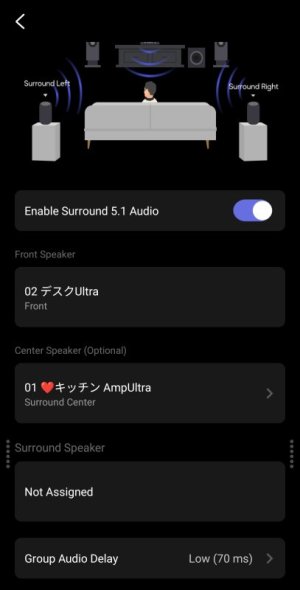
This is the wireless Dolby screen in the WiiM app. I’ve set the WiiM Ultra as the group leader (front speaker) and assigned the Amp Ultra as the center speaker. You can also assign a single WiiM Sound as the center speaker.
3397.jpg

If you want to play music in multi-room, set a WiiM device in another room as the leader and create a persistent group. This will allow you to switch between the surround group and the music group.
 
All of the above really.

Essentially i have a Sony Bravia (google tv) that i use for
Music (spotify app)
TV (netflix, over the air tv, etc)
Games (switch, playstation)

And I have a second adjacent room that we often move between with wired speakers. So especially when listening to music (either via TV or Spotify connect / google cast) that i'd want any of the above audio to be available for sharing between rooms. And of course 3.1 audio for tv/movies.
 
All of the above really.

Essentially i have a Sony Bravia (google tv) that i use for
Music (spotify app)
TV (netflix, over the air tv, etc)
Games (switch, playstation)

And I have a second adjacent room that we often move between with wired speakers. So especially when listening to music (either via TV or Spotify connect / google cast) that i'd want any of the above audio to be available for sharing between rooms. And of course 3.1 audio for tv/movies.
You can create two multi-room groups and switch between them, but this might be a bit of a hassle. The easiest approach is to put all your devices in a single group and mute the ones you’re not using.

For example, if you have a WiiM device in your bedroom for music, you can simply mute the bedroom when watching TV in the living room.

Also, since all WiiM devices have audio latency, they may not be suitable for gaming. Multi-room groups have a latency of at least 70ms to 150ms.
 
Oh interesting on the latency. That may be a problem. Won't that apply to two devices used in a 3.1 setup (in the same room)? Unclear if multi room would introduce more latency on top of that.
 
Won't that apply to two devices used in a 3.1 setup (in the same room)?
Yes, that's correct. Since 3.1 is also a multi-room group, there is some latency.

Based on my tests, the DSP latency for the WiiM Ultra is around 50 ms, while the latency for the Amp Ultra and Pro is around 100 ms.

Group latency can be adjusted in three steps: 70 ms, 150 ms, and 800 ms.

Therefore, we can infer that a group with the Ultra as the leader will experience a latency of 70 ms or more, while a group with the Amp will experience a latency of 100 ms or more.

Also, setting the group latency to 70 ms may cause audio dropouts, so please assume there is a latency of 150 ms as a general rule.
 
That's very interesting information thanks so much for taking the time to explain. This is making me reconsider as that's some serious latency probably noticable during basic tv watching ( lip sync issue) in 3.1.

Will have to reconsider a traditional wired avr in that case given this would annoy me to no end.
 
TVs normally have a lipsync function you can adjust. I have thar function on my hisense and also amazon's firestick tv OS has a wizard with visualization and sound sync.
 
TVs normally have a lipsync function you can adjust. I have thar function on my hisense and also amazon's firestick tv OS has a wizard with visualization and sound sync.
My cheap TVs only allow the audio to be delayed, not the video.
 
TVs normally have a lipsync function you can adjust. I have thar function on my hisense and also amazon's firestick tv OS has a wizard with visualization and sound sync.
Have you confirmed that the TV’s lip-sync feature can reduce the delay on WiiM?
I can’t adjust the delay on WiiM using the lip-sync feature on my Hisense U7E.

Of course, the lip-sync feature on Fire TV works, but it doesn’t apply to game consoles.
 
My video goes behind audio. TV and Fire TV content. Note that is important that your TV digital audio settings is set to "passthrough" so as it does not process audio but just forward the stream to HDMI. Leave that processing to Wiim.
In such way even Wiim's processing may add some delay, i my case sound is still ahead of video. So for TV content I use the digital audio delay options on my TV and for Fire TV content i used the fire TV audio-video sync feature.
 
My video goes behind audio. TV and Fire TV content. Note that is important that your TV digital audio settings is set to "passthrough" so as it does not process audio but just forward the stream to HDMI. Leave that processing to Wiim.
In such way even Wiim's processing may add some delay, i my case sound is still ahead of video. So for TV content I use the digital audio delay options on my TV and for Fire TV content i used the fire TV audio-video sync feature.
Could this be caused by video processing latency on your TV?

I don’t see how this relates to audio latency with the WiiM group. Since there’s no video delay on my TV, the audio and video are in sync when using the TV’s speakers.

Whether in pass-through mode or any other mode, the amount of delay from the WiiM speakers remains the same.
 
I think we don't understand each other. Never mind ;). I am happy with my tv and wiim audio sync, no issues. i was just trying to give some hint to Mr Ee on what tv, fire tv settings may work to minimize and sync AV delay.
 
Could this be caused by video processing latency on your TV?

I don’t see how this relates to audio latency with the WiiM group. Since there’s no video delay on my TV, the audio and video are in sync when using the TV’s speakers.

Whether in pass-through mode or any other mode, the amount of delay from the WiiM speakers remains the same.
I suspect most TVs don't offer audio delay settings in their config options, assuming internal speakers, but within their "Smart" OS there are more likely such settings. For HDMI-connected streaming video devices like @hipoagumol's Fire device or my Apple TV 4K, factoring audio system latency is a thing. I'm sure it's more useful for streaming movies than for channel-surfing live content, but I go into it in this post to a thread here (where I expound on my overall skepticism about successfully supporting home WiFi-based multichannel AV setups in this day and age).
 
I suspect most TVs don't offer audio delay settings in their config options, assuming internal speakers, but within their "Smart" OS there are more likely such settings. For HDMI-connected streaming video devices like @hipoagumol's Fire device or my Apple TV 4K, factoring audio system latency is a thing. I'm sure it's more useful for streaming movies than for channel-surfing live content, but I go into it in this post to a thread here (where I expound on my overall skepticism about successfully supporting home WiFi-based multichannel AV setups in this day and age).
At least on my TCL Google TV, the lip-sync feature doesn’t work. First of all, Google TV’s lip-sync only works in PCM mode. It doesn’t work in pass-through mode.

Also, the maximum audio delay that lip-sync can correct is -50ms. However, even when set to -50ms, it doesn’t correct the delay on the Amp Ultra (no change). I have also confirmed that setting it to +500ms adds additional latency, causing the audio to delay even further.

Of all the devices I own, the Fire Stick is the only one that can correct the latency of the WiiM.
 
I have to use my Nvidia Shield to compensate. Does anyone know if the Apple TV 4k has this capability? I want one for my other tv.
 
Back
Top