3.1 a real thing now?

m49808

New Member
Joined
Oct 11, 2025
Messages
8
I noticed the Dolby 5.1 documentation was updated recently and specifically calls out 3.1 (and other support) in the table of supported formats. Is this real now? The docs seem pretty light on how to actually leverage 3.1 as I hear that doing so historically has been flaky at best (setting up 5.1 then removing extra channels).


I ask because the remainder of the doc steps all still say 5.1 with no mention of how to achieve the other formats.

If i do 3.1, do the rear channels get sent to the front speakers?

Thanks for any info. Considering building this system out for tv/movies/music fed from the TV to avoid a huge AVR and another device to deal with.
 
I noticed the Dolby 5.1 documentation was updated recently and specifically calls out 3.1 (and other support) in the table of supported formats. Is this real now? The docs seem pretty light on how to actually leverage 3.1 as I hear that doing so historically has been flaky at best (setting up 5.1 then removing extra channels).


I ask because the remainder of the doc steps all still say 5.1 with no mention of how to achieve the other formats.

Yes, you can now set up a 3.1 system without rear speakers.


If i do 3.1, do the rear channels get sent to the front speakers?

No.


Interesting, thanks for the reply. Has anyone done this? I'm trying to have a fairly minimalist sound system for my TV that is between a soundbar and dedicated AVR. I dont need a huge AVR to power 3 speakers, deal with changing inputs, etc. Just route what i want through the TV. And play it in multiple rooms with other wiim devices.

Does this work well? Why not?
 
Interesting, thanks for the reply. Has anyone done this? I'm trying to have a fairly minimalist sound system for my TV that is between a soundbar and dedicated AVR. I dont need a huge AVR to power 3 speakers, deal with changing inputs, etc. Just route what i want through the TV. And play it in multiple rooms with other wiim devices.

Does this work well? Why not?
Do you want to listen to TV audio in multi-room? Or do you want to play music in multi-room and enjoying TV audio in 3.1 surround sound?

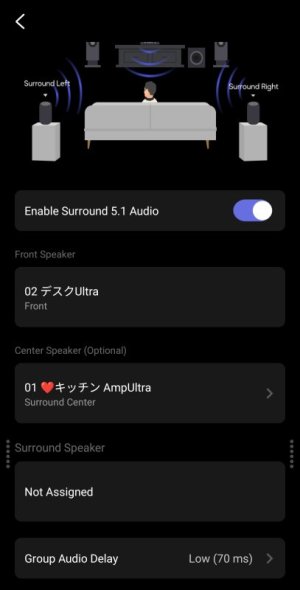
This is the wireless Dolby screen in the WiiM app. I’ve set the WiiM Ultra as the group leader (front speaker) and assigned the Amp Ultra as the center speaker. You can also assign a single WiiM Sound as the center speaker.
3397.jpg

If you want to play music in multi-room, set a WiiM device in another room as the leader and create a persistent group. This will allow you to switch between the surround group and the music group.
 
All of the above really.

Essentially i have a Sony Bravia (google tv) that i use for
Music (spotify app)
TV (netflix, over the air tv, etc)
Games (switch, playstation)

And I have a second adjacent room that we often move between with wired speakers. So especially when listening to music (either via TV or Spotify connect / google cast) that i'd want any of the above audio to be available for sharing between rooms. And of course 3.1 audio for tv/movies.
 
All of the above really.

Essentially i have a Sony Bravia (google tv) that i use for
Music (spotify app)
TV (netflix, over the air tv, etc)
Games (switch, playstation)

And I have a second adjacent room that we often move between with wired speakers. So especially when listening to music (either via TV or Spotify connect / google cast) that i'd want any of the above audio to be available for sharing between rooms. And of course 3.1 audio for tv/movies.
You can create two multi-room groups and switch between them, but this might be a bit of a hassle. The easiest approach is to put all your devices in a single group and mute the ones you’re not using.

For example, if you have a WiiM device in your bedroom for music, you can simply mute the bedroom when watching TV in the living room.

Also, since all WiiM devices have audio latency, they may not be suitable for gaming. Multi-room groups have a latency of at least 70ms to 150ms.
 
Back
Top