Best practice for creating a local library: DLNA? Folder structure?

Underbridge

Member
Joined
Oct 15, 2025
Messages
15
Hi all. I'm planning to buy a WiiM Amp Ultra. I have a local MP3 library ripped from CDs stored on a NAS, but I want to recreate it in lossless FLAC to use with the new WiiM. I thought I would ask the community for guidance before I get too far along.

As I am starting from scratch, what is the best practice way of serving up the library to the WiiM? Should I use DLNA, or something else? The WiiM would be the main/only consumer of it. The NAS is old and due for replacement - Netgear ReadyNAS Duo V2. It doesn't support modern security protocols but it apparently has DLNA. I'll get a new one at some point, so that will have up to date features. As an interim step, I could just dump the library onto a drive plugged into the WiiM's USB port until then.

Also, the library structure. I have started using Exact Audio Copy, configured for lossless conversion according to guides I found online. I am ripping into a structure that looks like this:
  • Artist 1
    • Album 1
      • Track 1.flac
      • Track 2.flac
      • Track N.flac
      • Cover.jpg
    • Album 2
      • Track 1.flac
      • Track 2.flac
      • Track N.flac
      • Cover.jpg
  • Artist 2
    • etc.
EAC also creates a cue file and log file for each CD, which I have left there. EAC populates the main metadata tags, including CD Title, CD Artist, Year, Genre, Track Title, Composer.

The cover artwork JPG that EAC finds is usually 1400x1400, sometimes smaller.

Do I want artwork as a separate JPG like this, or embedded in the files? Not sure if EAC also embeds it, or how to tell.

Is the above the usual way? Is there anything else I should be doing or capturing to give the best experience?

I know the WiiM screen is small, but I might use the WiiM app on a Chromecast with Google TV to display artwork etc. on a nearby screen, and am looking forward to having that capability.

Any help is appreciated, thanks.
 
Last edited:
Can anyone point me to something online showing WiiM and Lyrion in action?
Can you be specific about what functionality you want to see working ?
Lyrion is very functionally rich because of the plethora of plugins you can install so if you can narrow it down it will help,
 
I use the same folder structure (one folder per album, not per disc) but name my files %discnumber%.%tracknumber%.flac because I'll never browse by folder, but as long as they're unique it's fine.
I have just been stung by NOT having %cdnumber% in the filename in EAC.

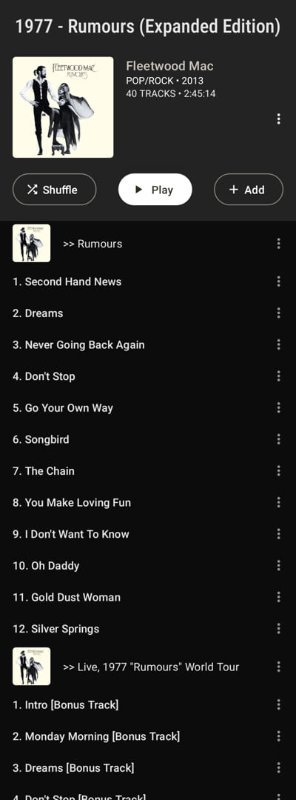
Ripping Fleetwood Mac Rumouors 35th Anniversary Edition. Disc 1 is the original release. Disc 2 is live performance. Recording sessions and other stuff on discs 3 and 4.

Some combinations of track number and track name are repeated on multiple discs. For example track 4 is "Don't Stop" on discs 1, 2 and 4. So "04 Don't Stop.flac" was created from disc 1, then overwritten by disc 2, and overwritten again by disc 4.

I'm just going to include %cdnumber% at the start of the file name.

In WiiM Home App, is there any support for playing a particular disc of an album? I would probably usually want disc 1 in this case. Currently I am differentiating by giving the 4 discs different album names so I can choose the one I want in WHA. But it's really just one album. I have my Amp Ultra now (yay) but didn't see this.

I realise there are at least 2 different scenarios, as discussed earlier in this thread: (1) main disc, with additional/supplementary content on other discs. And (2) the album content spans multiple discs because it doesn't fit on one disc.
 
Last edited:
I realise there are at least 2 different scenarios, as discussed earlier in this thread: (1) main disc, with additional/supplementary content on other discs. And (2) the album content spans multiple discs because it doesn't fit on one disc.
Quite right. I would indeed treat those two cases differently.

In doing so I free myself of any physical restrictions of CDs or LPs. I don't care about being able to uniquely identify a track or an album or a disc for the purpose of online verification. This I can do when initially ripping a CD, so I have less manual tagging work in the first step. But once that is done I will modify the tags and filenames as they serve my logic and purpose.

One of my considerations has always been to keep my tags as universal as possible so that even the most stupid server or app can handle it. Working with disc nos. may be the sophisticated way, but it can also get you into trouble with less sophisticated servers/apps.

In this particular case (case 1) I would indeed make that separate albums, simply for the browsing and listening experience. You will still be able to identify them as a set by giving the album tags appropriate values like 'Rumours 35th Anniversary Edition - Disc 1 - Original' and 'Rumours 35th Anniversary Edition - Disc 2 - Live' etc. WHA can definitely deal with that.

In case 2 (spans multiple discs because it doesn't fit on one disc) I will create one album and foregt about disc nos. I will break the original track numbering starting on disc 2. So track 1 on disc 2 will become track 13 in the joint album and so on. But like I said, I neither care about the physical restrictions of CDs nor a subsequent matching with external data sources.
 
Many moons ago I had this exact same occurrence and it was the reason I switched to 01-01-trackname.flac naming convention. It wasn't that release but it was an exactly similar situation - same named track in same position on Disc 2.

Making a point on the other question. Lyrion in conjunction with Material GUI now has "GROUPING" and "WORK" tag support. I am not a classical afficinado but they both work the same way. Example below. The 2 sides of Kate Bush's Hounds of Love have different sub titles. NB You can also do this with DISCSUBTITLES in this particular instance but that doesn't work for an original album with bonus tracks on the same CD. GROUPING does work here.

1764147012935.png
 
In WiiM Home App, is there any support for playing a particular disc of an album? I would probably usually want disc 1 in this case. Currently I am differentiating by giving the 4 discs different album names so I can choose the one I want in WHA. But it's really just one album. I have my Amp Ultra now (yay) but didn't see this.
Whilst the WHA is responsible for how things are displayed and some of the interactive functionality (A-Z jump bars), it's the media server that controls the content.

If you're using the media server built into the Amp Ultra then your only options are:
  • Store the files in separate folders and use folder view for browsing
  • Tag each cd with a different album name
Both have obvious limitations.

The free version of MinimServer supports the discsubtitle tag which allows you to assign an image and title to each disc; now, when browsing an album you'll be presented with tracks and discs. Unfortunately the WiiM Home app displays discsubtitles out of order and without an associated image (I have an open ticket about this behaviour), but the functionality is there.

Presentation in BubbleUPnP:
Bubble.jpg
Presentation in the WHA:
WHA.jpg
From this screen you can play the entire album or select one of the discs and start playback from there.

I realise there are at least 2 different scenarios, as discussed earlier in this thread: (1) main disc, with additional/supplementary content on other discs. And (2) the album content spans multiple discs because it doesn't fit on one disc.
In addition to the discsubtitle tag MinimServer also supports the group tag, which allows you to group a sequence of tracks (all tracks from disc 1 and the first few tracks from disc 2) for display and playback purposes, offering much the same functionality as discsubtitle except they're not bound to entire discs.
 
Last edited:
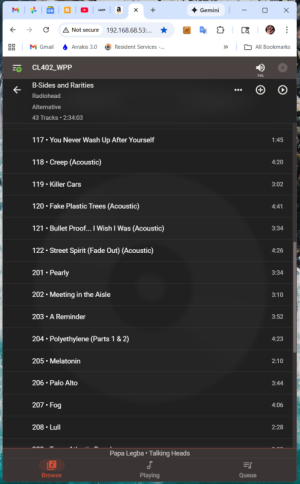
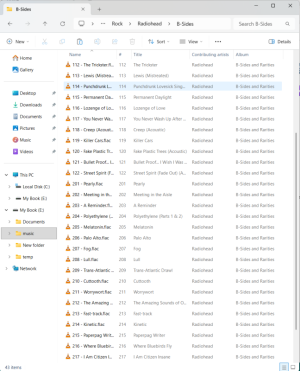
I don't use disc number tags at all. Instead, I number song tracks so that the disc number is clear. For single disc albums I number the tracks 01, 02, 03, etc. (always use leading zeroes!). For multiple disc sets, I tag the disc one tracks 101, 102, 103, etc. for disc 2, I tag the tracks 201, 202, etc. When displaying the track numbers in either LMS or a file explorer in Windows (probably the same in Mac) the tracks will always appear in the proper order.

Numbering this way is very easy using MP3tag.

Here's how it looks in LMS:

1764171733954.png

And here's how it looks in the file explorer:

1764172051367.png
 
I don't use disc number tags at all. Instead, I number song tracks so that the disc number is clear. For single disc albums I number the tracks 01, 02, 03, etc. (always use leading zeroes!). For multiple disc sets, I tag the disc one tracks 101, 102, 103, etc. for disc 2, I tag the tracks 201, 202, etc. When displaying the track numbers in either LMS or a file explorer in Windows (probably the same in Mac) the tracks will always appear in the proper order.

Numbering this way is very easy using MP3tag.

Here's how it looks in LMS:

View attachment 30107

And here's how it looks in the file explorer:

View attachment 30108
I tag that way for some bootlegs that have all the tracks from multiple discs in the same folder but normally I have a subfolder for each disc.
 
That results in exactly the same as using disc no with the same effect. Easy to set up at ripping stage if the ripper supports it e.g. dbPoweramp
 
Back
Top