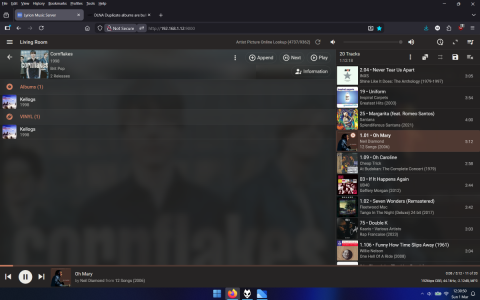
DLNA Duplicate albums are bulked together

ecole

New Member
Joined
Mar 1, 2026
Messages
1
Hi,

Recently, I had an access to high quality turntable, so I ripped a few vinyls I own, some of them happened to duplicate albums that I already had in my collection.
Whilst Jellyfin client has no issue showing two separate albums, WIIM DLNA indexer shows a single album and duplicates tracks in it instead.
I've checked with VLC (no other DLNA capable software on a mac), and it clearly shows two different sources for the albums.

For now, I had to change album name in all .flac files, but this is a HORRIBLE way of dealing with this, any other way to separate these?
 
Hi,

Recently, I had an access to high quality turntable, so I ripped a few vinyls I own, some of them happened to duplicate albums that I already had in my collection.
Whilst Jellyfin client has no issue showing two separate albums, WIIM DLNA indexer shows a single album and duplicates tracks in it instead.
I've checked with VLC (no other DLNA capable software on a mac), and it clearly shows two different sources for the albums.

For now, I had to change album name in all .flac files, but this is a HORRIBLE way of dealing with this, any other way to separate these?
How can you tell which album is which with Jellyfin? I always add (Vinyl) to my rips.
 
Hi,

Recently, I had an access to high quality turntable, so I ripped a few vinyls I own, some of them happened to duplicate albums that I already had in my collection.
Whilst Jellyfin client has no issue showing two separate albums, WIIM DLNA indexer shows a single album and duplicates tracks in it instead.
I've checked with VLC (no other DLNA capable software on a mac), and it clearly shows two different sources for the albums.

For now, I had to change album name in all .flac files, but this is a HORRIBLE way of dealing with this, any other way to separate these?

I would label vinyl to releasetype, that way it'll seperate the two. At least with another music database it'll create album & vinyl types
 
Test. Files are in the same directory. One set of files labelled "vinyl" and other "album" in release type. Yeah still in the same "album list" so duplicate .

Moved into another directory

1772368254068.png

So I'd tag your vinyl albums, then batch move them to \artist\vinyl\album
 
This is why I finally decided to use emby and not jellyfin. I have organized my music files by disc. So the files of a multi disc album are split in multiple folders. Jellyfin regarded every folder as a separate albums. Emby recognises that the different folders belong to the same Album. The only drawback of emby is still not supporting replay gain.
So the described behavior is what I would expect.
 
This is why I finally decided to use emby and not jellyfin. I have organized my music files by disc. So the files of a multi disc album are split in multiple folders. Jellyfin regarded every folder as a separate albums.
Jellyfin does merge across folders (tested with CDxx and Disc x). What's slightly odd is that the album artwork needs to be stored in the shared parent.

There are better options though.
 
This is why I finally decided to use emby and not jellyfin. I have organized my music files by disc. So the files of a multi disc album are split in multiple folders. Jellyfin regarded every folder as a separate albums. Emby recognises that the different folders belong to the same Album. The only drawback of emby is still not supporting replay gain.
So the described behavior is what I would expect.

With LMS, multi disc, the files can be in the same or different directory, just ensure the album name is the same (not CD1 etc) and using the disc and total disc tags
 
Back
Top