hgo58
Major Contributor
Just as with the VU meters, it's not working for Bluetooth or DLNA output.Does this work on all inputs / sources?

Just as with the VU meters, it's not working for Bluetooth or DLNA output.Does this work on all inputs / sources?
 . I'm sure later there will be more options as with the VU meter.
Yes, it will be included in the next firmware update, according to the WiiM Home App release notes.Currently planning a purchase when the black friday deals hit the UK in a few days...
Does anyone know if this also works on the Amp Ultra?
I've been reading some really good reviews about the ampilifier within the Amp Ultra that are so good, it seems well worth the step-up from just the Ultra. But I've been waiting for an FFT spectrum for such a long time...
I know others in this thread have decried flashy gimmicks as just that but, for the likes of me, they're part of the experience.


 )
)on the first beta of the spectrum analyzer display, indeed the line above it showed useful track info. but people here seriously disliked it and it was removedHello all wiimers
a small message to tell that it seems to me that there's vastly enough room above the spectrum display (which I really like because of the eye candy effect) for the album art on top left and the title/author/etc... at its right.
(in anycase I would not be clear enough tell me I'll try to develop
Regards
JJ

on the first beta of the spectrum analyzer display, indeed the line above it showed useful track info. but people here seriously disliked it and it was removed
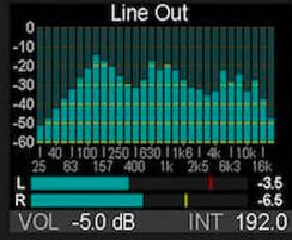
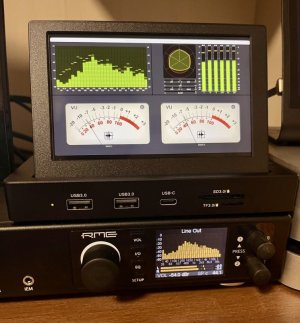
The RME horizontal meter can also be changed so it shows both the input and post-DSP levels. Very handy to have both. The RME and new line of topping DACs have really good spectrum analyzer displays. So far WiiMs attempt is not on the same level. All WiiM needs to do is just copy the competion. They have it nailed so no need to reinvent the wheel!The RME DAC still has the most informative small display.
View attachment 30131
Please add a horizontal VU meter section.

They also have USB loopback to feed their even more informative Digicheck NG app.The RME DAC still has the most informative small display.
View attachment 30131
Please add a horizontal VU meter section.
You have the option to choose input or output signal source for both vumeter and spectrum.Sorry if this question has already been asked but what is it actually displaying? Is it displaying what is being fed in to it or what is being fed out of it? I am using the PEQ slots to correct some modes in the room. So is it showing the spectrum pre-PEQ or post?
I'm assuming it would be better to show it pre-PEQ changes because otherwise it would be showing something completely different to both the source and to what is really happening in the room.

I didn't think input signal was available for the spectrum yet.You have the option to choose input or output signal source for both vumeter and spectrum.
I will confirm it in minutes but I had the idea it is…I didn't think input signal was available for the spectrum yet.
Could just be that I need an app update?
It's not available yet. WiiM have confirmed it will be later.I didn't think input signal was available for the spectrum yet.
Could just be that I need an app update?
Sorry my bad. I saw the option but it’s under the vumeters and I don’t know if it affects the spectrum.I will confirm it in minutes but I had the idea it is…
EQ and volume control is not transparent! The purpose of these are actually to modify the sound and you should be able to see that when comparing input with output.It would make a lot more sense if it displayed the input.
After all, room correction or an otherwise good EQ is supposed to be transparent. So, we shouldn't be perceiving anything different to the input.
Until 5 minutes ago this is exactly what I though. However, the reason I asked the question in the first place is that I noticed a fairly big dip in the band at 100hz. I wondered if the songs that I was playing had lowered the input at that range. But upon finding out that it the spectrum analyser was showing the output I checked my PEQ settings again and realised I had made a mistake at 115hz on the left speaker. I was reducing the db instead of boosting it. I know most people recommend not boosting and only reducing peaks so I do need to redo my measurements and settings in REW at some stage.It would make a lot more sense if it displayed the input.
After all, room correction or an otherwise good EQ is supposed to be transparent. So, we shouldn't be perceiving anything different to the input.
EQ and volume control is not transparent! The purpose of these are actually to modify the sound and you should be able to see that when comparing input with output.