Bulit in CD player/ripper, thoughts and questions

Steve Woodhouse

Major Contributor
Joined
Aug 11, 2023
Messages
2,056
Okay, so we've seen at least one other streamer with a built in CD player, which will also rip CDs to your device.

Okay, that sounds good, but...

If anyone has any experience with this, what file/folder structure is used for the ripping destination? Usually it's something like a folder for each artist, then a sub-folder for each CD within that.

I have a bespoke folder structure, which starts with two main folders - my main music (that I'm likely to play) and another big folder with everything else. Inside each of these are sub-folders splitting the alphabet into bite-sized chunks (A-E, F-I, etc.). I'm dubious that any built-in ripping could follow this, o be customised to ge it right. It'd be better if it ripped to a temporary folder, then asks where you want to put that.

But having thought about it, frankly, if you have a library of ripped CDs, you already have your system set up on your PC, complete with a CD drive already installed. So overall it'd be best if you could just rip on your PC, then copy the files over to the WiiM. I mean that just takes seconds.

Anyone with any experience, of this, please feel free to comment.

That aside, you can buy a CD drive for £20-£30. Any new CD transport without a DAC really needent cost much more.
 
just a personal view, but built in cd drive gets a big 'NO' from me .. 👎

1/ too messy mechanically
2/ a definate point of failure
3/ would probably rely on a third party supplier with the issues that brings.
4/ would probably need either on board storge or buffer
5/ possible copyright issues for wiim

a function for the wiim to record locally to say a usb device from say the online radio/tuner would be handy (y) imho
 
I thought it was legal in most places to rip your own CDs for you own personal use, possibly even more so than recording radio.
Although who didn't record the Top 40 to tape each Sunday? :)

As for Steve's folder structure, as I see it the intention is that physical storage structure is meant to be totally irrelevant as tagging should identify / group etc. every song no matter where it physically lives.
Not saying that a physical structure isn't useful at times, but such a bespoke srructure will almost certainly be completely incompatible with any sort of automated ripping.
 
I don't see the point in getting a CD player with ripping capacity. That is done much better using a PC (better software, multi parses, etc).

A real CD transport with LinkPlay module that can be linked to your other WiiM devices would however be very nice.
 
Last edited:
As for Steve's folder structure, as I see it the intention is that physical storage structure is meant to be totally irrelevant as tagging should identify / group etc. every song no matter where it physically lives.

I use folder vie by default, so it matters a lot to me.

Not saying that a physical structure isn't useful at times, but such a bespoke srructure will almost certainly be completely incompatible with any sort of automated ripping.

Yes, that's what I thought. I'd much prefer just being able to copy files over my home network.
 
I have a bespoke folder structure, which starts with two main folders - my main music (that I'm likely to play) and another big folder with everything else. Inside each of these are sub-folders splitting the alphabet into bite-sized chunks (A-E, F-I, etc.). I'm dubious that any built-in ripping could follow this, o be customised to ge it right. It'd be better if it ripped to a temporary folder, then asks where you want to put that.
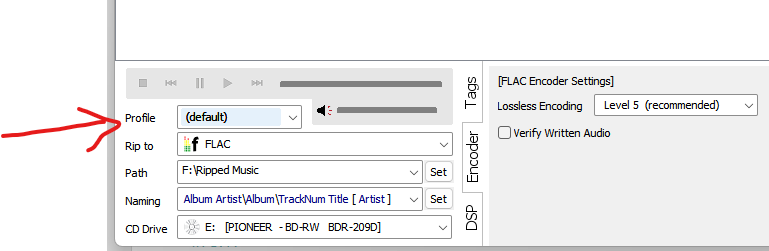
I believe that dBpoweramp, for one, would be able to do this for you. It has customisable file naming using both retrieved attributes and user entered attributes.
For example you could use two different profiles (see screenshot) to rip to differing naming folder structures

1775306885767.png
 
I believe that dBpoweramp, for one, would be able to do this for you. It has customisable file naming using both retrieved attributes and user entered attributes.
For example you could use two different profiles (see screenshot) to rip to differing naming folder structures

View attachment 36277

Cheers, I didn't know it could do that.

I don't have any need for it now, as CDs are all ripped. I only need it for new CDs I buy, which is relatively rare.

If a new WiM arrived with an in-built CD ripper, I don't think I could get it to rip the files to the right place. But if I rip it on my PC to a temporary file, I could then just copy it over my network to the streamer's storage.

That's what I do now, except instead of copying over the network I have to unplug the HDD from the Ultra and plus it into my PC, copy over, re-connect to the Ukltra, and re-scan. It' be nice just to miss out all that palaver.
 
That's what I do now, except instead of copying over the network I have to unplug the HDD from the Ultra and plus it into my PC, copy over, re-connect to the Ukltra, and re-scan. It' be nice just to miss out all that palaver.
This is on the roadmap.

"NAS Mode (SMB Write): Transform the WiiM Ultra into a true network music server. Manage and transfer files to your attached USB drive wirelessly over the network."

 
Back
Top